Backoffice Insurance 8.0
May 4th, 2026
Customer Technology Preview (CTP) is an early access release of FintechOS 8.0 that enables customers and partners to actively explore, implement, and validate the platform’s core capabilities ahead of General Availability.
It provides hands-on access to real, production-grade features while the platform continues to expand toward its full GA scope, allowing organizations to start building, testing real use cases, and shaping their modernization journey early. The CTP is designed to help financial institutions move beyond experimentation, by making data and AI operational within real product workflows, under governance, traceability, and control.
What's New
UI Update: Enhanced Navigation in Service Insurance
We’ve refreshed the Service Insurance interface to make everyday work smoother, faster, and more intuitive for back‑office teams.
-
Updated color palette for clearer visual hierarchy and improved readability
-
Refined typography, giving the application a cleaner, more modern feel
-
Related functionalities grouped together in a more logical structure, reducing the number of clicks needed to complete common tasks
These changes are part of our ongoing effort to improve navigation and streamline workflows for insurance back‑office users. The updated layout makes it easier to find what you need, understand where you are in the process, and move confidently through the product.
MTAs Payment Types
Backoffice Insurance now supports updating payment types within MTAs, displaying only the required payment details based on the selected option: Bank Transfer, Broker Collection, Direct Debit UK, Direct Debit SEPA, Card Payment, and Recurring Card Payment, with each type triggering its specific mandatory fields where applicable.
Policy Parties Roles
Roles for policy parties have been rearranged and improved:
-
We added new standard roles:
-
Intermediary standard role with Broker and Agent roles;
-
Insured standard role with Prime and Nominee roles;
-
Other standard role with Dependent and coinsured roles;
-
Insurer with Insurer role;
-
-
A policy can have either an Agent or a Broker, not both.
Exclude Policy Under Master Policy
A new option for mid-term adjustments allows you to exclude changes to a single policy from being applied to master policies. It restricts single-policy changes, such as payment type, frequency, due date. This option is only available for standalone policies and is not applicable to policies already under a master policy.
Automatic Reinstatement Enhancements
A new Always auto reinstate option in the Product Admin Configuration form allows policies to be reinstated automatically upon payment without relying on grace‑period conditions. The system now automatically approves reinstatements created during payment allocation, including previously unapproved ones, and updates them with the correct payment details. When a suspended master policy installment is paid and no other installments remain unpaid, the automatic reinstatement process is triggered to return the policy to active status.
Reactivate inactive mid-term adjustments
When you initiate an adjustment to a policy and its adjustment is in Draft status. In the meantime, a new policy is added to that master policy, which generates a new master policy version. The system used to throw an error when you returned to the initial adjustment to register the change. Now, the adjustment goes into Inactive status and you can reactivate it in the new context, i.e. new policies on the master policy.
Allow adding policies on a master with pending alterations
New Allow add policy on master with pending alterations option (visible when Chronological Alterations enabled) controls policy additions during pending future-dated alterations; ensures new policies attach to draft clones, blocks additions post-cancellation date, and adds retrial limits to prevent infinite CloneToVersion failures.
Configurable Formulas
Policy Admin now uses configurable formulas instead of hardcoded logic for pro-rata calculations and renewal annual premium, ensuring upgrade-safe customizations via Insurance Parameters.
-
The formulas for pro-rata, DailyProrataStandard and MonthlyProrataStandard, are configured in the Insurance Parameters page. If a project needs a different logic, then a new formula must be defined and the parameter value updated, so that an upgrade will not overwrite the changes. The formula input must be the prorataFormulaInput: endDate, policyEndDate, policyStartDate, policyValidityPremiumAmount, startDate.
-
Annual premium calculation at Renewal: A new new Insurance Parameter, RenewalAnnualPremium and a new formula, RenewalAnnualPremium are introduced, which replace the previous hardcoded code that calculates annual premium. The new formula receives the parameters:
-
policyValidityType (e.g., Months / Days)
-
policyValidity (duration value)
-
policyPremiumAmount (premium for that validity)
-
Automated Renewal Decision Updates
You now have two new Quote Admin parameters, Renewal Automatic Decision on Quotes (RADQ) and Renewal Automatic Decision on Master Quotes (RADMQ), that activate automated renewal decision for quotes and master quotes. When enabled, the system runs daily jobs that evaluate renewal quotes in Offers Submitted status and trigger ftos_qa_clientdecisionapi . It decides which offer should become the new policy card based on the quote’s offer type. If the renewal business offer type is As Expiring, the system uses the single “as expiring” offer and turns it into the new policy card. If the renewal business offer type is Proposal Offers, it selects the proposal card that has the same name as the card on the current policy. If the renewal business offer type is Both, the system always prioritizes and uses the As Expiring offer.
Renewal Same Policy Jobs Updates
-
FTOS_PA_PolicyMaturity: Updated to exclude policies that have renewal versions in Version Pending, preventing premature maturity.
-
FTOS_INS_MasterPolicy_Maturity: Updated to exclude masterpolicies that have renewal versions in Version Pending, ensuring renewals are processed first.
-
Renewal with Same Policy: Modified to create new versions in Version Pending and Version Effective Date with the new policy start date, enabling processing by FTOS_INSPA_ApprovePendingPolicies and FTOS_INSPA_ApprovePendingMasterpolicies.
These changes to scheduled jobs prevent premature maturity, ensure renewals start on correct dates, and streamline approvals.
Change Renewal Type Alteration
The Change Renewal Type alteration has been enhanced to support additional configuration options based on the selected Renewal Type.
You can now specify:
-
The Renewal Tariff Type (Same Tariff or New Tariff),
-
The Renewing Policy Type (Same Policy or New Policy), or
-
The Renew Business Offer Type (Proposal Offers, As Expiring, or Both).
These options are available for all renewal types except No Renewal.
Verify Payment Allocation
The new FTOS_PYMT_ReprocessPayment scheduled job uses Async Engine to verify the payment allocation status when an invoice is marked as processed, triggering updates to both allocated and unallocated amounts in the payment records.
Statement Generation Days
This release provides a clearer mechanism for controlling how statement generation days are calculated. The system now uses the “Use Working Days for Statement Generation Days” insurance parameter to determine whether statement generation should count only working days or all calendar days.
Enforced, Now In Force
The Enforced policy status is now In Force. This is only a label change, the behavior stays the same.
Cancellation and Payment Handling
Previously, unpaid invoices could continue to trigger scheduled payment retries even after a policy was canceled. This release ensures proper financial handling and prevents unintended payment attempts
-
Automatic payment retries stop as of the cancellation date,
-
Manual payment methods (e.g., bank transfer, broker) are unaffected by retry logic; no new invoices are issued after cancellation,
-
Reimbursements are created only when payments were collected prior to cancellation or when delays occur in processing.
In accordance with policy conditions, customers continue to receive prorated premium refunds when applicable.
Improved Payments Search
For payments, we improved the manual allocation search by adding two new filters: a Compensation checkbox to quickly include either positive/zero or negative (compensation) invoices, and a Payment in Advance checkbox to switch between searching existing invoices or future installments without statements.
Bulk Migration Quotes and Master Quotes
In this release, you can migrate Quotes and Master Quotes in bulk to the new Quote Admin data model, improving performance and making the transition off the legacy tables easier to manage. The following scheduled jobs have been updated to accommodate this:
-
FTOS_QA_MigrateMasterQuotes job for bulk migrating master quotes to the new MasterQuoteAdmin, ApplicantData, and ApplicantDataRole tables.
-
FTOS_QA_MigrateQuotes job for bulk migrating quotes to the new QuoteAdmin, ApplicantData, and ApplicantDataRole tables.
-
FTOS_QA_DeleteMigratedOffers job to clean up already migrated quote offers from the legacy tables, based on the same bulk logic.
Insured object in JSON format
FintechOS is transitioning to a JSON‑based model for storing insured object data. All policy generation and alteration processes now rely on this structure. The legacy insured object extensions and mapping entities in Product Admin Configuration are deprecated.
Key Changes and Guidelines
-
Policies generated with the new policygenerationapiv2 now support the insured object JSON format
-
Product formulas must reference only keys defined in the insuredObject. The system automatically includes: paymentFrequency, paymentType, validity, validityType, and each coverage’s insured amount in [CoverageName]IndemnityLimit format.
-
Insured object mapping and data mapping configuration steps are no longer required in Product Admin Configurator.
-
MTAs automatically use all keys from the insured object JSON, including the default and insured amount keys.
-
In the ChangeInsuredObject MTA, selecting Specific Form by Product moves form configuration to Product Admin Configuration (PAC).
-
Any custom form in PAC can include its own validations. The MTA opens the insured object from the cloned policy version when that form is used.
-
Custom forms must include Discard and Validate buttons.
Deprecated Components
The following legacy entities and mappings are decommissioned:
-
FTOS_INSQB_InsuredObjectHealth
-
FTOS_INSQB_InsuredObjectPerson
-
FTOS_INSQB_InsuredObjectProperty
-
FTOS_IP_InsuredObjectMapping
-
FTOS_IP_InsuredObjectTypeDimension
The new JSON model simplifies product setup and maintenance by removing the need for separate mapping entities. It ensures faster configuration, easier versioning, and consistent data handling across policies and MTAs.
Mid-term Adjustments on Renewed Policies
You can now perform mid-term adjustments (MTAs) on policies that have already been renewed using the same policy in non-chronological flows. When a non-chronological MTA is approved on a renewed policy or master policy:
-
the existing renewal policy automatically moves from Pending to Unapproved;
-
the MTA clone becomes the new active policy version;
-
the renewal job is automatically triggered with the new policy ID to generate an updated renewal policy.
For chronological alterations, MTAs can no longer be created on policies that have already been renewed.
For renewals using a new policy, the existing behavior remains unchanged for both chronological and non-chronological flows: the MTA applies only to the current policy version, and users are prompted to confirm before proceeding.
This improvement enhances policy governance and consistency across renewal flows. It prevents unintended alterations on renewed policies in chronological scenarios while enabling controlled adjustments in non-chronological flows. As a result, renewal data remains synchronized with the latest valid policy version, reducing manual corrections and improving operational accuracy.
Async Policy Generation Option
You can now choose whether policy generation runs asynchronously or synchronously using the new Async Policy Generation parameter in Product Admin Configuration.
-
Yes - Uses the FTOS_INS_StartPolicyGenerationFlow_Async flow to run policy generation in the background. It validates the request, reserves a policy number, and orchestrates all required steps to create policy data, coverages, parties, insured object, payment schedule, and invoices, optionally updating the master policy.
This is recommended for high‑volume workloads to ensure better performance and avoid data loss.
-
No - Runs policy generation synchronously through the PolicyGenerationAPI, returning the fully generated policy in a single call.
This enhancement increases system scalability and reliability for insurers handling large policy volumes or concurrent operations. By supporting asynchronous execution, it reduces generation time, avoids bottlenecks, and protects against data loss in long‑running or high‑throughput scenarios.
Written Premiums and Commissions Overview
You can now view written premiums and commissions directly on the policy and master policy form through a dedicated tab that surfaces key details such as transaction date, type, premium amount, and associated commissions and fees, making it easier to review and reconcile policy-level financial information.
Asynchronous Processing for Payment Hub Events
Payment hub events are now processed asynchronously through a dedicated flow and queue so that unprocessed events are reliably picked up, checked for existing runs, and sent to the async engine only when needed, improving performance and preventing duplicate processing during statement generation and scheduled executions.
Cancellation Refunds with Recurring Card Payments
You can now process cancellation refunds via recurring card payment if the policy’s payment type is Recurring Card Payment:
-
When you cancel a policy or master policy and choose Recurring Card Payment as the refund method, the system:
-
Creates an outgoing payment for the reimbursement.
-
Generates a Payment HUB refundCardPayment event using the saved card token from FTOS_INSPA_PolicyCard.
-
Updates the outgoing payment status from Approved → Scheduled → Closed based on the asynchronous confirmation from the payment provider.
-
-
Refund events are now driven by the REV (Refund Events) insurance parameter, which:
-
Uses FTOS_PYMT_GenerateInvoiceEvents as the events library.
-
Uses addOutgoingPaymentEvent as the refund method for card and recurring-card payments.
-
Replaces the old StatementsRules logic from the FTOS_PYMT_StatementFlow setting, which is now deprecated.
-
Manual Issue Policy
In Quote Admin, when you change the start date of a policy and click Issue Policy, the system updates the policy status from Proposed to Issued and triggers an alteration process that creates a new policy version with the revised start date, recalculated end date, and an updated payment schedule.
Refactored MasterPolicyInstallments
You now manage master policy installments through the new FTOS_INS_MasterPolicyInstallmentsUpdate stored procedure and DBTask instead of direct CRUD on FTOS_INS_MasterPolicyInstallments, with all relevant flows (policy generation under master, lapsing, alterations, renewal, cancellation, payment allocation, and payment schedule status jobs) routed through this centralized logic so you get consistent calculation of business status and grouped installment amounts by due date and status.
You should update any custom reports or integrations that still call the old CRUD logic for FTOS_INS_MasterPolicyInstallments to use the new FTOS_INS_MasterPolicyInstallmentsUpdate stored procedure or rely on the updated APIs instead.
Update Policy Party MTA
You can now update the policy holder and only fill in the payment details required for the current payment type.
-
For Bank transfer, Broker Collection, Card Payment, no extra data is needed.
-
For Direct Debit UK/SEPA, you’re guided to complete all mandatory mandate details (account/holder, bank, IBAN, amount, dates, etc.).
-
For Recurring Card Payment, you can optionally update the stored card; if you do, the dedicated Payment Hub action is triggered.
-
The system prevents you from keeping the same policy holder, regenerates mandates for Direct Debit on the effective date/version clone, and warns you if a card-paying policy holder has no email or mobile contact.
Updated Security Roles
The Backoffice Insurance security roles have been reorganized into clearer functional clusters, with several roles renamed and new ones introduced to improve structure and usability. In addition, the four‑eyes principle has been applied to selected roles, ensuring that critical actions require review and approval by a second authorized user to strengthen control, reduce errors, and prevent unauthorized changes.
Negative Installments Handling
On cancellation, negative installments equal the refunded amount. Compensation amounts greater than 0 are represented as negative installments with status OnTime, while the remaining refund is recorded as a negative installment with status StatementIssued and linked to the premium reimbursement.
When the payment reimbursement status changes to Paid (outgoing payment generated), the related installment is automatically updated from StatementIssued to Paid.
Customers View and Business Transitions
After onboarding, use the new Customers view to navigate through customer records, view and search for policies they contracted, payments, premiums, claims, and so on. New customers are automatically assigned the Newbie status and their record transitions from one status on another depending on the activity on their account, such as policies contracted or maturing. After a policy is issued, a customer record with the Newbie or Prospect status automatically transitions to Customer status.
Revoke Cancellation with Refund Paid
When you revoke a future-dated cancellation with an already-paid refund, the system automatically adds an on-time installment dated on the revoke date for the exact refund amount to reinvoice it in the payment schedule. This applies to both chronological and nonchronological revoke cancellations for policies and masterpolicies.
Exchange Rates and Types Enhancements
You can now manage exchange rates more flexibly. If your business requires different rate categories beyond the standard BNR source, you can define custom exchange rate types tailored to specific markets or operational needs.
You can create and maintain exchange rates directly in the FintechOS Portal using a streamlined workflow. Insert a new rate, select the currencies, date, and type, then enter the rate details, including an optional multiplicator that automatically recalculates the final exchange value.
You can also define new exchange rate types by providing a name and code, allowing you to categorize and apply rates in line with your financial processes. This enhancement delivers more precision and structure for handling multi-currency operations across your insurance products and financial flows.
Insurance Agents and Brokers
You can now manage agents and brokers more efficiently in FintechOS, ensuring each intermediary is properly set up for quoting and policy issuance. Brokers require a FintechOS account, while agents can operate without one.
You can create agents directly in the Portal and then use them through the Generate Quote API. The setup process is streamlined so you can quickly add an agent and complete the required sections.
You can also create brokers with full business, contact, banking, and commission details, giving you a complete and accurate profile for each partner. This update helps you maintain clear, structured, and compliant intermediary records across your insurance operations.
External Request Processing for Insurance
The external request processing capability is coming to insurance to help you process requests faster and more reliably.
-
A new Async Engine DLQ Messages dashboard lets you see any unprocessed requests
-
You can reprocess failed requests with one click directly from the dashboard
This upgrade helps you keep operations running smoothly, reduce bottlenecks, and maintain full visibility over any request that needs attention.
Customer Lifecycle and Status Management
You can now track and govern the full customer lifecycle more clearly, from lead to active customer and beyond. The solution differentiates customer roles (policyholder, insured person, beneficiary) while providing a single Customers view for back‑office teams to see personal details, policies, premiums, payments, and claims.
A standardized business status model (Newbie, Prospect, Customer, Dormant, Blocked, Closed) makes it easy to understand where each customer sits in the lifecycle and risk spectrum. Designated users (for example, Policy Admin Manager) can adjust statuses based on policies issued, inactivity, or KYC/AML risk, improving governance and regulatory readiness.
For insurers, this delivers sharper portfolio visibility, cleaner customer data, and better control over inactive or high‑risk relationships - enabling more targeted servicing, commercial actions, and compliance reporting.
Cancellation refunds with recurring card payments
You can now automate cancellation refunds for policies paid by Recurring Card Payment, reducing manual work and settlement risk for insurers. When a policy or master policy is cancelled and you select Recurring Card Payment as the refund method, the system creates an outgoing payment, triggers a refund event in Payment HUB using the stored card token, and automatically moves the refund through Approved → Scheduled → Closed as confirmations are received from the payment provider.
Refund processing is now driven by the REV (Refund Events) insurance parameter, which standardizes how refund events are generated and executed for card and recurring-card payments. It uses a dedicated events library and a single refund method for outgoing payments, replacing the previous StatementsRules-based configuration, which is now deprecated. For insurers, this delivers more consistent refund handling, clearer configuration, and better auditability across cancellation flows involving card payments.
BackOffice Form Extensibility Enhancement
Introduced configurable bullet item visibility controls in BackOffice forms under Contract Management > Insurance Settings > BackOffice Form Setting. Developers can now hide sections for all users or restrict access to specific security roles via Section List, Hide Section For All, Visible For Security Roles, and Allowed Security Roles fields. This improves form customization and role-based access in FintechOS Portal.
Payment Hub Updates
Enhanced the Payment Hub to allow configuration of which payment types trigger event processing. This improvement simplifies configuration and accelerates the rollout of new or updated payment scenarios.
For insurers, this introduces greater flexibility by enabling extension of payment flows without changes to core logic, while ensuring clear mapping between payment types and active event types.
APIs
-
PolicyGenerationAPI accepts two new optional fields on each insurance product item:
waitingPeriod(number) andwaitingPeriodType(from WaitingPeriodType). -
The same two optional fields are added per coverage in coverageMappings for ftos_qa_generatequote, generatemasterquote, registerquoteapi, and registerRenewal. They are stored on
FTOS_QA_QuoteAdminOfferItemand passed through to PolicyGenerationAPI. -
FTOS_QA_UpdateMasterQuoteAsyncis called when all quotes for the master have been generated and migrated, updating the master quote status to Offers submitted, Locked by UW, or Rejected, depending on the quote statuses. -
FTOS_QA_GenerateMasterQuoteAsync, when called without quote details, generates a draft master quote. -
FTOS_QA_AddQuoteOnMasterAsyncgenerates a quote under an existing draft master quote, validates master quote and party data consistency, optionally runs underwriting and pricing asynchronously, saves the quote and quote offer, and leaves the master quote unchanged in draft status. -
clientDecisionRenewalhandles client decisions specifically for renewal quotes. -
ftos_qa_registerrenewalquoteregisters renewal quotes by retrieving eligible renewal offers (including pricing and underwriting) and creating the corresponding renewal quote(s) in Quote Admin. -
FTOS_INS_StartPolicyGenerationFlow_Asyncstarts a full, asynchronous policy generation flow that validates the request, reserves a policy number, stores the input, and then orchestrates downstream steps to create the policy data, coverages, parties, insured object, payment schedule, invoices, and (optionally) update the master policy. -
The
FTOS_PH_UpdateEvent APIis used to simulate the payment provider response and update the event and card details on the policy or master policy (via addUpdateCardDetails).
Decommissioned
-
Policy Administration is transitioning away from the current implementation to a JSON-based insured object model. Going forward, the JSON insured object format will be the only supported standard for policy servicing. Existing implementations based on the current approach will continue to function temporarily but are now classified as legacy. All new servicing capabilities will be built exclusively on the JSON-based model.
-
Proposal Configurator is decomissioned starting with this version.
-
The Cancellation process has been refactored, and the previous data model has been decommissioned and is no longer supported. Going forward, only the new Cancellation data model must be used. Any existing dependencies on the legacy model must be removed or replaced. The old policy surrender (cancellation) is decomissioned, the FTOS_INSP_PolicySurrender job is eliminated.
-
The Agent & Broker components have been refactored and are now part of the Policy Party model, with data stored in the Policy Party data structure. The previous data model is no longer used and is scheduled for deprecation in the next major release. No further enhancements will be delivered for the legacy model.
List of decommissioned jobs:
-
FTOS_PYMT_FollowUpInvoice
-
FTOS_PYMT_ReprocessPayment
-
FTOS_INSPA_ReinsuranceContracts
-
FTOS_PA_MasterPolicyLapsed
-
FTOS_PA_MasterpolicyRenewalOffers
-
FTOS_INSP_PolicySurrender
-
FTOS_PA_PolicyLapsedNotification
-
FTOS_INSP_PolicySurrender
Mandatory Changes
-
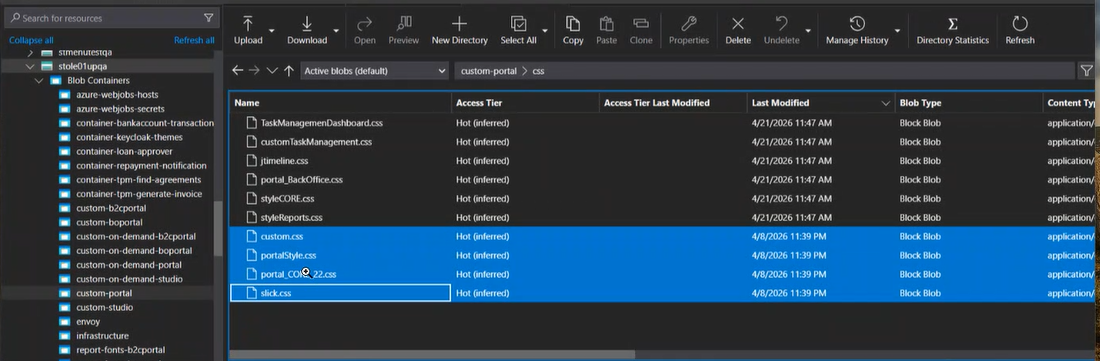
The UI for Backoffice solutions received a major update this release. At upgrade to v8.0 from v22.x or 24.x, you must manually delete 4 .css files from the custom-portal in the Azure resource group, so the upgrade runs successfully, and does not result in an error. To access them, navigate to your storage account and then click Storage Browser in the left-side menu > Blob containers, and you'll find the custom-portal folder. More about the custom folders here.
The files are:
-
custom.css
-
portalStyle.css
-
portal_Core.css
-
slick.css
-
-
At upgrade, certain files from the Backoffice installation kit must be manually copied to the uploadebs folder in Azure, in the resource group for your environment. The files are:
-
CancelPolicy_Template.xlsx
-
ChangeCard_Template.xlsx
-
ChangePolicyStartDate_Template.xlsx
Find the files in the installation kit in the following folder:
....InsuranceBackOffice_v24.5.0_GOLD.zip\02 ConfigurationData\uploadebs. From here, you must manually copy the files to the uploadebs folder in Azure.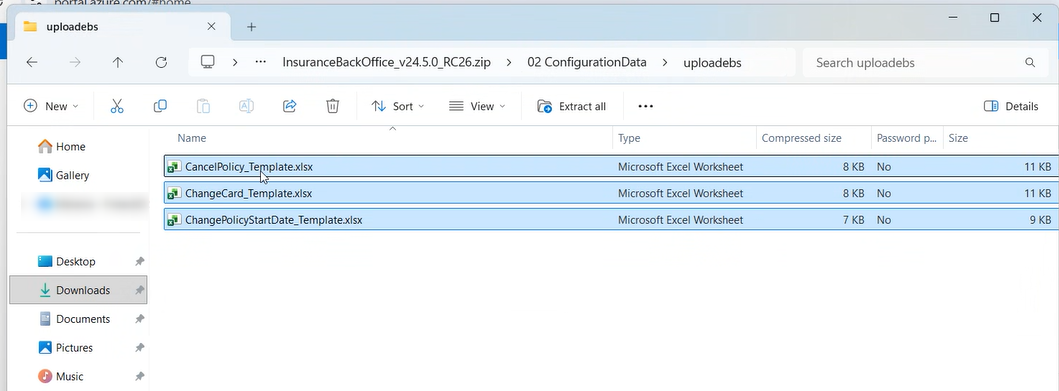
-
-
If you’ve extended the change engine solution, specifically the FTOS_INSP_PolicyAlterationGroup form, you may need to update your custom code in this release. The following attributes on FTOS_IP_PolicyAlterationType have changed from a single string value to an array of strings:
-
productNames,
-
productTypes,
-
approvalRoles,
-
mpEligibleStatuses,
-
policyEligibleStatuses
This alters how data is persisted and read, and could potentially represent a mandatory change so it might be necessary to revise your customizations that impact this form.
-
-
Before installing Backoffice Utils packages, go to FintechOS Studio and disable the scheduled job FTOS_BSC_PACVersioning.