Scheduled Jobs
Scheduled jobs are automated procedures that perform certain tasks, running at a specific time or on a recurring schedule. Read detailed information about scheduling jobs in the FintechOS Studio User Guide's dedicated page. The following scheduled jobs are configured per module.
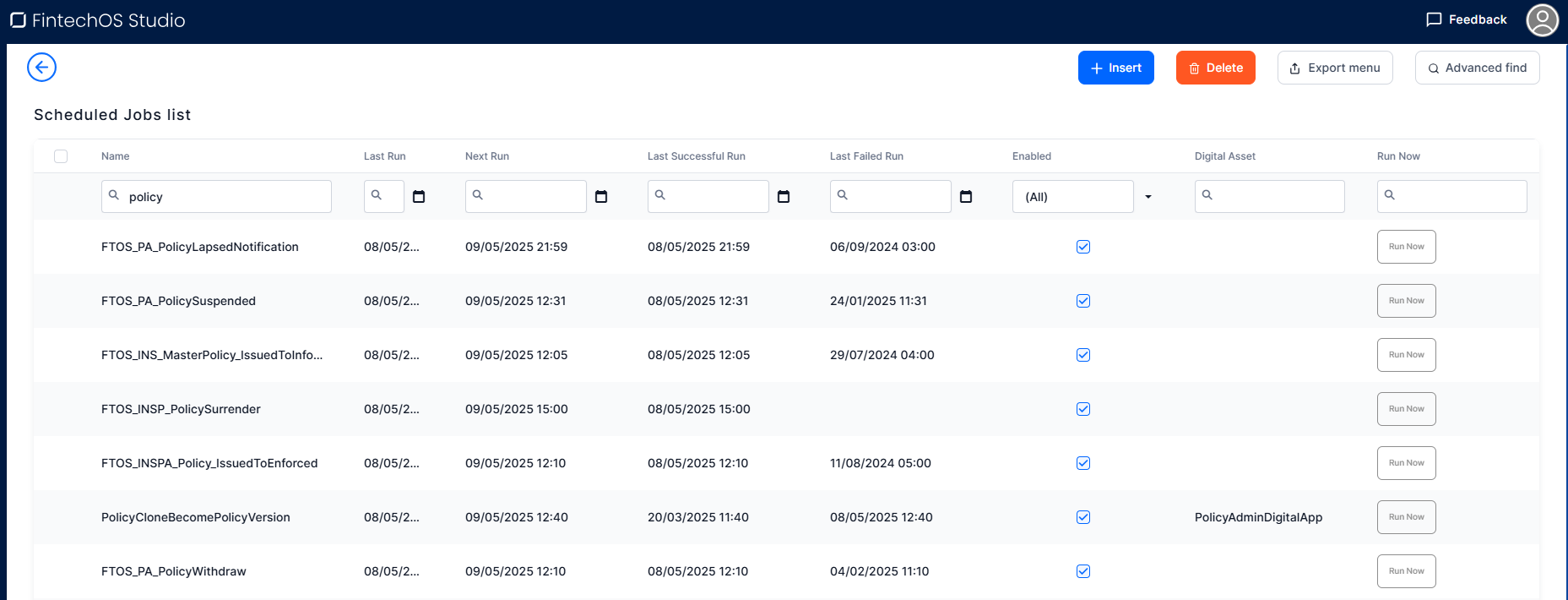
Monitor Scheduled Jobs
In the FintechOS Portal, go to Main Menu > Contract Management > Monitor > Insurance Monitor > Monitor Scheduled Jobs to view details such as when a job was last run, the next scheduled run, as well as when was the last failed run.

Scheduled Jobs
 Billing and Collection
FTOS_PYMT_Payment_ReturnUnallocatedAmount
Billing and Collection
FTOS_PYMT_Payment_ReturnUnallocatedAmount
| Scheduled | At 02:30 AM, daily run |
| Description | This job automatically creates payment returns for payments which are in Unallocated status for more than the number of days set by the No. of Days Before Return parameter. For example: if a payment is in Unallocated status for more than 5 days, a payment return is automatically generated for this unallocated payment, in the sixth day. |
FTOS_PYMT_GenerateStatementJOB
| Scheduled | At 02:00 AM, daily run |
| Description | This job generates a statement (invoice) for canceled policies and masterpolicies, for negative compensation rates. Find information on how to configure invoice generation at product level in the Product Admin Configuration page, section Invoice Generation. |
FTOS_PYMT_DirectDebitMandateStatus
| Scheduled | At 03:20 AM, daily run |
| Description | For all the mandates registered in the system, the job checks the Begin and End Dates against the current date and updates each mandate’s status accordingly. For example, if the current date is passed the End Date set for a mandate, the mandate status is changed to Expired. |
FTOS_PYMT_OutgoingPaymentInstructionFile
| Scheduled | At 03:30 AM, daily run |
| Description | Generates a timestamped payment instruction file (.csv with .txt extension) containing all outgoing payments in Scheduled status whose payment date is on or before the current date. |
FTOS_PYMT_DIDE_ADDACS
| Scheduled | At 3:40 AM, daily run |
| Description | This job is scheduled to perform status changes (canceling, modifying or reactivating) on the existing mandates, based on the unprocessed records from the FTOS_PYMT_DIDE_ADDACS entity. |
When trying to run FTOS_PYMT_DIDE_ADDACS and DIDEUK_Instructions jobs, while the FTOS_PYMT_DIDEProcessor is set to SEPA type, the system will log an error and stop running the job.
DIDEUK_Instructions
| Scheduled | At 03:10 AM, daily run |
| Description | The job is scheduled to change Direct Debit UK mandates from Draft to Pending and generate the BACS mandate instruction file for the new mandates created the previous day. |
When trying to run FTOS_PYMT_DIDE_ADDACS and DIDEUK_Instructions jobs, while the FTOS_PYMT_DIDEProcessor is set to SEPA type, the system will log an error and stop running the job.
FTOS_PYMT_DIDEInstructionFile
| Scheduled | At 03:00 AM, daily run |
| Description | This job uses the FTOS_PYMT_DIDEConfiguration parameter to generate a standardized .txt direct debit instruction file (DIDEPaymentsInstructionFile for SEPA or DD_BACSPayments for UK) with billing instructions for active mandates so the bank can collect installment amounts from the insured into the insurer’s account. |
Quote Admin
FTOS_QA_ChangeQuoteBusinessStatus
| Scheduled | 00:00:01 AM, daily run |
| Description | This job runs daily to find all Quote Admin records with the Submitted status and a quote end date in the past, and changes their business status to Expired. |
FTOS_QA_MigrateQuotes
| Scheduled | every 30 seconds, starting at :00 second after the minute |
| Description | This job migrates the quotes and quote offers from Quote and QuoteOffer entities into QuoteAdmin, QuoteAdminOffer and QuoteAdminOfferItem entities, updating the business statuses of the Quote Admin and Quote Admin Offer records in the process. |
FTOS_QA_MigrateMasterQuotes
| Scheduled | every 30 seconds, starting at :00 second after the minute |
| Description | High-frequency scheduled job that migrates master quotes and their associated quotes from MasterQuote, Quote, and QuoteOffer entities into MasterQuoteAdmin, QuoteAdmin, QuoteAdminOffer, and QuoteAdminOfferItem entities, updating the corresponding business statuses. |
FTOS_QA_DeleteMigratedOffers
| Scheduled | 03:00 AM, daily run |
| Description | A daily cleanup job that deletes obsolete Quote Admin offers and their related records (offer items and BW), in order to control database growth and improve performance. |
FTOS_QA_RenewalQuotesApproval
| Scheduled | 06:00 AM, daily run |
| Description | It evaluates all the renewal quotes in status Offers Submitted and calls the ftos_qa_clientdecisionapi to issue the new policy with the existing card of the renewed policy. It works with insurance parameter Renewal Automatic Decision on Quotes (RADQ) set to true. It decides which offer should become the new policy card based on the quote’s offer type. If the offer type is As Expiring, the system uses the single “as expiring” offer and turns it into the new policy card. If the offer type is Proposal Offers, it selects the proposal card that has the same name as the card on the current policy. If the offer type is Both, the system always prioritizes and uses the As Expiring offer. |
FTOS_QA_RenewalMasterQuotesApproval
| Scheduled | 06:15 AM, daily run |
| Description | It evaluates all the renewal quotes in status Offers Submitted and calls the ftos_qa_clientdecisionapi to issue the new policy with the existing card of the renewed policy. It works with insurance parameter Renewal Automatic Decision on Master Quotes (RADMQ) set to true. It decides which offer should become the new policy card based on the quote’s offer type. If the offer type is As Expiring, the system uses the single “as expiring” offer and turns it into the new policy card. If the offer type is Proposal Offers, it selects the proposal card that has the same name as the card on the current policy. If the offer type is Both, the system always prioritizes and uses the As Expiring offer. |
Policy Admin
FTOS_PA_PolicyLapsed
Scheduled for 01:50 AM, daily run.
daily scheduled job that automatically moves policies with unpaid installments from Inforce to Lapsed status after the configured Days after unpaid due date grace period (DAUDD) is exceeded, updating policy end date, premium and installment schedule accordingly.
When in Lapsed, the policy is modified as follows:
-
The End Date becomes the Due Date of the unpaid installment;
-
If there are no claims registered, the Premium Amount becomes equal to the Paid Premium (sum of paid installments). If there are claims registered on the policy, the Premium Amount doesn't change;
-
If the Premium Amount is changed, the installment schedule is updated including just the paid installments.
The system also checks the Master Policies payment and, if there will be any installments still unpaid, being in the Unpaid status) after X days for a Master Policy (X days since the due date of the last unpaid installment of the Master Policy), then that Master Policy changes its status from Inforce to Lapsed. After a Master Policy is moved in the Lapsed status, that Master Policy is modified as follows:
-
The end date becomes the due date of the unpaid installment;
-
The new premium amount is equal to the paid premiums (the sum of paid installments);
-
Because the premium amount is changed, the payment schedule of the Master Policy is updated and only includes the paid installments.
The following service runs as part of this job:
-
FTOS_PA_PolicyLapsed: automatically moves policies from InForce to Lapsed status, when the DAUDD parameter is fulfilled.
FTOS_PA_PolicyRenewal
Scheduled for 04:00 AM, daily run.
Daily scheduled job that identifies policies in InForce status whose end date is approaching, based on a configured No of days before renewal (NDBR) parameter, and initiates their renewal process.
The following service runs as part of this job:
-
FTOS_PA_PolicyRenewal: searches for the End Date and the NDBR parameter in order to identify the policies in InForce status that are suitable for automatic or manual renewal, for renewal offers.
FTOS_INSPA_Policy_IssuedToEnforced
Scheduled for 00:20 AM, daily run.
For the policies that are in the Issued business status, have the same Begin Date as the Current Date and have the Automatic InForce checkbox selected, at Product level.
This job verifies whether the above conditions are fulfilled and moves policies from Issued to In Force status.
The following service runs as part of this job:
-
FTOS_INSPA_Policy_IssuedToEnforced: verifies if policies that are in the Issued business status, have the same Begin Date as the Current Date and have the Automatic InForce checkbox selected, and moves them from Issued to In Force status.
FTOS_PA_PolicyMaturity
Scheduled for 11:59 PM, daily run.
This job is set to transition the policy status from In Force or Suspended to the Maturity status when policies current date is greater than the end date. This job also automatically transitions the policy status from In Force to Maturity when the policy's current date is greater than the end date. If the end date is resulted from a cancellation, then the status is changed to the corresponding configured status on the cancellation reason. Policies that have renewal versions in Version Pending are excluded from processing until the pending renewal is approved.
The following service runs as part of this job:
-
FTOS_PA_PolicyMaturity: transitions the policies and master policies to the Maturity status, when their current date is greater than their end date. If the end date is resulted from a cancellation, then the status is changed to the corresponding configured status on the cancellation reason.
FTOS_INSPA_ApprovePendingPolicies
Scheduled for 00:30 AM, daily run.
This job approves pending policies, when the effective date is reached for MTA and Cancellation requests, and puts the policy in status. It also approves renewal versions of individual policies that are generated in Version Pending and Version Effective Date with the start date of the new policy.
The following service runs as part of this job:
-
FTOS_INSPA_ApprovePendingPolicies: approves pending policies, when the effective date is reached for MTA and Cancellation requests.
FTOS_PA_PolicySuspended
Scheduled for 01:40 AM, daily run.
This job finds all the policies with unpaid installments, that have also passed the grace period, and transitions them to the Suspended status.
The following service runs as part of this job:
-
FTOS_PA_PolicySuspended: transitions the policies with unpaid installments into the Suspended status, after their grace period has ended.
FTOS_INS_MasterPolicy_IssuedToInforce
Scheduled for 00:10 AM, daily run.
For the masterpolicies that are in the Issued business status, have the same Begin Date as the Current Date and have the Automatic InForce checkbox selected, at Product level.
This job verifies whether the above conditions are fulfilled and moves masterpolicies from the Issued to the InForce status.
The following service runs as part of this job:
-
FTOS_PA_MasterPolicy_IssuedToInforce: verifies if masterpolicies that are in the Issued business status, have the same Begin Date as the Current Date and have the Automatic InForce checkbox selected, and moves them from Issued to InForce status.
FTOS_INS_MasterPolicy_Maturity
Scheduled for 11:50 PM, daily run.
This job is set to transition the master policy status from InForce or Suspended to the Maturity status when the current date is greater than the end date. This job also automatically transitions the master policy status from In Force to Maturity when the master policy's current date is greater than the end date. If the end date is resulted from a cancellation, then the status is changed to the corresponding configured status on the cancellation reason. Masterpolicies that have renewal versions in Version Pending are excluded from processing until the pending renewal is approved.
The following service runs as part of this job:
-
FTOS_INS_MasterPolicy_Maturity: transitions the master policy to the Maturity status, when their current date is greater than their end date. If the end date is resulted from a cancellation, then the status is changed to the corresponding configured status on the cancellation reason.
FTOS_INSPA_ApprovePendingMasterpolicies
Scheduled for 00:40 AM, daily run.
This job approves pending masterpolicies, when the effective date is reached for MTA and Cancellation requests, and puts the masterpolicy in status. It approves renewal versions of masterpolicies that are created in Version Pending and Version Effective Date with the start date of the new policy.
The following service runs as part of this job:
-
FTOS_INSPA_ApprovePendingMasterpolicies: approves pending masterpolicies, when the effective date is reached for MTA and Cancellation requests.
FTOS_INSP_PolicyAlterationGroup_Expire
Scheduled to run once a day at 03:00 AM.
The job updates the status of draft alterations group to expired when the effective date is smaller than the system date.
FTOS_PA_OfferRenewal
Scheduled to run once a day at 05:00 AM.
The job generates quotes for the policies configured with renewal offer, logged in the Renewal Offer entity.
PolicyCloneBecomePolicyVersion
Scheduled to run once a day at 00:50 AM.
The job updates on effective date the policy clones resulted from alterations to policy versions. This job also calculates the premium due based on the current version of the policy, using the due date minus statement generation days (SGDays) to determine when to generate the bill. Reevaluates the refund amount and generates the premium reimbursement for the policy, reflecting the future‑dated cancellation and any new payments.
FTOS_PA_MasterPolicyRenewal
Scheduled to run once a day at 04:30 AM.
The job generates new master policy for the products configured with renewal for a new or the same policy.
FTOS_PA_PolicyWithdraw
Scheduled to run once a day at 01:30 AM.
The job updates the status of the policy from Proposal to Withdraw if it has an installment in status unpaid and that installment transitioned to the Unpaid status for more than the number of day set in insurance parameter PWDAY.
PaymentScheduleDetail_UpdateJob
Scheduled to run once a day at 01:00 AM.
The job evaluates all installments and updates the status to In Grace or Unpaid.
FTOS_PYMT_Statement Paid
Scheduled to run once a day at 02:40 AM.
The job updates the status of a payment from Closed to Paid when the payment due date is greater than the system date.
Statement_OnGrace_Unpaid
Scheduled to run once a day at 02:50 AM.
The job updates Invoice status from Generated to OnGrace and from OnGrace to Unpaid.
FTOS_PH_ProcessAsyncEvents
Scheduled to run every 10 minutes.
The job processes async events from the Payment HUB. It uses the processAsyncEvents function that gets all unprocessed events and sends them to async. This function is also used on generate statements.
FTOS_INS_syncAccountOnPolicies
Scheduled to run once a day at 01:20 AM
Scheduled job that runs a DB task to update the accountId on insurance policies (master and individual) with the valid policy holder account for the current validity period, only when the existing accountId differs from the correct one.