Insurance Parameters
In the Service Insurance solution, an insurance parameter is a configurable value or rule that determines how key insurance modules, such asPolicy Administration, Billing and Collection, Claims Management behave within an insurance system. These parameters define business logic, calculation rules, and operational settings that shape how the system executes financial or policy-related processes.
View Default Parameters
-
Open your FintechOS Portal and click the main menu at the top left corner. From the drop-down, select Contract Management > Contract Management Settings.
-
Click the Insurance Settings tab and select Insurance System Parameters to see the full of all parameters grouped by module.
-
The parameters are arranged into modules. Expand one module to open its specific parameter.
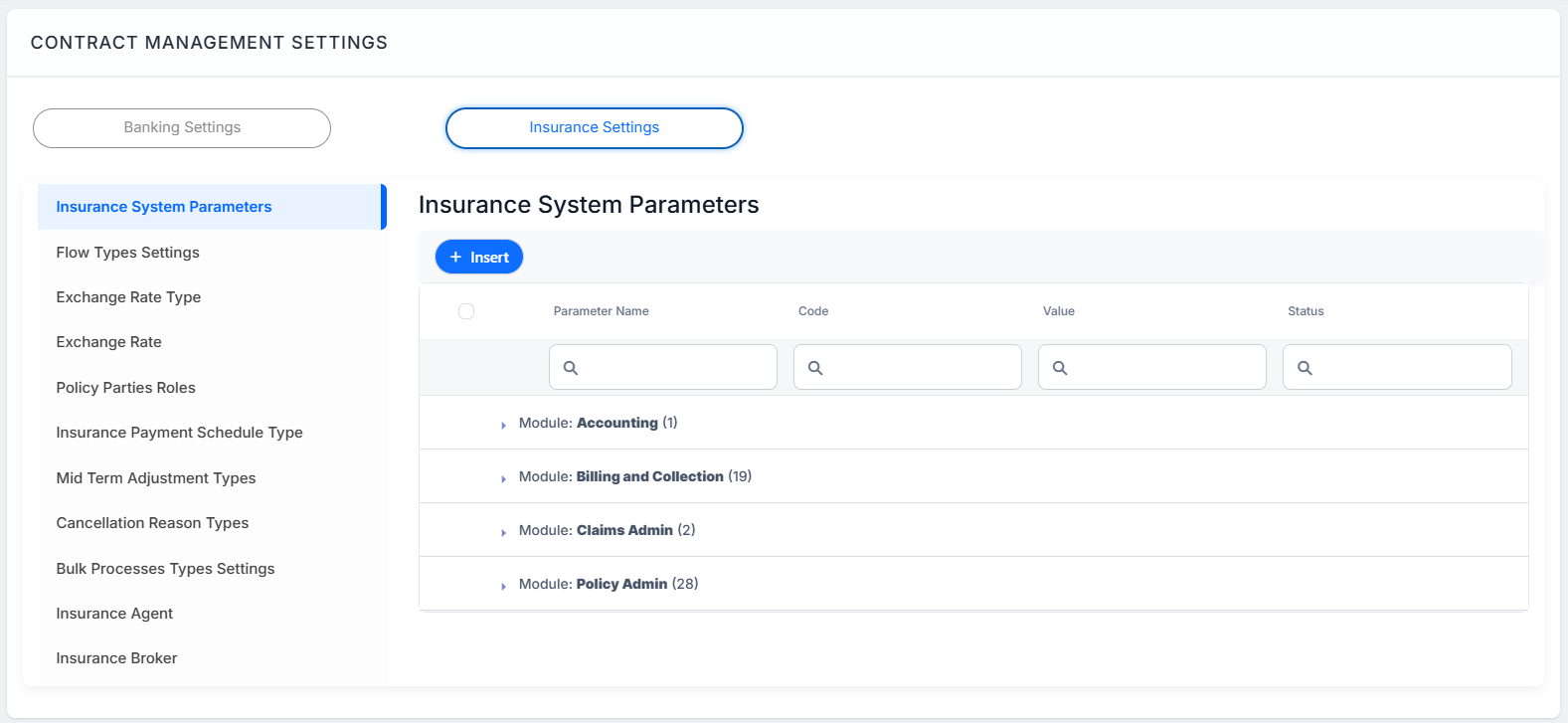
List of Default Parameters by Modules
 Accounting
| Category | Name | Code | Description | Default Value |
|---|---|---|---|---|
| Solution Activation | GLUsed | GLUsed |
Used to determine if the General Ledger (GL) entries should be generated or not. 1 -> Activate Operational Ledger Module. Accounting Registration will be done automatically; 0 -> Deactivate Operational Ledger Module; |
0 |
Billing and Collection
| Category | Name | Code | Description | Default Value |
|---|---|---|---|---|
| Broker collection | Broker Billing Statement Scope | BKSCOPE | Determines if the scope is Due Installments or Confirmed Payments. For Due installments, the policies with payment type Broker collection and with due dates in the last month will be included in the invoices. Confirmed payments is not supported for now. | N/A |
| Broker Payment Allocation Criteria | BKPYMALC | Determines if the broker payments allocation should be made following the FIFO rule of by reference. | N/A | |
| Broker Write Off | BKWO | Determines if write offs are needed for the broker payments. No - no write off will be added Generic - insert a Write Off, considering product write off settings. |
N/A | |
| Broker Billing Statement Generation | BKSGD | Day of the month when the invoices for the brokers should be generated. | N/A | |
| Direct Debit | DaysBeforeUKMandatesActivation | DBUKMA | This parameter controls how many days you wait to receive notifications (like AUDDIS) about a mandate cancellation that’s still in Pending status. For example: if the parameter is set to 5 days, a Draft mandate will automatically become Active after 5 days (or by the last day of the period configured in the parameter) - as long as no cancellation notice for that mandate appears in an imported AUDDIS file during pending period. | 0 |
| Invoice
|
Installment Due Date | IDD | This parameter sets the number of days in the past, for which the installment are evaluated for the statement generation. | 7 |
| Statement Generation Number | SGN | Prefix and Padding of Invoice number(reference) | N/A | |
| StatementGenerationStatuses | SGS | The list of statuses for policy and master policy, for which the invoices need to be generated. | N/A | |
| No. of Days in Advance | SGDAY | This parameter sets the day for generating the statement (invoice) in advance with a number of days before the payment's due date. This parameter is set for all the invoices to be generated for the installments on a policy. The FTOS_PYMT_GenerateStatementJOB and FTOS_PYMT_GenerateStatementAPI that triggers the generation of the invoice are using this parameter. This is the default value, custom value can be set on product level. | 10 | |
| UseWorkingDaysForSGDays | UWD | A boolean parameter indicating whether the statement generation should cover only working days (true) or all calendar days (false). |
N/A |
|
| SQLForStatementProcess | SQLSP | If this parameter exists and it's approved and has value call the custom procedure to generate invoices instead of the standard procedure. | ||
| Notification | BillingNotification | BillingNotification | 1 -> Activate Billing and Collection notifications 0 -> Deactivate Billing and Collection notifications |
0 |
| NoOfDaysFollowUpInvoice | NDFI | The number of days used to determine when a follow-up invoice notification should be sent. | 3 | |
| Refund | No. of Days before Return | PRDAY | This setting defines how many days to wait before automatically creating a Payment Return for payments that are still in Unallocated status. The value you set is used by the scheduled job (FTOS_PYMT_Payment_ReturnUnallocatedAmount) to trigger the payment return process. | 30 |
| Refund Events | REV | Event method for refund. | N/A | |
| Solution Activation | BillingUsed | BillingUsed | 1 -> Activate Billing and Collection Module 0 -> Deactivate Billing and Collection Module |
1 |
| Write Off | FTOS_ExchangeRateDefaultType | FTOS_ExchangeRateDefaultType | This is the standard exchange rate type used in multiple processes, such as allocation, reinstatement, or write-off. The valid options are stored in the FTOS_CMB_ExchangeRateType entity. | BNR |
| Write Off | WO | This parameter defines the limit values for a Write-Off payment, which the system generates automatically during payment allocation. You can set this parameter for RON and EUR currencies. | N/A |
Claims Admin
| Category | Name | Code | Description | Default Value |
|---|---|---|---|---|
| Claim | Major Loss | MLP | This parameter defines the minimum value and currency for a major loss on a claim. If your system uses multiple currencies, make sure each one is defined in this parameter. | N/A |
| Solution Activation | ClaimUsed | ClaimUsed | Set to 1 -> Activates the Claims Admin Module (default setting) Set to 0 -> Deactivates the module During the cancellation process, the system will only search for claims where this parameter is set to 1. |
1 |
Policy Admin
| Category | Name | Code | Description | Default Value |
|---|---|---|---|---|
|
Cancellation |
Days after unpaid due date | DAUDD | This parameter defines how many days can pass after an unpaid installment’s due date. Once this period is reached, the policy automatically changes from In Force or Suspended to Lapsed status. | 30 |
| UseNewVersion | UNV |
Specifies if the new version (on entity FTOS_INSP_PolicyAlterationGroup) is used, or not (and the one on FTOS_INSP_PolicySurrender is used). IMPORTANT!
The Cancellation process has been refactored, and the previous data model has been decommissioned and is no longer supported. Going forward, only the new Cancellation data model must be used. Any existing dependencies on the legacy model must be removed or replaced. |
||
| Free Withdrawal Limit Date | FWLD | The parameter represents the number of days used in calculating the Free Withdrawal Limit Date for cancellation. | 14 | |
| Policy automatically Withdraw | PWDAY | This parameter sets the Automatically Withdrawal Day of a policy after a number of days since the First Installment on that policy moved to Unpaid status. When the parameter is fulfilled, the policy is transitioned to Withdraw status. |
15 | |
| Notification | PolicyAdminNotification | PolicyAdminNotification | 1 ->Parameter that enables email notifications 0 -> Deactivate email notifications Default value: 1 |
1 |
| DaysBeforeExpirationGracePeriod | DBEGP | This parameter defines how many days before the grace period ends the system should act. A lapse notification will be sent to the designated address within the number of days specified by this parameter. | 1 | |
| Policy
|
Active policies status | APS | Active policy statuses, used in overlapping policies rule on policy generation. | N/A |
| Policy overlapping Insured product types | PO_IPT | The list contains the insurance product types for which the overlapping policy rule is verified. | ||
| Policy Suspension Duration (days) | PSDD | The default value used for insurance product policy suspension duration. | 1 | |
| WrittenPremiumsDBTaskName | WPDBTN | Database task name for generating the Written Premiums and Commissions report. | N/A | |
| Payment Grace Period (days) | PGP | This is the default value used to set the Payment Grace Period at product definition level. | 1 | |
| Policy Alteration Settings | PAS | The default form for alteration group that allows multiple types of modifications on a policy or master policy. | N/A | |
| Insurance Tax | IPT | Insurance premium tax percentage used to calculate the TotalTaxes value on the policy and its installments. | 3 | |
| No of days before renewal | NDBR | This parameter correlates the starting date of the Renewal process with a given number of days before the End Date of a policy. For example: it is required to start the Renewal process within 5 days before policy reaching its End Date. As a result the parameter is set to 5 days. |
5 | |
| PAID Payment Config | PAIDPYMT | This parameter sets the details regarding PAID Payments. The parameter contains details about: the commission set for payments, the beneficiary of payments, the IBAN where the payments are made, and the bank correlated with the IBAN. | N/A | |
| Pro-rata type | PRT | The default value for pro-rata type used on insurance product. | N/A | |
| dailyProrataFormula | DPF | The formula for daily pro-rata: (EndDate-StartDate) in days * policyValidityPremiumAmount / (PolicyEndDate-PolicyStartDate ) in days. Its value must be added in Product Admin Configuration. | DailyProrataStandard | |
| monthlyProrataFormula | MPF | The formula for monthly pro-rata: (EndDate-StartDate) in months * policyValidityPremiumAmount / (PolicyEndDate-PolicyStartDate ) in months. Its value must be added in Product Admin Configuration. | MonthlyProrataStandard | |
| Policy Edit form | claimDataTab | claimDataTab | Claim Tab on policy edit form 1 -> display 0 -> hide |
1 |
| Refund | Outgoing Payment Approval Limits | OPAL | Outgoing Payment Approval Limits. | N/A |
| Refund Approval Limits | RAL | Specifies the rules for approving premium reimbursements based on refund amounts and user roles. | N/A | |
| Reinstatement | Policy Status List for Reinstatement | PSLR | Specifies the policy status for which a reinstatement can be issued. | N/A |
| Renewal | RenewalAnnualPremium | RAP | References a configurable formula( same name) that calculates the policy's annual premium at renewal using policyValidityType, policyValidity, and policyPremiumAmount. | RenewalAnnualPremium |
| Renewal Offer Retry Number | RORN | Specifies the number of retry attempts the Renewal Offer job makes to generate a renewal quote | 5 | |
| Solution Activation | PolicyAdminUsed | PolicyAdminUsed | 1 -> Activate Policy Admin Module 0 -> Deactivate Policy Admin Module Default value: 1 |
1 |
View Offer Parameters
-
Open your FintechOS Portal and click the main menu at the top left corner. From the drop-down, select Offer Management > Offer Management Settings.
-
Click the Insurance Quote Parameters tab to view the parameters:
Insurance Quote Parameters
| Category | Name | Code | Description | Default Value |
|---|---|---|---|---|
| Quote | Masterquote Migration Limit | QAMML | This parameter is used in Quote Admin migration job, in order to prevent big transactions and performance issues. | 10 |
| Quote Admin Customer Process | QACP | You can configure which API you use for creating accounts, in case your project needs something custom. | ||
| Quote policy issuance start date | QPISD | The parameter represents the number of days used to calculate the policy start date in Quote Admin on clientDecisionAPI when the customer policy start date is less than system date. | 1 | |
| Quote Validity | QAV | The parameter represents the number of days used to calculate the Quote Admin record expire date. | 30 | |
| Renewal Automatic Decision on Master Quotes | RADMQ | When true, the scheduled job FTOS_QA_RenewalMasterQuotesApproval evaluates all the renewal masterquotes in status Offers Submitted and calls the ftos_qa_clientdecisionapi to issue the new policy with the existing card of the renewed policy. It decides which offer should become the new policy card based on the quote’s offer type. If the offer type is As Expiring, the system uses the single “as expiring” offer and turns it into the new policy card. If the offer type is Proposal Offers, it selects the proposal card that has the same name as the card on the current policy. If the offer type is Both, the system always prioritizes and uses the As Expiring offer. | true | |
| Renewal Automatic Decision on Quotes | RADQ | When true, the scheduled job FTOS_QA_RenewalQuotesApproval evaluates all the renewal quotes in status Offers Submitted and calls the ftos_qa_clientdecisionapi to issue the new policy with the existing card of the renewed policy. It decides which offer should become the new policy card based on the quote’s offer type. If the offer type is As Expiring, the system uses the single “as expiring” offer and turns it into the new policy card. If the offer type is Proposal Offers, it selects the proposal card that has the same name as the card on the current policy. If the offer type is Both, the system always prioritizes and uses the As Expiring offer. | true |
Manage Parameters
Change Parameter Values
An insurance parameter is identified by Parameter Name and Code. Double click on the parameter record and use the Insurance Parameter form to change the desired values. Click Save and Close, at the top right corner of the page.
Fill Value Parameter TypesBased on it’s type, the value of the parameter can be filled in as follows:
| Key | Values |
|---|---|
| Integer | Add an integer value (mandatory) in the field. The system does not validate whether the input is numeric or text, ensuring the correct type is mandatory before opening the editing form, by selecting the appropriate Option Set. |
| String | Add a string value (mandatory) in the field. The system does not validate whether the input is numeric or text, ensuring the correct type is mandatory before opening the editing form, by selecting the appropriate Option Set. |
| Collection | Use the [+] button to add new entries to the Key/Value grid. After adding all required rows, click Save Values to store the data. |
| JSON | Provide a valid JSON object or array in the ValueJson field. |
| Option Set | For this parameter type, first select an Option Set, then select the corresponding Option Set Value. |
Insurance Parameter ImplementationBelow are the form driven flow and the endpoint used for changing the values of insurance parameters.
Form driven flow: FTOS_PA_InsuranceParameter - This is a form driven flow used as default for Insert and Edit on Insurance Parameter entity.
In order to change the values of the insurance parameters, the following functions are used:
| Function | Input parameters | Output parameters |
|---|---|---|
| formScope.getCollectionDataSource() Returns an array of objects containing 2 keys: key and value, based on the data from valueJson. | N/A. | Object - An object containing the 2 keys: key and value. |
| formScope.showValueByType() Based on the parameter type, it shows or hides fields, to fill in the values of the parameter. | dataSource - Object loaded using the formScope.getCollectionDataSource() function, and used to generate the grid of values for collection parameters. | N/A. |
| formScope.showCollectionOptions() For Collection parameters, it shows or hides buttons based on form mode: Insert or Edit, with different options, based on the status of the record. | dataSource - Object loaded using the formScope.getCollectionDataSource() function, and used to generate the grid of data with different options, using the formScope.showBillingParametersDataGrid() function. | N/A. |
| formScope.showBillingParametersDataGrid() For Collection parameters, it generates the grid with values of the parameter. | allowAdding - Use allowAdding option as a parameter for generating the grid,
allowDeleting- Use allowDeleting option as a parameter for generating the grid, allowUpdating - Use allowUpdating option as a parameter for generating the grid, dataSource - An object loaded using the formScope.getCollectionDataSource() function, to generate the grid of data. | N/A. |
Insurance Parameter Life CycleAll Insurance Parameters are stored in the Insurance Parameter entity. This entity uses the FintechOS versioning mechanism, ensuring that all changes made to a parameter are fully logged and traceable. You can manage the lifecycle of an Insurance Parameter by updating its Status from the top-right section of the screen.
Insurance Parameters follow these valid state transitions:
Draft → Approved
Draft → Unapproved
Approved → Closed.
Rules to be considered:
- Once an Insurance Parameter is live, its settings cannot be modified;
To update a live parameter, you must create a new version;
When a new version is created, the existing version is automatically retired;
Each new version always begins in the Draft state and must be Approved before it can go live;
Only one active (live) version of a given Insurance Parameter can exist at any time.