External Request Processing
To improve the platform's overall performance through parallel processing, Service Insurance sends the requests generated for processing outside of the platform, instead of being processed within the platform, through JobServer. Thus, Service Insurance processes the requests in a parallel asynchronous way, through Async Engine.
Managing Unprocessed Requests
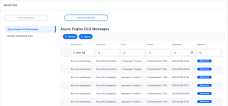
If a request is not processed by the Async Engine regardless of the reason, you can view a message in the dedicated Async Engine DLQ Messages dashboard in your FintechOS Portal. Send the request for reprocessing by the Async Engine from the same dashboard, simply clicking a button next to that message.
Viewing the DLQ Messages
Follow these steps to view the requests that the Async Engine could not process:
-
In FintechOS Portal's Home page, go to Main Menu > Contract Management > Monitor > Insurance Monitor > Async Engine DLQ Messages.
-
View the messages in the list. Each message contains the queue name, the flow name, the error message, the payload, and the time stamp of the unprocessed request.

Reprocessing Failed Requests
You can send for processing each of the failed requests one by one, as follows:
-
Click the Reprocess button in line with the desired request.
-
The request is sent back to the Async Engine for processing and an informative message is displayed on your screen.