Insured Objects
An insured object represents the item, person, or exposure covered by an insurance policy. It consolidates the characteristics, attributes, and values that define the insured risk. This includes both general details about what is being insured and product-specific information required to calculate premiums, determine coverage, or validate policy changes.
Insured Object Types
An insured object type defines the category of what is being protected by the policy. In FintechOS, a set of predefined insured object types are available when designing products in the Product Factory. These types are specific to each product. For example, when creating an individual healthcare product, the only available insured object type to select is Health.

An insured object type can be reused across multiple insurance products. When configuring a product in the Product Factory, you define product settings, which are later referenced in underwriting formulas. These settings, such as date of birth, gender, or year of construction, vary depending on the insured object type.
Custom Insured Object Types
You can create custom insured object types and associate them with insurance products as follows:
-
In FintechOS Studio, go to Products > Settings > Insured Objects. The list of all insured object types opens.
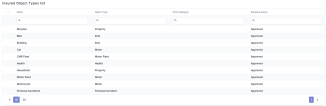
-
Click Insert, enter a Name and select an Object Type from the list. You can also define a new custom object type. Click Save and reload.
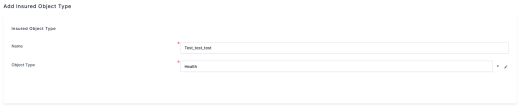
-
Add one or more Insurance Product Types. Click Save and reload again.


Insured Object JSON
Starting with version 24.5, the insured object is stored in JSON format. This eliminates the need to create a separate entity with mapped attributes as required in version 24.4 and earlier. The insured object JSON is saved directly on the policy and used in formulas, provided that the product’s formulas reference only keys included in the Insured Object.
It automatically includes the following keys:
-
paymentFrequency -
paymentType -
validity -
validityType -
each coverage’s insured amount, expressed as
[CoverageName]IndemnityLimit(mandatory format).
The policygenerationapiv2 generates policies with insured object in JSON format.
Custom Form
To display the insured object’s attributes and values within a policy, create a custom form as outlined in the Data Form page.
-
The form must be created on the
FTOS_INSQB_InsuredObjectentity. -
Add the form name under the Product Admin Configuration, in the Policy Rules section.

Once configured, the form will display the insured object’s attributes under Portal > Contract Management > Policies > Insured Object, as shown below:

When configuring the Update Insured Object MTA, enable the Specific Form by Product option to ensure that your custom form is used to display the insured object attributes and values. It is mandatory to include Validate and Edit buttons on your custom data form.
