Unified Product Operations Engine 8.0
May 4th, 2026
Customer Technology Preview (CTP) is an early access release of FintechOS 8 that enables customers and partners to actively explore, implement, and validate the platform’s core capabilities ahead of General Availability.
It provides hands-on access to real, production-grade features while the platform continues to expand toward its full GA scope, allowing organizations to start building, testing real use cases, and shaping their modernization journey early. The CTP is designed to help financial institutions move beyond experimentation, by making data and AI operational within real product workflows, under governance, traceability, and control.
To view detailed Sandbox release notes, please view the Kit versions and compatibility page.
Mandatory Changes
selectedCurrencies Key Removed from Configuration Manager
With the introduction of a dedicated Currencies section in the Product Factory settings, the selectedCurrencies key has become redundant and was removed from the Configuration Manager.
What's New
Customer Workflows and Back-Office Workflows
This release introduces an improved Workflow Engine that supports new types of customer-facing journeys and internal operational processes:
- Customer Workflows are external, customer-facing experiences that guide users through a structured sequence of steps and decision points to complete a specific process(e.g., digital onboarding, loan origination, quote-and-bind).
- Back-Office Workflows are internal workflows that support servicing, compliance, and operational activities performed by agents, brokers, call-center operators, and internal staff (e.g., account updates, claims processing, disbursements, contract changes, regulatory processes).
The new Workflow Designer provides a graphical interface for configuring all aspects of a workflow, including UI design, steps, decision logic, user interface behavior, data models, service calls, orchestration rules, integrations, and functional specifications.
Highlights include:
- A dedicated Data Domain that manages data entities, relationships, technical variables, and reusable templates. Each workflow attribute is bound to a corresponding Data Domain object.
- A State Machine that tracks both business and process states throughout the workflow lifecycle, ensuring clear state management and traceability.
- Comprehensive Workflow Lifecycle Management, including publishing, preview, versioning, and FSD export capabilities.
- Code Extension framework, enabling custom logic through scoped JavaScript extensions:
- Custom Business Services - server-side logic for core business processing and data handling
- Presenter - client-side UI interaction and rendering logic
- Application Logic - client-side workflow behavior and service interaction logic
- An integrated UI Designer, allowing you to refine the UI implementation of your screens after the workflow was published.
- Logic Blocks to configure event-driven behaviors for screens, with seamless integration of Presenter and Application Logic components.
Product Factory
Advanced Testing Framework for Products and Offers
Product and offer testing has evolved into a full professional-grade framework. Key enhancements include:
- A streamlined interface for running individual test cases.
- Identify all offers available for a product that are targeting a specific audience.
- Import and execute multiple test cases in bulk.
- Inspect the full execution history for all the test runs and selectively review test case outputs, reload test cases, or archive them.
- For critical test cases, configure a minimum number of successful tests that are required for product or offer approval, and iterate through them until enough tests execute successfully.
- Test analytics.
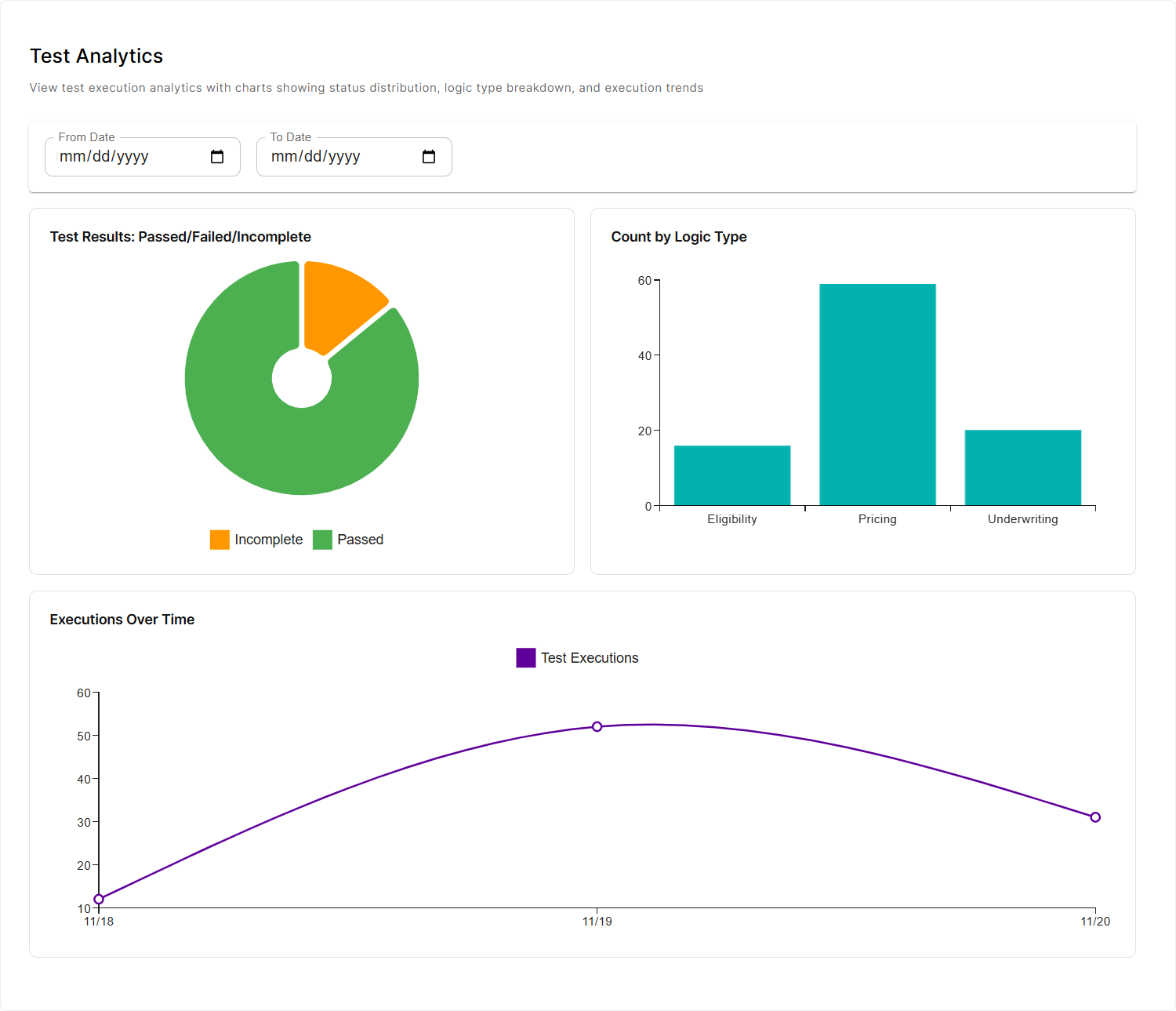
- The testing framework is now also available for draft products and offers. You no longer need to create new versions or clones when switching between design and testing.
- For each test case, you can now optionally provide the expected results, allowing you to validate your predicted outcomes (if the actual results differ, the test case fails).
For more details, see the product testing framework and offer testing framework documentation.
New Product Types
The built-in product types have been expanded to include more sophisticated banking products, allowing you to create:
- Credit Cards - Revolving credit products that allow cardholders to make payments and withdrawals up to a predefined credit limit.
- Tokenized Deposits - Deposit products that support cryptocurrency-based balances (e.g., SOL, BTC) and can be configured to operate across one or more blockchain networks.
- Crypto Wallets - Current account product designed specifically for digital assets, allowing users to store, receive, and transfer cryptocurrencies. They can operate across one or more blockchain networks and support both custody or non-custody models.
Product Factory Access Management
Product Factory access is now managed through a dedicated Roles and Permissions section where Product Factory-specific permissions can be assigned to security roles. This enables more granular control over user actions, such as viewing products and offers, approving or closing items, and running or viewing test cases.
Split Insurance Premiums
For each insurance plan, you can now distribute insurance premium amounts between coverages or sub-coverages, depending on where the premium formula is applied:
- If the premium formula is defined at the insured object level, the total premium can be divided among its coverages.
- If the premium formulas are defined at the coverage level, each coverage premium can be further divided among its sub-coverages.
For more information, see the FintechOS Studio documentation.
A split property has been added to the Get Product Metadata by Product ID and Get Product Metadata by Product Code API responses at both coverage and sub-coverage levels, to specify the proportional allocation of the premium amount for each coverage or sub-coverage.
Similarly, split properties have also been added to the Calculate an Insurance Product's Pricing and Calculate an Offer's Pricing API responses in each premiumCalculationResults array, to showcase the premium amount calculated based on the split configuration.
Loyalties
Your offers can now include loyalties, value-added perks such as premium services, discounts, or installment-based benefits to enhance their attractiveness.

Variable Fee Calculation Over Product Lifecycle
For fees with recurring periodicity (e.g., monthly, annual, weekly), you can configure multiple segments within the repayment schedule, each with its own calculation method, such as a fixed amount, a variable value, or a formula-based computation.
E.g.: A Down Payment Fee calculated using the formula Down Payment × 0.002 for the first three installments, then Down Payment × 0.001 for the next three installments, and 0 € for all remaining installments.
Option Set and Lookup Lexicon Terms
Two new data types are available for lexicon terms: Option Set and Lookup.These enable you to define lexicon terms that reference centrally managed values instead of relying on free-text inputs. With Option Set, users can select from predefined lists, while Lookup allows selection from records stored in a business entity.
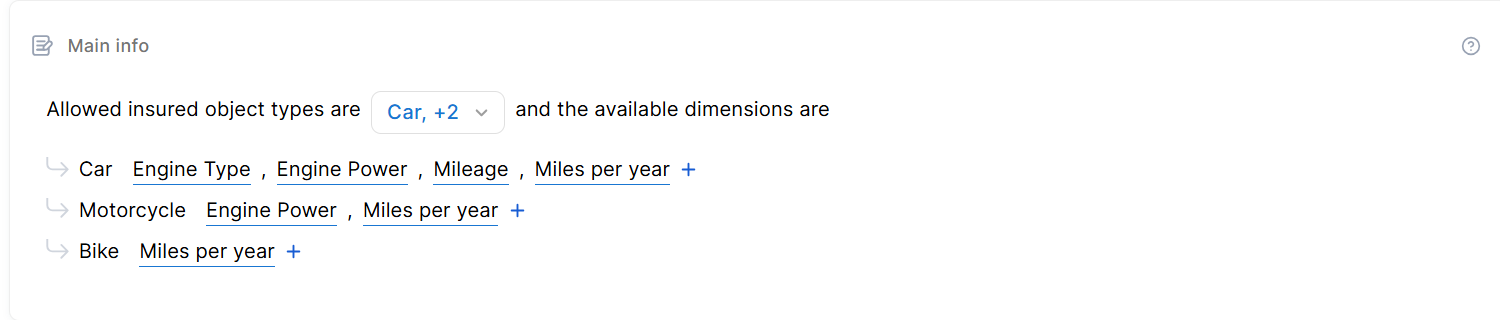
Customizable Main Info Section for Insurance Product Types
You can now define which insured objects and related dimensions are available in the Main Info section for products based on custom insurance product types.
Products Export/Import as a Zip Archive
To further support the improved export settings, we also introduced a new V2 version of the products import/export APIs that now work with .zip files instead of the old .json format:
baseAPIUrl/pfapi/api/v2/products/export: exports the product definitions by their product IDs or codes in a JSON file format within a zip archive. This zip archive can be used as a prerequisite for importing product data into another system. The product IDs or codes should be obtained from product edit or view pages.baseAPIUrl/pfapi/api/v2/products/import: imports the product definitions from a zip archive. The zip archive should be in the format produced by the export function.
These V2 endpoints enable exporting product configuration and assets (such as images and JSON definitions) in a ZIP archive and importing them back on compatible platform versions. To use these, you must add the API URL in the following Configuration Manager key: /environment-context/InternalPFApiUrl.
Product Definition APIs
Two new APIs are available to retrieve the definition of a banking or insurance product by ID. The APIs retrieve the complete product definition, including the configuration details and rating calculation rules.
Linear Principal Repayments
New repayment schedules types with equal principal repayments are now available for secured loans, unsecured loans, and working capital banking products. They are called STLoan Once, STLoan Once_TLU, and STLoan Once_WKC respectively.
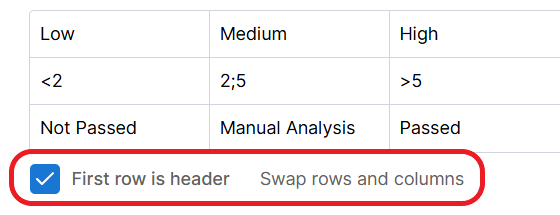
Streamlined Data Set Inputs
When pasting data sets into Product Factory, you can now ignore the first row by selecting the First row is header checkbox. You can also use the Swap rows and columns option to quickly reorganize the data for easier viewing.
Product Dashboard
The Product Factory homepage has been redesigned as a centralized dashboard, providing direct navigation to core capabilities, and visualizations for key product and performance metrics.
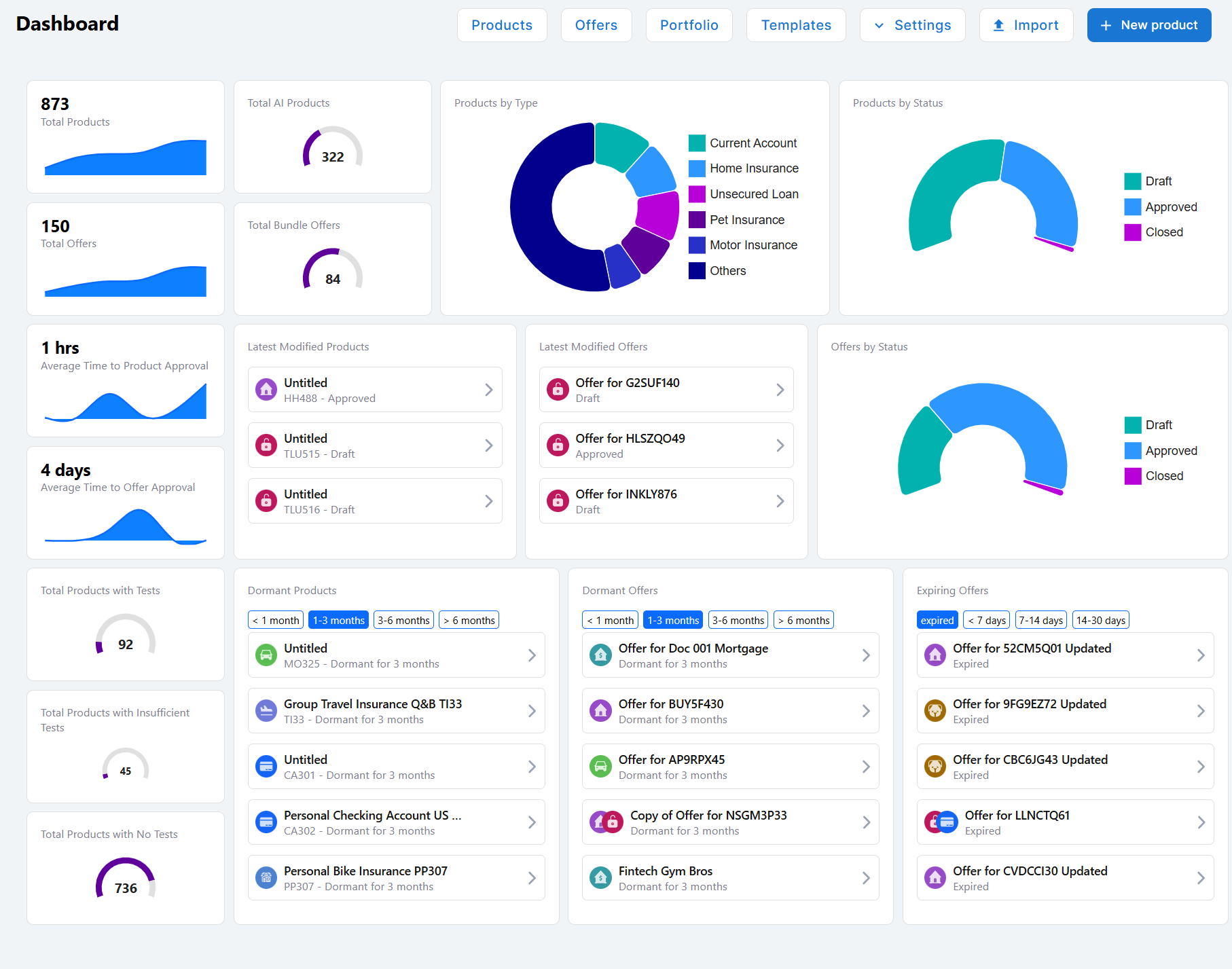
For more information, see the FintechOS Studio documentation.
Product Templates
You now have access to templates, preconfigured product examples designed to provide hands-on insight into the available product types. Each template contains pre-populated data that illustrates the supported capabilities and possible configuration options for a product type.
Product Cloning
You can now clone products from the Product Factory user interface. This allows you to quickly create similar products by reusing an existing configuration as a starting point, instead of building them from scratch. For more information, see the FintechOS Studio documentation.
Import and Export Products from the GUI
Product import and export capabilities are no longer limited to API calls. Now you can import and export products directly from the Product Factory user interface.
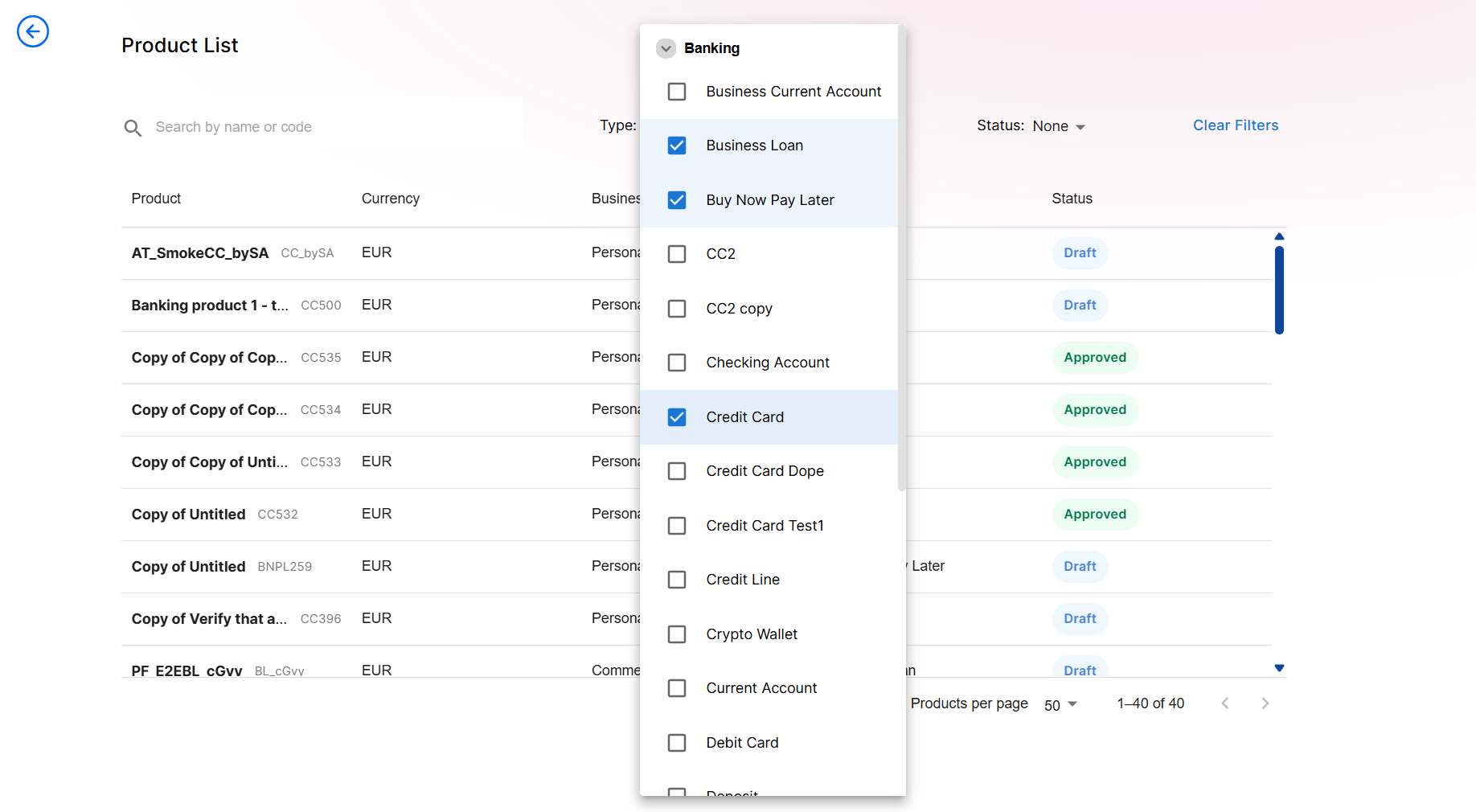
Filter Products by Type
A multi-select filter has been added to the product list, allowing you to filter products by type.
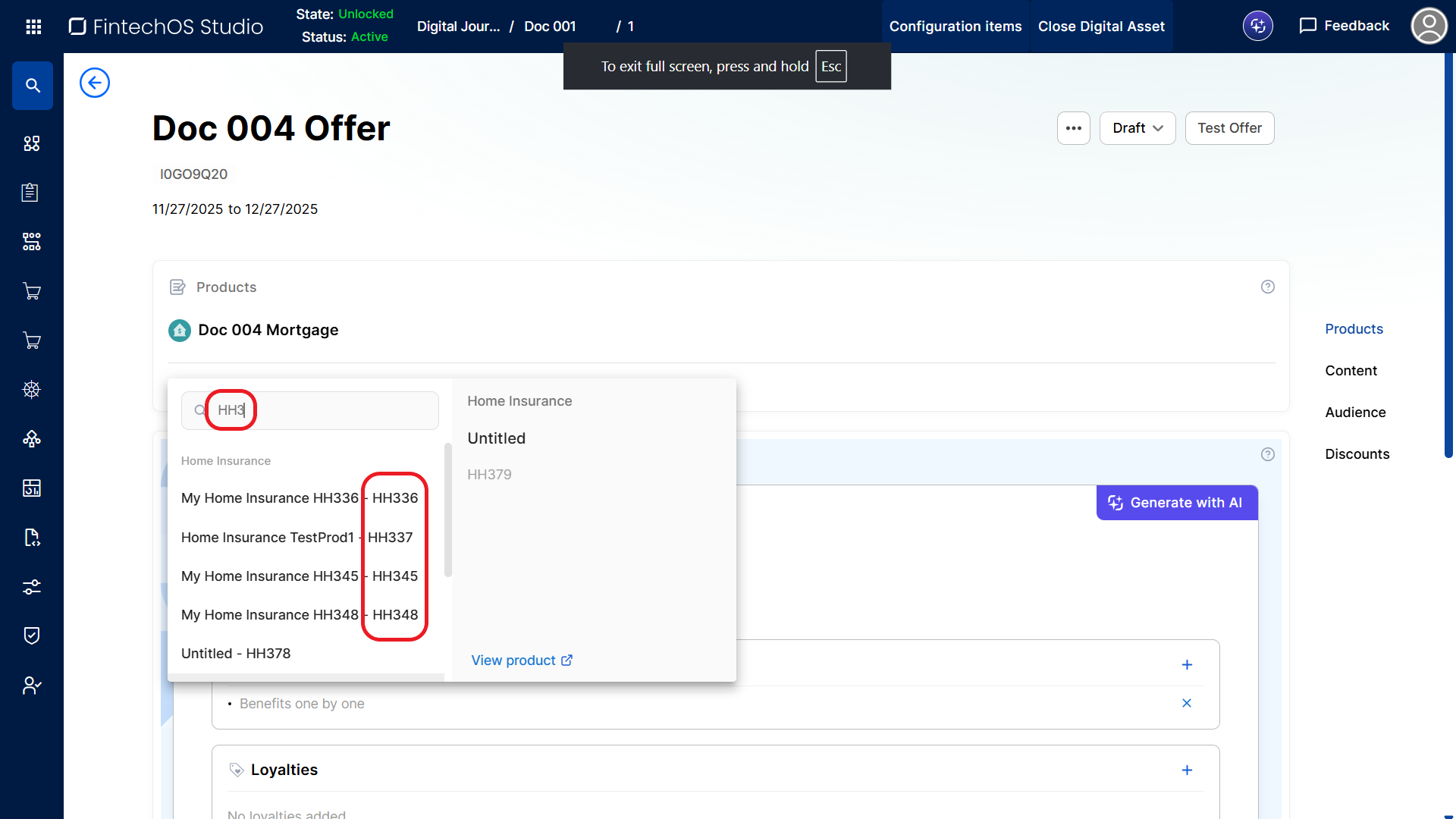
Search Products by Code in the Offer Screen
When adding products to an offer, the product selector now searches for available product codes, not just product names. This improves consistency and productivity as product codes do not change throughout the lifespan of the product and you can quickly filter through products with similar names.
Improved Search Results
Search results in Product Factory have been enhanced to deliver more relevant and accurate lexicon term matches.
Unique Offer Names
Offer names can be updated only if the provided name is unique. If a duplicate name is entered, the system displays a warning and prompts the user to choose a unique name.
Product Metadata V1 APIs Include V2 Product API URLs
The legacy (V1) endpoints Get Product Metadata by Product ID and Get Product Metadata by Product Code now return both V1 and V2 product API URLs. The following sections include a new field named apiV2Url alongside the existing apiUrl:
pricingApiunderwritingApieligibilityApi
Example:
"underwritingApi": {
    "apiUrl": "/pfapi/api/v1/product/HH5087/underwriting?businessLine=insurance",
    "apiV2Url": "/pfapi/api/v2/products/insurance/HH5087/underwriting"
This gives legacy API consumers direct access to the newest product API endpoints, ensuring they can leverage current capabilities without modifying existing calls.
Improved Error Messages
Product Factory UI and API error messages have been updated to be clearer and more intuitive.
Studio Home Page Update
The FintechOS Studio main page has been updated to provide access to frequently used features:
- Access the Dex AI assistant, as well as suggested example queries
- Browse, resume working on, or create:
- Workflows
- Products
- Digital Assets
Journey Designer UX Improvements
This release introduces a series of user experience enhancements in Journey Designer, focusing on improved usability, visual consistency, and more intuitive interactions across the interface:
- Padding within document controls have been updated to ensure better element alignment.
- Data object categories are limited to two rows. When full, the area becomes scrollable. Clicking a category tab automatically scrolls to keep the selected category visible.
- The specifications icon is highlighted when the specifications drawer is open.
- The properties icon has been updated (now displaying horizontal sliders instead of vertical ones) and is highlighted when the properties side panel is open.
- New attributes are now assigned by default to the General category.
- The hover animation for the Advanced Interface button has been updated.
- The External Step icon has been updated.
- The positions of the Save and Delete attribute icons in the screen editor have been swapped.
- The height of the integrations catalog modal no longer shrinks, even if the window is empty (no search results are returned).
- The Create New button in the integrations catalog modal has been moved to the bottom of the window to reduce excess white space below the title.
- Searching for various components (attributes, integrations, journey elements, etc.) has been improved:
- The text color in attribute search bars now changes between placeholder text (gray) and input text (black).
- Attribute search bars and filter bars are highlighted when active.
- The first search result is automatically highlighted, and users can navigate results using the up and down arrow keys.
- Search results now display indicative messages and/or illustrations when no results are found (e.g., No results or No attributes have been found.
- An x icon is now displayed in all search bars, allowing users to clear the search inputs.
- When selecting a service or integration from the catalog, the default title is now based on the service/integration name rather than its type.
- The Connect To element width is now aligned with the other journey elements. Its find button (crosshair) has been moved outside the search bar.
- When a side panel is open, clicking Cancel in the modal window closes both the side panel and the modal.
- Title properties have been renamed to Title (Display Name) throughout the interface. Name properties are now editable and automatically formatted using camelCase notation.
- Screen titles are now editable. When left empty, the default step name is used.
- The properties side panel for text attributes now includes localization settings.
- The subflow icon size has been aligned with other interface elements, and the subflow menu (...) icon is now highlighted on hover.
- The design of the navigation path selectors in Decision elements has been improved:
- No padding is applied on the left side of the list.
- On hover, the gray highlight fills the entire row.
- The vertical scroll bar is displayed on top of the gray highlight.
- Data entity categories now display a tooltip on hover showing the full category name (useful when labels are truncated).
- Attribute properties side panels can now be closed by clicking the properties icon again in the data entity modal.
- The default Back and Next buttons are no longer visible in the designer if the screen has no content.
- When adding an attribute based on a lexicon term, its display name is now populated by default.
Improved Endpoint Search in Logic Block Actions
The Execute Endpoint logic block action now includes a search bar, allowing you to quickly locate and select endpoints without typing directly over the endpoint pill.
Simplified Object and Object Collection Handling in Business Formulas
You can now use the new CREATEOBJECT() and CREATEOBJECTVECTOR() functions to programatically create objects and object collections in the formula editor, instead of using complex namespace references like FintechOS.Metadata.Core.Workflow.Common.Formulas.DataTypes.ObjectVector<dynamic>(). For more information, see the FintechOS Studio documentation.
Naming Restrictions for Entities and Primary Attributes
When configuring business entities, the entity name and primary attribute name fields are now validated to ensure they begin with a letter and contain only alphanumeric characters or underscores.
Entity Versioning Settings - Automatic Export/Import
Version settings and version settings items are now exported/imported together with the parent entity. This transfer is automatic, (no version-related configuration items can be manually added to or removed from digital assets). Any versioning settings added or updated for an exported entity in the source environment will be applied to the corresponding entity in the target environment during import. If versioning has been disabled for an exported entity in the source environment, it will be removed from the matching entity in the target environment on import.
Improved Performance When Creating Formula Arguments
The creation of business formula arguments has been refactored to consolidate multiple database queries into a single call. Previously, the process executed several individual queries, which increased response time and reduced overall performance.
New Method: ftos.convert.byteArray.toBase64
We’ve added a new utility method, ftos.convert.byteArray.toBase64, which converts the binary contents of an IFtosWorkflowBlob into a BASE64‑encoded string. It does not support byte array.
Order Index Deployment Scenarios
You can now choose between Append and Overwrite order index deployment scenarios when importing packages, so that all entities with an order index keep the correct ordering in the target environment and you avoid manual reordering after deployment:
-
Append: inserts new items from the package at the end of the existing list in the target environment. Existing items in the target remain in their current positions and are updated without altering their original order index.
-
Overwrite (the default): the target environment adopts the ordering from the package. Items included in the package are placed first and their order indexes are recalculated accordingly, while any items that are only in the target environment are appended afterward, preserving their relative order.
To control the order index import scenario when a digital solution package is imported using SysPackageDeployer, the user has to set a new key that was added to the .config file. Read more about the key on the Importing and Exporting Packages page.
Product Factory Export Settings
This update introduces configuration options for exporting products as a .zip package that includes both product data and attached files (such as images or PDFs). In the past, products were exported in a .json file.
These new settings define how Product Factory information, especially security roles, is handled during export and import.
Key updates
- Products can now be exported with their attached assets (e.g., images, PDFs) in a .zip file.
- Added Include Configuration (off by default) to optionally include Product Factory configuration in the export package.
- Added Stop Package Generation On Product Factory API Error (on by default):
- When enabled, export stops on Product Factory–related errors and saves Product Factory configuration to the package for automatic import.
- When disabled, export continues with a warning and skips only the products that caused errors.
Configurable Log Path
The SysPackage Deployer now supports a configurable log file location, allowing you to specify the folder where deployment logs are written. Previously, logs were written to the console and to a file located in the executable's root directory, which was hard-coded. This update improves user experience when working in personal sandbox environments by giving developers access to deployment logs in the same folder as logs from Studio, Portal, etc.
Deletion Return Values
In v24.5.0, we updated the ftos.data.delete method so that attempting to delete a non-existing record no longer throws an exception. Instead, the method now returns true when a record is found and successfully deleted, and false when no record with the given ID exists and therefore nothing is deleted.
Async Route Execution
You can use a new SDK method, executeRouteAsync, to execute routes with complete Intellisense support for the payload; this method replaces the previous executeRoute, which was not working correctly and had missing Intellisense information, and executeRoute will no longer be available in versions from v24.5.0 onward.
OptionSet Integrity Check
When you import a package into version 24.5.0, the new AttributeIntegrityValidator now checks that every attribute of type OptionSet also has a non‑null optionSetId value. If an attribute of type OptionSet is missing this value, the import fails with the error: “The record of type ‘attribute’ with ID ‘<guid>’ is of type 'Optionset', which requires a value for 'optionSetId', but none was provided.” A similar error is thrown when importing any other package that has an attribute that doesn’t obey the rule mentioned before.
To proceed with the import, you need to identify and correct these invalid attributes in your source environment by setting a valid optionSetId, then re‑export the package and import it again into 24.5.0.
Multiple Business Units Selection
To support users assigned to more than one Business Unit (BU), the system now allows BU selection during login when configured appropriately.
-
Enable the system parameter sys-allow-multiple-BU-per-user to display a pop‑up with a drop‑down list of available Business Units, at user authentication in the Portal
-
If the parameter is not enabled, your primary BU is automatically selected by default.
-
Business Units are assigned by administrators in Studio, with no limit to how many can be added.
-
If you have only one assigned BU, it becomes your default and no selection option appears.
-
Available only when logging into the Portal.
-
Applies only to users authenticated through FintechOS ID.
-
Not applicable to service accounts, temporary users, or inactive users.
Switch between local sandbox instances in VS Code
You can now seamlessly switch between multiple locally installed sandbox instances (of the same version) directly from VS Code, making your development workflow faster and more efficient.
-
You can log out from your current sandbox instance in VS Code and log in to another configured local sandbox.
-
When you switch, the newly selected sandbox instance is automatically scaled up while the previous one is scaled down (for sandbox environments only, not cloud).
-
On first use of a sandbox instance, you provide its URL and credentials once, and these are stored for subsequent logins.
-
You benefit from significantly faster and more efficient sandbox context switching during development.
Configurable log file location
The FtosSysPackage Deployer now supports a configurable log file location, allowing you to specify the folder where deployment logs are written. Previously, logs were written to the console and to a file located in the executable's root directory, which was hard-coded. This update improves user experience when working in personal sandbox environments by giving developers access to deployment logs in the same folder as logs from Studio, Portal, etc.
Server SDK for Flows
You can now control flow instances directly from server-side scripts, so you initiate, read, update, move, and close flows programmatically, and react to their process and business states as part of your automation.
IDP User Status Sync Improvements
Locked or disabled accounts in IDP are reflected in Studio, providing a clearer, more consistent user‑status synchronization between your IDP and FintechOS Studio.
-
Disabled user statuses from IDP sync to Studio every 5 minutes through FTOS.SyncUsersFromKeycloakService scheduled job.
-
Regular users are synced; temporary users and service accounts are excluded.
-
When a user is disabled in IDP, they appear in Studio’s Inactive list.
Known Issues
Order Index not updated when re‑importing same package with Overwrite
When you import a package into an environment using Append, and then import the exact same package again into the same environment using Overwrite, the Order Index (OI) values from the database are not updated to match the OI values from the package. In other words, after this scenario, the Order Index in the destination environment remains unchanged instead of reflecting the Order Index as defined in the package.
Append does not update
When importing a package with Deployment Scenario set to Append, existing security role entries in the target environment are not updated. If a security role with the same security role name, entity, and security scope already exists, only completely new combinations are added. Any change to permissions (for example, adding Update to an existing Create, Read setup of a security role) is ignored and will not be reflected after the import, even if Include Security Configuration is enabled and regardless of the Include Extended Security Configuration setting.
For example, if security role Security Role 1 has full rights (Create, Read, Update, Delete) on entity E1 for the Business Unit scope in the source environment, but in the destination environment SR1 already has only Create, Read on E1 for the Business Unit scope, then importing the package with Deployment Scenario = Append will keep the destination at Create, Read and will not add Update, Delete, even though these rights exist in the source.
BW custom transitions only from Studio
Custom scripts for Business Workflow transitions cannot be edited from VS Code and are only available from Studio.
No new products on Sandbox
Product creation on Sandbox does not work. Until the bug is fixed, use the following workaround: go to Vault > Dev > environment-context. Find the ProductFactoryApiUrl key and from its value, remove v1 but keep the rest of the URL.
Fixed Issues
| No. | Summary |
|---|---|
| n/a | The import process of custom files no longer stops if there are orphaned file references that exist within the database. This is a fixed known issue from v24.4. |