Personal Credit Card
A credit card is a payment card that allows the cardholder to make purchases by borrowing funds from the issuing bank up to a predetermined credit limit. The borrowed amount must be payed back at a later date, allowing the cardholders to make purchases even if they don't have the funds immediately available.
In the title field, enter a name for the product. Optionally, you can click the ellipsis button (...) to also provide a description and/or an availability period. Below, fill in the following product configurations.
Main Info
This section defines the card’s financial limits and behavior, including payment terms, deferment, and restructuring Modifying the original terms and conditions of the loan to provide a more affordable repayment plan, typically when a borrower is facing financial difficulties or is struggling to meet their loan obligations.
Can provide relief in the form of lower interest rates, extended repayment periods, deferred payments, changes in payment frequency, debt consolidation, waiving of penalties or fees, partial write-offs, etc. options.
Modifying the original terms and conditions of the loan to provide a more affordable repayment plan, typically when a borrower is facing financial difficulties or is struggling to meet their loan obligations.
Can provide relief in the form of lower interest rates, extended repayment periods, deferred payments, changes in payment frequency, debt consolidation, waiving of penalties or fees, partial write-offs, etc. options.
| Parameter | Description | Default |
|---|---|---|
| Maximum limit amount | up to - The highest total balance the cardholder is allowed to hold in the specified currency. | |
| Minimum payment amount | is - The minimum amount the cardholder is required to pay by the due date to keep the account in good standing. | |
| Installment payment plan deferred | by - The number of installments by which the payment schedule is deferred. | |
| Restructuring |
|
Allows restructuring |
Interest
The interest sets up the amount of money (which is distinct from the principal repayments) that the borrower pays as a cost for borrowing money when repaying the credit card debt. You can set up both regular and withdrawal interests The interest charged when a cardholder takes money out of the credit card as cash instead of using it for purchases. Also called cash advance interest., with interest rates The interest rate is the amount a lender charges a borrower and is a percentage of the principal (i.e., the amount loaned). that are fixed, variable or based on a formula.
Click + Add interest or + Add withdrawal interest to set up a regular or cash advance interest rate respectively:
- fixed - Sets an interest rate that is a fixed percentage of the credit amount.
- variable - Sets an interest rate based on an underlying benchmark interest rate plus a specified percentage margin.
- based on formula - Allows you to set interest rates based on Product Formulas.
- for the first / for - Applies the interest rate for a specified number of installments Regular payment that a borrower is required to make to the lender to repay a loan over time..
- until end - Applies the interest rate until full repayment.
E.g.: Interest is fixed at 5% for the first 3 months and then variable indexed to EURIBOR 3M with a margin of 2.5%.
If you define multiple interests, the user will have the option to select one of them during the application.
Fees
- Click +Add fee.
- Select a predefined type of fee from the list, or click Create new to define a new fee type (you can also rename an existing fee by clicking the fee name). The type of fee determines parameters such as the conditions under which the fee is applied, how often the fee is charged, whether the fee is refundable or not, etc. For more information, see Fee Types.
- Enter the amount of the fee:
- value - a fixed value in the specified currency.
- percentage - a specified percentage of the remaining value, financed value, paid value, unused amount, used amount, overdraft limit amount, amount, etc.
- based on formula - Allows you to set fees based on Product Formulas.
- If the fee type has a recurring periodicity (e.g., monthly, annual, weekly), you can configure different amounts for specific installment ranges. For example, you may define a fixed amount for the first three installments, a variable amount for the next six installments, and a formula-based amount for the remaining installments.
E.g.: Down Payment Fee is based on formula Down Payment * 0.002 for the first 3 installments and then based on formula Down Payment * 0.001 for 3 installments and then value 0 € until end.
Fee types with the periodicity set to Once are automatically configured to be charged a single time.
You can set up multiple fees that will be charged independently, based on their Fee Types. E.g.:
- Front-end Fee is 25 € one time.
- Repayment Fee is 4% over remaining value one time.
This will always charge the borrower a $25 fee on loan application. If, during the loan, the borrower decides to repay the loan in advance, a 4% fee is charged over the loan's remaining value.
Limits
Limits define the maximum amounts allowed for specific types of payments or withdrawals within a defined time period.
- Click + Add limit.
- Select the payment or withdrawal type from the list. If the required type is not available, click + Create new to add it. This will create a new entry in the Limit Types settings list.
- Select the limit periodicity: daily, monthly, or per transaction.
- Enter the maximum amount that the cardholder can set for the limit.
- Enter the maximum amount assigned to the limit by default.
E.g.: ATM daily limit up to 500 USD with a default value of 200 USD.
Discounts
In the Discounts section, you can define discounts on any of the already configured interest items, commission items, or on all pricing elements.
There are three ways to create discounts:
- Follow the sentence-based interface to configure a condition based on a dictionary attribute (e.g., Age >18), for which you define a discount. Note that you can also create new attributes, extending your dictionary (+Add discount > Create New).
- Add a Dataset based on one, two, or more attributes for a pricing item. You can add more data sets, one for each pricing item. For more details on how to create Data Sets, see Product Data Sets.
- Add a formula to define discounts with more advanced conditions based on mathematical expressions, data sets, and other inputs. You can add more formulas, one for each pricing item. For more details on how to create formulas in Product Designer, see Product Formulas.
A discount does NOT override the previous value of a pricing item, but is applied to it, decreasing the pricing item's final value. For example:
- A discount of 10% applied to an existing 10€ commission results in a new value of 9€ for the commission.
- A discount of 2€ applied to an existing 10€ commission results in a new value of 8€ for the commission.
Covenants
Covenants represent conditions that the customer must comply with and that are periodically reviewed.
To add a covenant:
- Click + Add covenant.
- Select the covenant type from the list. If the required type is not available, click + Create new to add it. This will create a new entry in the Covenant Types settings list.
- Enter the threshold or required amount (e.g., €500 or €1000).
- Enter how often compliance is checked (e.g., monthly or every 6 months).
- Enter when the covenant is active:
- indefinitely - no end date
- between - a fixed interval between two dates
E.g.: Salary wiring with a value of 1000 USD reviewed every 6 months available indefinitely.
Underwriting
The underwriting rules determine an applicant's eligibility for the product and whether or not a manual approval process is required (available only for underwriting rules based on Product Data Sets).
There are three ways to add Underwriting rules:
- Add Rule - Follow the sentence-based interface to configure a condition based on a Lexicon Term (e.g. Credit Rating is Good or Excellent).HINT
In the attributes' pop-up window, you can click +New Attribute to quickly add a new lexicon term or Product Settings to edit the current lexicon term. - Add Formula - Use Product Formulas that return a boolean result ("True" for approval and "False" for rejection);
- Add Data Set - Use Product Data Sets for the evaluation. This is mandatory if the rule can return an outcome where the application must go through a manual approval process. The data set can return only the Approved, Derrogation, or Rejected results (or an equivalent terminology defined in the Underwriting Data Set Values, e.g. Passed, Manual Analysis, or Not Passed).
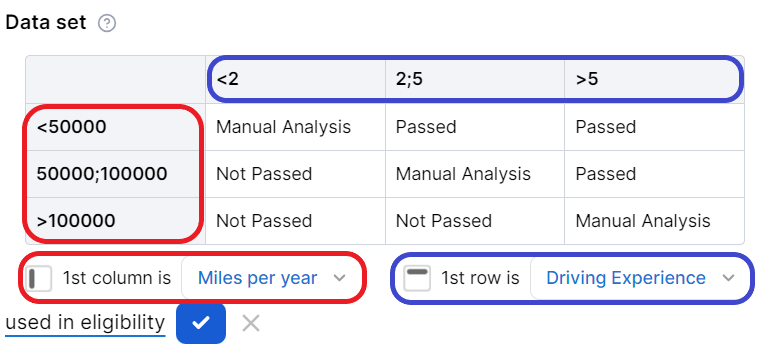
For each rule, you can select the used in eligibility option to mark it as a knock-out rule, which automatically disqualifies the applicant if its condition is not met. Otherwise, the rule is submitted to the final approval review.
For the manual approval result, you need to configure the journey to direct the application to a back-office manual approval process. If you are using Multi-Dimensional Data Sets based on cascading data sets, the manual approval outcome must be defined in the top-level data set.
Card Designs
Card designs define visual and physical characteristics of your cards which will later be used in the card issuance processes.
To add a card design:
- Click + Add design.
- Enter a name to identify the design.
- Pick a card material:
- plastic
- metal
- polycarbonate
- Choose whether the card is embossed or not embossed.
- Upload a background image for the card.
E.g.: Card design Colorful is made of metal is embossed with background image myBackground.png.
After configuring the design, you can click Preview to view a rendering of how the card will appear.
Card Settings
Card settings allow configuration of core card issuance parameters, including issuing country, card format, validity, and BIN A Bank Identification Number (BIN) represents the first 6 to 8 digits of a payment card number. It identifies the institution and card network responsible for issuing and processing the card, determining how transactions are routed and handled./PAN The PAN (Primary Account Number) is the full card number printed on a payment card. It uniquely identifies a card account and is used in all transaction processing. structure:
- Choose the country where the card will be issued.
- Select the available card formats:
- Physical
- Virtual
- Physical and Virtual
- Enter how long the card is valid in months (e.g., 12, 24, 36).
- Select a BIN (Bank Identification Number). Based on your selection, the payment processor is automatically filled in (e.g., BIN is 400000 with Visa payment processor). If the required BIN is not available, click + Create New to add it. This will create a new entry in the BIN settings list.
- Enter the total length of the PAN (Primary Account Number).
- Enter the BIN range. This defines the numeric range for the variable sequence used when generating individual card numbers under the selected BIN (e.g., BIN range is between 1 and 999999).
- The range applies to the digits after the BIN and before the checksum (Luhn) digit.
- It determines the lower and upper bound PAN values that can be assigned to issued cards.
- If the provided range values are shorter than the available digit space (total PAN length minus BIN length minus one checksum digit), they are left-padded with zeros to match the required length.
Example:
- BIN: 555132 (6 digits)
- PAN length: 16 digits
- BIN range: 1 - 999999
Available range length: 16 - 6 - 1 = 9 digits, interpreted as 000000001 – 000999999
Resulting PAN range (including the final checksum digit): 5551320000000019 - 5551320009999996
Documents
Specify the document types required from the applicants (and/or others involved in the origination process, e.g. codebtors Individual who assumes joint responsibility for repaying a loan alongside the primary borrower. If the primary borrower defaults on the loan, the codebtor becomes liable for the remaining debt.), as well as the document types provided to the applicants.
| Parameter | Description |
|---|---|
| Required from customer |
Documents that the applicant must provide in order to verify identity, income, product eligibility, etc. To add a required document:
E.g.: Income statement mandatory for debtor and mandatory for co-debtor. |
| Provided to customer |
Documents that must be provided to the applicant typically in order to obtain an agreement and/or signature. To add a provided document:
E.g.: Terms and conditions is static requires accord and requires signature. |
Service
The Service section is used to define the configuration structure and characteristics of your banking product. The following options are available:
- Commission on unused amount: The number of months after which the system starts calculating commissions for any unused amount.
- Disbursement allowed: The number of months for disbursing funds to the borrower.
- Minimum principal for early repayment: Minimal principal allowed for early repayment.