Getting Started with Policy Admin
This page walks you through the setup process step by step, with links to detailed guides for each stage. Complete these steps after setting up Service Insurance and before moving it into production.
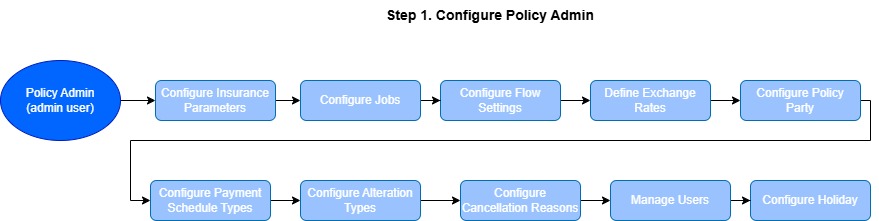
 Step 1. Configure Policy Admin
-
Insurance Parameters: create and configure insurance parameters for your solution.
-
Configure Jobs: each solution part of Service Insurance comes with specific scheduled jobs, automated procedures that perform certain tasks, running at a specific time or on a recurring schedule.
-
Flow Settings: adjust settings for a number of flows, such as the flows for changing client data, settings for currency exchange, for email notifications, for payments, and so on.
-
Define Exchange Rates:
-
Configure Policy Parties: define and configure the roles involved in a policy, such as Insured, Policy Holder, Beneficiary, or define Other parties.
-
Configure Payment Schedule Types: add and configure payment schedule types, to define and set details pertaining to the way the payment schedule works for the product.
-
Configure Alteration Types: configure the types of alterations that can be made to an insurance policy before the end of the policy.
-
Cancellation Reason Types: configure the reasons for canceling a policy or master policy.
-
Security Roles: configure the security roles that give access to functionalities inside Service Insurance.
-
Bank Holidays: the bank holidays & non-working days configuration is used for the Billing and Collection module. This setting controls the behavior of the direct debit generation endpoint; it prevents the endpoint from generating a direct debit file on a date corresponding to a bank holiday - like Easter or other dates declared as non-working days by authorities.

Step 2. Create Insurance Products
The configurations you set at the insurance product level significantly affect policy servicing. It's important to carefully review key settings such as the renewal type and policy suspension duration. These options are selected when creating the insurance product in Product Factory.
You can configure the process beforehand by using the two features described below:
-
Create Insurance Products: use a variety of product templates that are available out-of-the-box in Product Factory to create insurance products;
-
Configure Policy Renewals: the process of extending an insurance policy for another term, typically with the same or updated terms and premium.
-
Configure the Policy Suspension Duration: the specific period during which an insurance policy is temporarily inactive and coverage is paused.
-
Approve Insurance Products: use product approval and versioning to track product iterations through their various development and release stages.
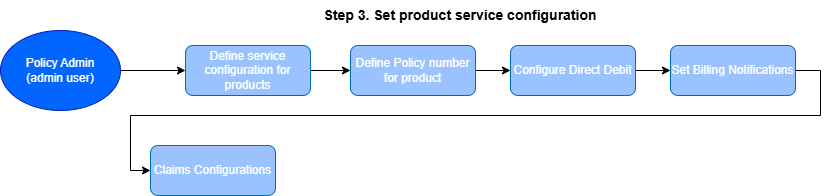
Step 3. Set Product Service Configuration
After creating and configuring insurance products using the Product Factory, follow the steps below to continue configuring your product:
-
Product Admin Configuration: define pricing rules, policy rules, claims handling, formula mappings, and payment types, and other key parameters. This is a mandatory step, without a valid Product Admin Configuration, the product cannot be used.
-
Insurance Product Sequencer: configure sequencers available for Service Insurance or modify the default ones provided out of the box.
-
Configure the Direct Debit Type: specify the direct debit processing type for Billing & Collection, either DIDE SEPA or DIDE UK.
-
Set the Billing Notifications: set up notifications to inform customers about the status of their invoices.
-
Configure Claims: define the implicit reserve and reserve currency for insurance perils before generating claims.
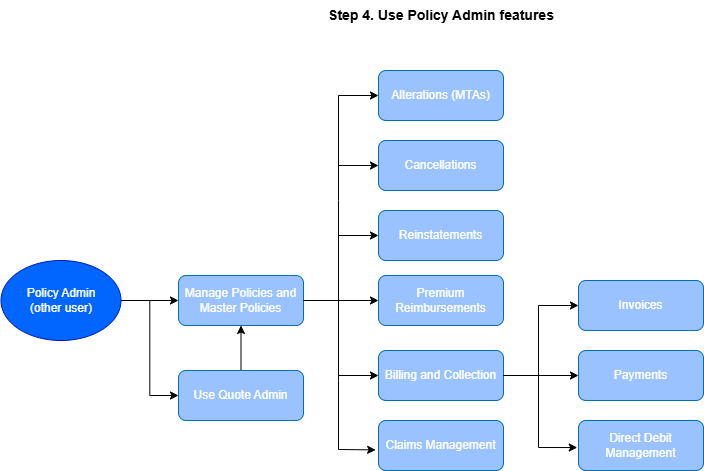
Step 4. Use Policy Admin Features
Use Policy Admin features to manage quotes, policies, billing, and claims within an integrated back-office environment:
-
Quote Admin: manage quotes originating from internal or external Quote & Bind flows exposed to a final client, all within a unified back-office interface.
-
Manage Policy Administration: oversee and manage all operations related to both individual and master policies, ensuring full lifecycle control.
-
Alterations (MTA): define new alteration types with less effort and at a faster pace, all within a configurable interface.
-
Billing & Collection: automate billing and collection processes, including direct debit operations. The system provides guided customer journeys to assist users with manual tasks such as completing payment allocations, importing bank statement files, or creating new payment requests - all in a timely and accurate manner.
-
Claims Management: register loss notifications, document and validate claims, and, upon approval, schedule payments promptly and accurately. This feature also enables insurers to maintain ongoing communication with the insured throughout the claims process.