Bank Holidays
Financial institutions are usually closed and do not process payments or claims during holidays, hence the payment schedules may be adapted to take the into consideration. In FintechOS, you can indicate the public holidays for the country used in the product definition, for the calendar years over which the institution's current business is spread.
The Bank Holidays configuration is used by the Billing and Collection module. It controls how the direct debit generation process behaves, ensuring that the system does not generate a direct debit file on dates defined as bank holidays (e.g., Easter or other official non-working days declared by authorities).
Bank holiday records are stored in the Bank Holiday entity. The Service Insurance solution allows you to add, edit, or delete these records.
Managing Bank Holidays
To create or update bank holiday entries, follow these steps:
-
Open your FintechOS Portal and select the main menu in the top-left corner. Navigate to Contract Management > Contract Management Settings > Insurance Settings > Bank Holidays.
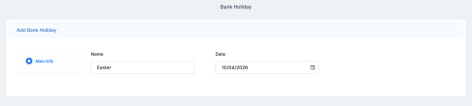
- Click Insert and enter a Name for the holiday. Select the date from the calendar.
-
Click Save and reload to save the record.

At the start of each year, you must update the bank holiday configuration for your region or country in the FintechOS Portal. Use the steps outlined above to add the holidays for the new year.