Configure Payment Schedule Types
When defining an insurance product, you must select a Payment Schedule Type that applies to all associated policies. Payment schedule types control how installments are calculated, scheduled, and collected.
In the FintechOS Portal, you can view, configure, and create payment schedule types to meet your business requirements.
View Default Payment Schedule Types
In FintechOS Portal, go to Main Menu > Contract Management > Contract Management Settings > Insurance Settings > Insurance Payment Schedule Type. The list of default payment schedule types records is displayed.

The system provides two default payment schedule types. Their primary difference lies in how the first installment date is calculated: either on the Start Date or the Issue Date of the policy:
-
Standard:
-
the first installment is due on the start date of the coverage;
-
the installment is rounded to two digits;
-
starting from this standard payment schedule, you can make adjustments to meet your business needs, as explained in the section below.
-
-
DueDateOn15:
-
the first installment is on the day the policy is issued;
-
the default collection day is on the first installment, set on the 15th of the month.
-
installment amounts are not rounded;
-
the first installment is set on Wednesday;
-
this schedule can be modified, or used as a template to create a custom schedule.
-
Configure a Payment Schedule Type
-
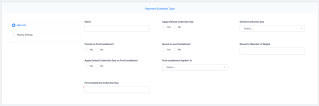
In the Insurance Payment Schedule Type view, click Insert to display the Payment Schedule Type form:
-
Complete the following fields in the Main Info tab:
-
Name: the name of the payment schedule type. This value becomes selectable when configuring an insurance product.
-
Apply Default Collection Day: If No is checked, each installment inherits the day of the first installment. If Yes is checked, the Default Collection Day applies to all installments except the first:
- Apply Default Collection Day on First Installment: Check Yes to apply the default collection day on the first installment;
-
Default Collection Day: Input a vale from 1 to 31, representing the date of the month. If the month has fewer days then the selected one, then the last day of that month will apply.
- Prorate to First Installment: If No is checked, then the premium is divided by the number of installments and then the rounding mechanism is applied. If Yes is checked, the following calculations are applied for the installments:
First installment = (Second installment due Date - Begin Date)*Total Premium / (End Date - Start Date);
Last installment = (End Date - Last Installment Due Date)*Total Premium / (End Date - Start Date);
Rest of installments = (Premium - First installment - Last installment) / Number of remaining installments.
-
Round on Last Installment: If enabled, rounding adjustments are applied to the last installment. If disabled, rounding adjustments apply to the first installment;
-
Round to (Number of Digits): Defines the number of decimal places used for rounding;
- First Installment Applies To: select whether the first installment is based on the Issue Date or the Start Date of the policy.
-
First Installment Collection Day: Input the number of days to apply to either the Start Date or the Issue Date of the policy.
-
-
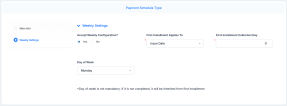
Complete the following fields in the Weekly Settings tab:
- Accept Weekly Configuration?: If Yes is checked, fill in the fields:
First Installment Applies To: Choose the date to which the first installment applies. The possible values are: Issue Date, Start Date, Day of Week (from StartDate, and Day of Week, (from Issue Date);
First Installment Collection Day: Select the collection day for the first installment;
Day of Week: Choose the weekday for collecting subsequent installments.
- Accept Weekly Configuration?: If Yes is checked, fill in the fields:
- When configuration is complete, save the payment schedule type. It is then available for selection when defining insurance products.

