Flow Settings
Flow Settings must not deleted.
Insurance flow settings can be accessed by navigating to Main Menu > Contract Management > Contract Management Settings > Insurance Settings > Flow Types Settings.

 Quote Admin
Update Private Individual or Legal Entity
Quote Admin
Update Private Individual or Legal Entity
FTOS_QA_Quote holds the settings for configuring the flow for updating the Private Individual or Legal Entity accounts.
Policy Administration
Policy Alteration and Cancellation
The FTOS_PA_Policy flow handles the policy alteration and cancellation. It has the following processor settings:
-
FTOS_PA_PolicyAlteration: settings for mapping the data during the policy alteration process, such as insured amount or excess value;
-
FTOS_PA_PolicyCancellation: set the default interval type, close surrender number of days, or contractual days until cancellation;
-
FTOS_PA_PolicyProcessor: specify the security roles, cancellation statuses, MTA statuses, insurance types.
The Cancellation process has been refactored, and the previous data model has been decommissioned and is no longer supported. Going forward, only the new Cancellation data model must be used. Any existing dependencies on the legacy model must be removed or replaced.
Payment Processes
FTOS_PYMT_PaymentFlow holds settings for payment processing. It has the following processor settings:
-
FTOS_PYMT_OutgoingPaymentProcessor: automatic allocation rules configuration used for the outgoing payment allocation process:
-
if a payment reference is mentioned on the payment, then the allocating will be made using the
paymentReferenceRuleconfigurations: by payment reference, IBAN and currency, on outgoing payment requests with the status defined in theoutgoingPaymentStatusChecklist; -
if a reference is not identified, the allocation will be made using the
ibanPaymentAmountRuleconfigurations, by payment amount, IBAN and currency, on outgoing payment requests with the status defined in theoutgoingPaymentStatusChecklist.
-
-
FTOS_PYMT_OutgoingPayments_PayerDetails: default values used when registering outgoing payment requests, to populate the Payer details section, containing the name of the payer and different IBANs per currency.
-
FTOS_PYMT_PaymentProcessor: configuration used in the incoming payment allocation processes:
-
AutoAllocationRules- available rules used for automatic payment allocation, and criterias used for the process; -
ExchangeCalculationType:-
for
StatementDate→ calculate the exchange rate for the day selected as invoice date (attribute on invoice); -
for
PaymentDate→ calculate the exchange rate for the day selected as payment date (attribute on payment).
-
-
PolicySequencerCode- code of sequencer used for the policy generation processes, used to determine how a policy number should look like, to search for it in the details provided on payment level.
-
Change Client Personal Data
This flow allows you to change client personal data. It uses the FTOS_CMB_ChangeAccountDataRequest flow setting. Follow the steps below:
-
In your FintechOS Portal, navigate down the main menu to General > Change Customer Data.
-
Click Insert and fill the at least one field and click the Search button to find the desired client.
-
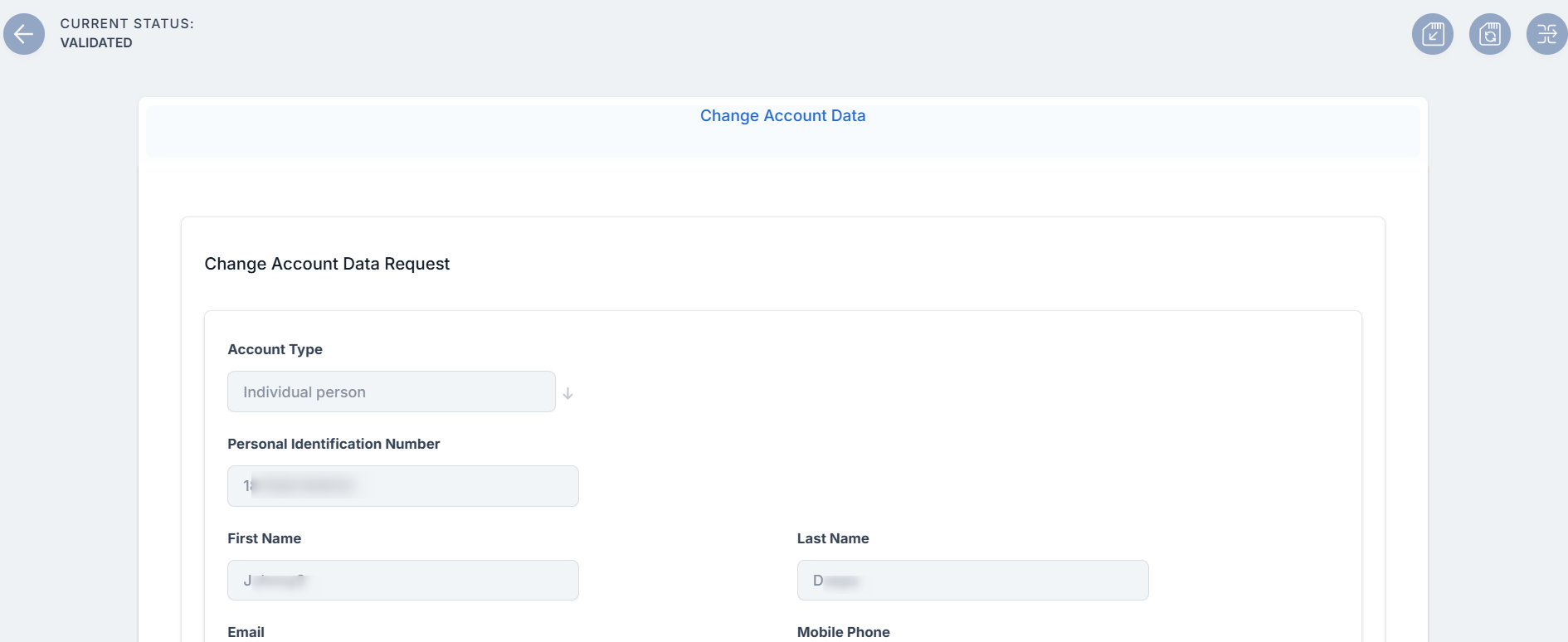
In the search results list, click Select on the record that you wish to edit. The Change Account Data form opens.
-
Change personal identification data, such as name, email, date of birth, and so on. You can also change the client's address.
-
Click Save and reload.
-
Click the Choose status button from the top left and change the status to Validated or Rejected.
-
If the chosen status is Rejected, no data will be changed for the client.
-
If the chosen status is Validated, the data will be changed for the client and a copy of all the data that was changed will be kept into the Change Account Data Request Log entity with the attribute name, the old value and the new value.
-
Configure the above flow by navigating to the FTOS_CMB_ChangeAccountDataRequest flow setting and mapping the available fields to destination entities.
Change Address
Access the FTOS_INSQB_Address processor to update the address in the Address entity.
Billing and Collection
Settings for Currency Exchange
FTOS_Exchange holds general settings for converting values to other currencies. You can configure the following fields:
-
ExchangeRateType - type of exchange rate, as defined in the exchange rates list;
-
LocalCurrency - local currency used by the system;
-
BidirectionalConversion - supports only false.
Email Notification ProcessAccess FTOS_INSP_CoreInsuranceNotification settings to configure the email notification process:
followUp - Follow up notification;
invoiceGenerated - Invoice Generated notification;
paymentConfirmation - Payment Confirmation notification
Invoice generation processFTOS_PYMT_StatementFlow holds the rules for invoice generation and default configuration for each payment type:
rulesArr: available list, where the first one will be identified as rule 0, the second one as rule 1 and so on;multiplePolicies: multiple policies of the same client can be grouped together, considering product settings;singlePolicies: one invoice for each policy;multiplePoliciesByQuoteMultipleNext: one invoice for all the policies issued with the same quote number;multipleFirstPoliciesByQuoteSingleNext: one invoice for all the policies issued with the same quote number for the first installment, individual invoicesfor the following installments;singleIndividualMultipleByMasterPolicy: for direct debit policies that are not part of a master policy, the system issues individual statements for each policy. For direct debit policies that are included in a master policy, the system groups the installments of all the policies included in the master policy, an issue only one invoice, including all these installments.
Configurations for each payment type; examples:
OP- rule 0 (multiplePolicies);brokerCollection- rule 0 (multiplePolicies);directDebit- rule 4 (singleIndividualMultipleByMasterPolicy);cardPayment- rule 4;recurringCardPayment- rule 4.
Set up DIDE ProcessingThe Billing and Collection solution can be applied to two types of direct debit processing:
DIDE SEPA - functionality used for the European area;
DIDE UK - functionality used for the UK area.
For implementing a certain direct debit flow, you must choose its corresponding direct debit type - either SEPA or UK. To do so:
1. Configure DIDE Type in PortalLocate the FTOS_PYMT_DIDEConfiguration record and double-click it. The Flow Setting form opens.
Click the Processor Settings tab. Double-click the FTOS_PYMT_DIDEProcessor record. The Processor Setting form opens.
In the Settings section, locate the
typekey. For this key you must insert the value for the flow you need to implement. You can use eitherSEPAorUK.
2. Prerequisites Parameters CheckThe following parameters must be filled in, according to your needs:
numberOfDaysInAdvance: Add the number of days in advance.runningOnBankHolidays: Add true or false depending on whether the flow should run on bank holidays.excludeWeekDays: Add the week days during which the flow is not available.
3. Insert UK Specific Default ValuesThis step is only applicable when you are configuring the direct debit functionality for UK.
The following are the available processors:
DIDEPaymentsFileDefaultValuesThis processor sets the value for the DIDEUK_Instructions job that collects all the Draft mandates and sends instructions for their activation to BACS.
The following parameters must be filled in, according to your needs:
destinationSort: Add the amount.destinationAcct: Add the destination account.destinationType: Add the destination type.usersName: Add the user name.
DIDEPaymentsFileDefaultValuesUkThis processor sets the value for the FTOS_PYMT_DIDEInstructionFile job that, for the active mandates registered in the system, assembles the file containing the direct debit payment instructions that are delivered to BACS, and then to the payer's bank.
The following parameters must be filled in, according to your needs:
destinationSort: Add the destination sort.destinationAcct: Add the destination account.destinationType: Add the destination type.transaction: Add the transaction number.freeFormat: Add the format.amount: Add the amount.usersName: Add the user name.
If the option configured in the processor is Sepa, the Service Insurance solution takes in consideration the direct debit processing for SEPA area. Otherwise, if the inserted value is Uk, the solution takes into consideration the direct debit processing for UK area.