FintechOS Platform 24.4.1
October 22nd, 2025
This release brings security updates and major enhancements across Product Factory, Dex AI Assistant, and Data Imports, along with quality-of-life improvements such as OpenTelemetry logging support, API performance optimizations, and stricter endpoint validations.
Mandatory Changes
File Uploads to Virtual Attributes No Longer Supported in B2C Portals
This release introduces a security validation that allows users to upload files in B2C Portals only within the context of a specific file attribute. This prevents file uploads to custom data extensions, as ownership settings cannot be applied to virtual attributes.
Workaround: Use a regular file attribute instead of a virtual file attribute for the scenarios where virtual attributes were previously used. E.g.: Use a button to upload a file to the regular file attribute, pass the file to an endpoint, then clear the file attribute from the UI.
Deprecation of Current User Session History Method
The ebs.getCurrentUserSessionHistory Client SDK method has been deprecated. While the method remains functional for backward compatibility, it is no longer recommended for use in new implementations.
Deprecation of Visual Studio Code Cloud Instance
The Visual Studio Code cloud instance has been deprecated. Although the feature remains accessible, developers are encouraged to transition to the local developer sandbox for code editing.
Known Issue
The "File not found" exception is triggered when orphaned file references exist within the database, entries pointing to non-existent or unlinked files. Upon encountering such discrepancies, the import process stops execution and surfaces the error. The workaround is to manually query the database for the invalid file references flagged in the error payload. These entries must be purged to restore import continuity. Note that multiple iterations may be required, as not all orphaned references are surfaced in a single pass.
What's New
Product Factory
Formula-Based Deductible Amounts and Indemnity Limits
For insurance products, you can now define deductible amounts and indemnity limits using product formulas, in addition to setting them as a fixed amount or a percentage of a reference value.
Character Limits for Text Fields in the Product Designer and Product Settings
When configuring products or offers in the Product Designer, the name and description fields now enforce the maximum character lengths defined in the database. The same restrictions apply when defining lexicon terms in the product settings. This prevents errors by automatically stopping input once the character limit is reached.
Test Product APIs Locally
You can now download a Postman collection (JSON file) for a product's APIs directly from the product test interface, allowing you to test API endpoints locally or share them with your team. You can also retrieve the collection programmatically through two new API endpoints, using either the product ID or product code.
APIs for Retrieving Deductible and Indemnity Limits
New APIs allow you to evaluate deductible and indemnity limits for insurance products based on specific input parameters (e.g., age, trip duration, etc.). Two endpoints with the same functionality allow you to specify the product either by its product ID or by product code. The endpoints return limits for each plan, coverage, subcoverage, and peril within the product.
Audience Validation in the Get Available Offers API
The Get available offers API supports a new boolean input parameter, IncludeFailedAudienceOffers. When set to true, the API response includes details on which offers passed the audience validation and the failure reasons for the offers that did not meet the criteria.
Renamed Payment Schedule Types Settings for Better Clarity
The payment schedule types parameters for Interest Calculation Type and Measurement Unit have been renamed to Day Count Conversion and Time Unit, respectively. These updates improve clarity and align terminology with industry standards. Functionality remains unchanged.
Product Formulas Stability Enhancements
Product formulas have been refactored for improved stability and efficiency. Previously, opening a product in the Product Designer caused formulas in its configuration to generate excessive network traffic and API calls. This could exceed the identity provider’s refresh token reuse limit, causing Product Factory to become unresponsive.
Get Offers API Deprecation
The Get Offers API endpoint is deprecated. Developers should use the new Get available offers API instead, which provides the same functionality, adds audience filtering, and will be the focus of all future developments. For backward compatibility, the Get Offers API remains functional but is no longer visible in the API definitions.
Dex AI Assistant
Compact View for Long Dex Replies
The chat history in Dex now displays lengthy replies in the chat history in scrollable frames. This makes it easier to skim past long answers while still giving you the option to dive into the full details when needed. An expand icon lets you open a compacted reply back into the conversation thread.
Message Copy Buttons
A Copy icon has been added below Dex replies, allowing you to copy the Markdown source of the message to the clipboard. This makes it easy to reuse, edit, or share the message while preserving all styling and structural elements.
Multi-Context Responses
For complex queries, Dex can now handle multiple contexts, combining relevant information from different domains into a single response (e.g., provide both navigation guidance and coding solutions in the same answer).
Improved Context Resolution for Banking and Insurance
The Dex context resolver has been enhanced to better match banking and insurance-related requests to their corresponding contexts. Previously, some of these requests were incorrectly routed to the Navigation context.
Updated Chat History Layout
The chat history window now displays past conversations in a more compact format, providing a clearer and more organized overview.
Zoomable Images
Image thumbnails displayed in conversations now include an expand icon, enabling full-size viewing.
Data Imports
Skip Failed Records in Data Imports
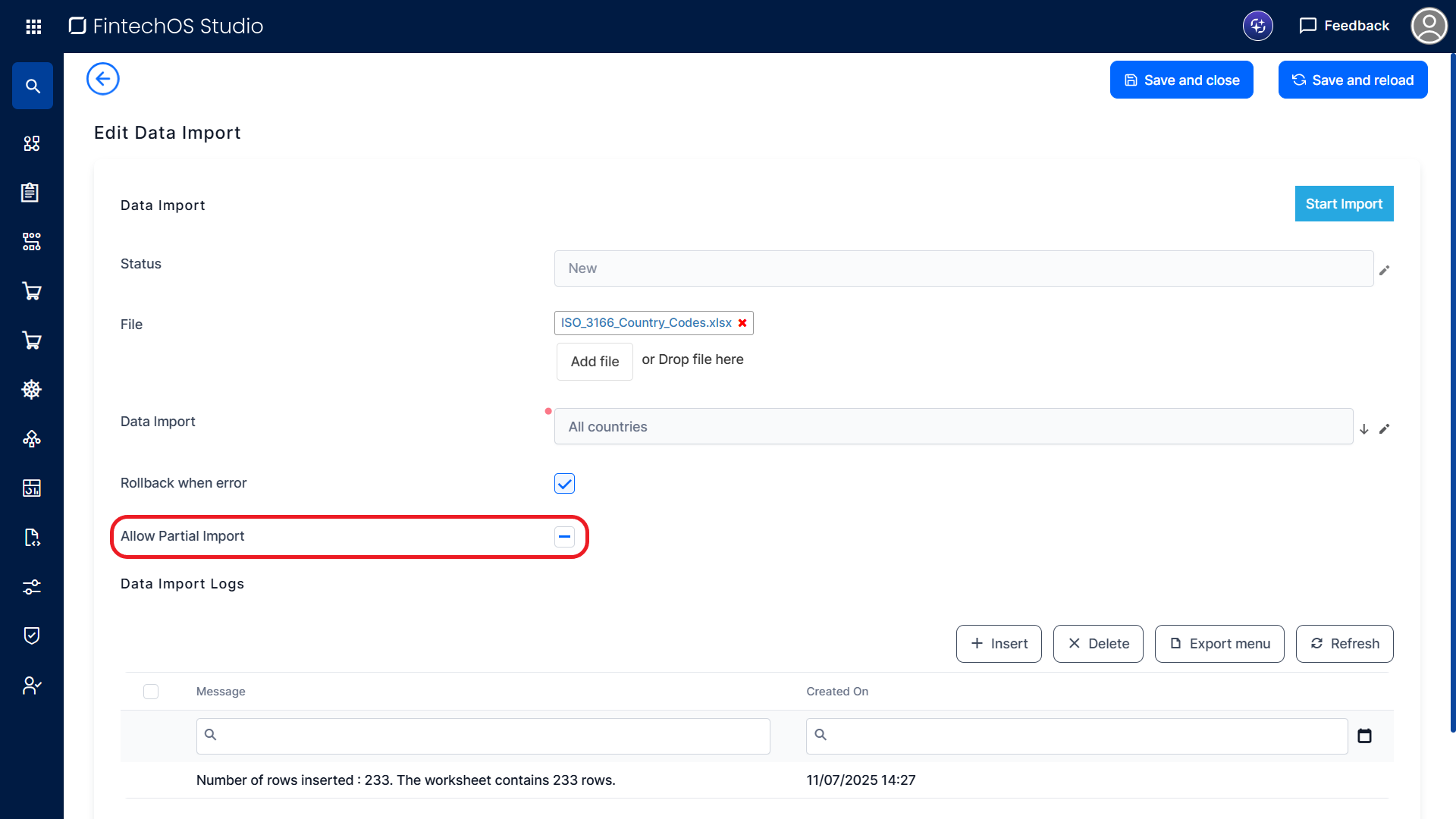
An Allow Partial Import checkbox has been added to data import templates. When enabled, it lets you skip Excel rows that generate errors without stopping the entire import process. Skipped records, along with the reasons for failure, are documented in the data import log.
Attach Imported Records to the Correct Business Workflow
Imported records with lookup attributes related to business workflow statuses (e.g., businessStatusId or previousBSId) are now consistently attached to the correct workflow configured for the destination entity. Previously, if multiple workflows in the target environment had statuses with identical names, imported records could be linked to the wrong business workflow.
Services Catalogue
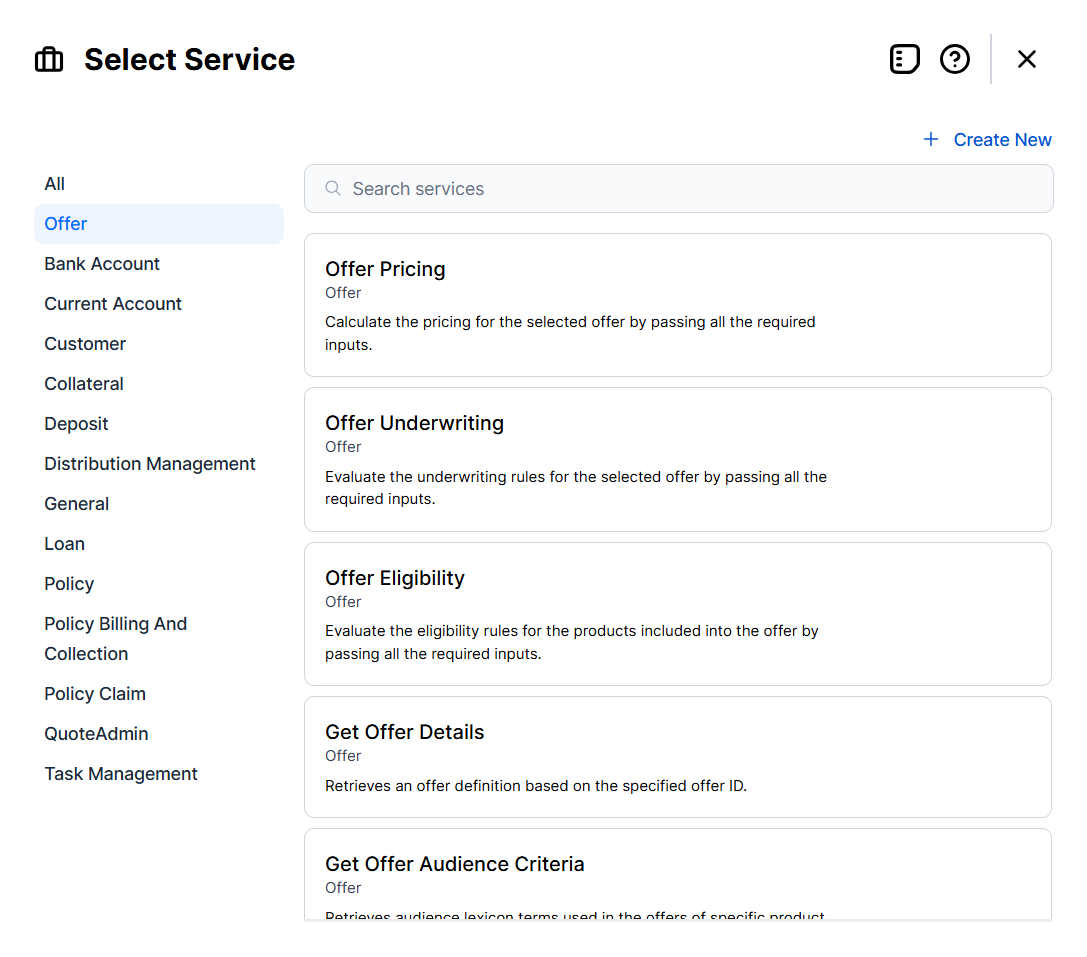
Service elements in the Journey Designer now include preset templates based on the Product Factory and Backoffice APIs. These templates replicate the API endpoints’ descriptions and input/output structures, allowing relevant service call details to be captured from the early design stages.
Option Sets
Sort Option Sets Alphabetically
A new field option, Order Option Set Items, is available for option set attributes. This setting lets you choose between the default sorting for option set items (based on the option set order index) and alphabetical order (based on the items' display names). Alphabetical sorting also takes localization into account, ensuring correct ordering in any language.
Include Order Index When Retrieving Option Set Items from Cache
The ebs.getOptionSetItemsFromCache Client SDK method has been enhanced to include the option set items' order index values in the output.
Multi-Select Control for Text Fields
The new ebs.renderWithMultiSelectControl Client SDK function allows you to populate text attributes with a set of predefined values from an option set, entity attribute, or custom list.
When applied, the attribute's default text field is replaced with the multi-select control. The attribute’s value is saved as an array-formatted string, for example: ['gbp', 'eur', 'usd'].
No-Label Attribute Fields
In the UI Designer, attribute fields now support a none label type in addition to the default and custom options. When selected, the attribute field is rendered without a label, and no space is reserved for one in the user interface.
Improved Debugging for Formula Tests
When testing business formulas, error messages now provide more detailed context, including the specific formula step where the issue occurred. This simplifies troubleshooting, especially for complex formulas with multiple steps.
Additionally, all formula tests now run with debugging enabled, delivering richer error details and complete stack traces. Stack traces are also captured in Application Insights, giving better visibility than standard runtime execution and easier troubleshooting.
Lock Discriminant Details After Data Set Versioning
Once a data set is versioned, the details of its discriminants (such as names and descriptions) are locked and cannot be edited.
Endpoint Name Validations
When configuring endpoints in FintechOS Studio, the endpoint name field is now validated to ensure it begins with a letter and contains only alphanumeric characters or underscores. This prevents errors when generating the OpenAPI definitions for the custom endpoints.
Alternative Navigation in Form-Driven Flows Without Saving Data
The formBeforeSave argument of the formData.on Client SDK method now supports a context.skipSave property. When set to true, this property allows navigation to the next step without saving the form. This is equivalent to setting the context.canSave property to false.
JQueryUI Upgrade
This release adds support for JQueryUI 1.14.1
GetEntitiesMetadata API Performance Optimization
The GetEntitiesMetadata API has been refactored to consolidate multiple database queries into a single call. Previously, the API executed several individual queries, which increased response time and reduced overall performance.
Open Telemetry Logging Support
We're introducing support for Open Telemetry, for logs, traces, and metrics, still viewable in App Insights. The otel-logging key must be enabled in Configuration Manager. You can only have one logging framework enabled at a time.
Configure the otel-logging parameters to set the detail level for platform-generated logs (such as job start and end events). Use SDK log level to control which logs from the SDK method are recorded, based on severity. The endpoint defines where telemetry data, logs, traces, and metrics, is sent, typically to an Open Telemetry Collector or monitoring backend. Finally, tracing determines how much request and operation tracking is included, ranging from basic logging (0), to capturing incoming HTTP requests (1), to full dependency tracking like SQL queries and external calls (2).
Developer Productivity
Null values for parameters
The Allow null value for endpoints' parameters is now unchecked by default. This means that when creating the endpoint, the parameter requires a value. If checked, null is allowed.
Users for Running Jobs
You can now change the integration user for running scheduled jobs in the JobServer to another user that doesn't necessarily have to be an admin, but must belong to the proper business unit and have the security roles when calling SDK methods in server scripting.
User types such as b2c, service accounts, temporary users cannot be assigned to the JobServer. In addition, the user must have the JobServer security role. The user is assigned in the Configuration Manager and the app service must be restarted after the change is made.
Message status column is now available for message queue form. It displays the status of emails sent through the message queue, Sent, Error, In Progress.
Azure AD Integration Update
Microsoft has introduced a change in its authentication flow involving dual tokens during redirects. This affects setups where the FintechOS Identity Provider acts as an identity broker with Azure AD, potentially causing users to experience double login.
To resolve this:
-
Add the correct Azure AD issuer URL to the FintechOS Identity Provider configuration;
-
Uncheck the "Validate signatures" option in the identity provider settings.
These adjustments ensure smooth token validation and eliminate redundant login prompts.
Fixed Issues
| No. | Summary |
|---|---|
| 79425 | Attribute fields configured as hidden in the UI Designer were visible when the form was exposed via B2C Portals. |
| 81040 | On environments with large databases, file downloads (such as digital solution packages, report documents, or uploaded files) could time out before completing. Storage handling has been optimized to ensure downloads finish successfully without errors or crashes. |
| 82168 | The ebs.callReportByName Client SDK function failed for HTTPS server URLs because the underlying WCF client expected an HTTP URI scheme. |
| 82924 | The ebs.getOptionSetItemsFromCache Client SDK method did not include the option set items' order index values in the output. |
| 83691 | The ftos.documents.generateById and ftos.documents.generateByName Server SDK methods failed to generate document reports that included tables of contents. |
| 83876 | Albanian special characters were not displayed correctly in B2C portals. |
| 84826 | The FTOS_BP_BankingProductHelper library in the Banking Product pack was missing a definition for the BPIIF variable. |
| n/a | In the code execution sequence, a step's flow control rules were triggered before its afterSave.js UI logic. When custom navigation rules were defined in the flow control rules, this caused navigation away from the step before the After Save code could run. |
| n/a | Resolved issue where the Code Editor failed to display client-side and server-side event handlers (e.g., beforeSave and afterSave events) in the Explorer tree. Event handlers are now correctly listed under their respective contexts. |
| n/a | Fixed issue where importing packages over 50 MB failed even though the size limit was set to 70 MB. The zip file check was hardcoded to 50 MB, now it's increased to 500 MB for imports. The regular size limit setting, DigitalSolutionPackageMaxSizeInMB, still applies. |
| n/a | The maximum allowed name length for digital solutions was increased from 50 characters to 100 to fix an error at deployment. |
| n/a | Restored Checkout and Release buttons in environments with Code Editor enabled, removing the Open in editor option to fix errors when editing fetch object expressions from entity views. This allows users to access the Show fetch designer without being forced into Code Editor. |