Configuring the Business Workflows Processor
The Business Workflows Processor uses rules-driven business transitions between statuses to help a bank see the status of an application. It renders the status of a record, i.e. in this case the loan application, in the workflow and provides processing that must occur for the application to move to the next step in its life cycle. For the Mobile Retail Loan Origination, there is an end-to-end self-service flow.
HINT
The statuses can be used as input to generate reports and see the number of successful applications or to see the status of each borrower.
The statuses can be used as input to generate reports and see the number of successful applications or to see the status of each borrower.
These are the following configurations:
The name is BARET_Loan_RetailLoan attached to the entity FTOS_Baret_Loan.
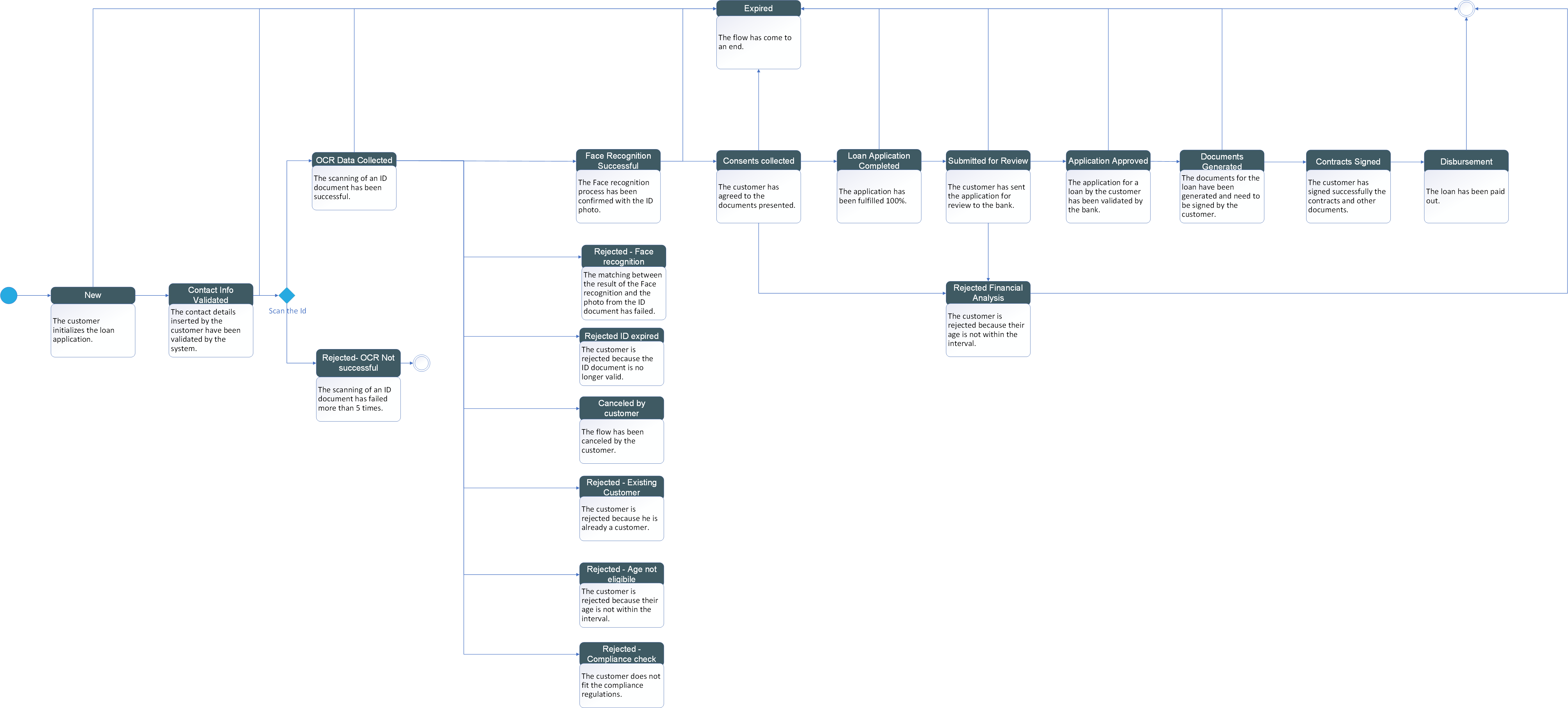
To download the diagram, click here.
Here is a list with the statuses and a definition for what it marks:
| Status | Description |
|---|---|
| New | The customer initializes the loan application. |
| ContactInfoValidated | The contact details inserted by the customer have been validated by the system. |
| OCRDataColected | The scanning of an ID document has been successful. |
| ConsentsCollected | The customer has agreed to the documents presented. |
| DocumentsGenerated | The documents for the loan have been generated and need to be signed by the customer. |
| FaceRecognitioSuccesful | The Face recognition process has been confirmed with the ID photo. |
| ContractsSigned | The customer has signed successfully the contracts and other documents. |
| LoanApplicationComplete | The application has been fulfilled 100%. |
| SubmittedForReview | The customer has sent the application for review to the bank. |
| ApplicationApproved | The application for a loan by the customer has been validated by the bank. |
| Disbursed | The loan has been paid out. |
| Expired | The flow has come to an end. |
| Rejected–AgeNotEligible | The customer is rejected because their age is not within the interval. |
| Rejected–ComplianceCheck | The customer does not fit the compliance regulations. |
| Rejected–ExistingCustomer | The customer is rejected because he is already a customer. |
| Rejected–FaceRecognition | The matching between the result of the Face recognition and the photo from the ID document has failed. |
| Rejected-FinancialAnalysis | The customer is rejected because their age is not within the interval. |
| Rejected–IDExpired | The customer is rejected because the ID document is no longer valid. |
| Rejected–OCRNotSuccessful | The scanning of an ID document has failed. |
| CanceledByCustomer | The flow was canceled by the customer. |
IMPORTANT!
For a loan application to be transitioned to the status
For a loan application to be transitioned to the status
Expired, two conditions must be met:- the application must not have reached the rejected or loan approved statuses
and
- since the last status change, 30 days have passed without any modification.
| Transitions between statuses | Reason for transitioning | Location | Executed by |
|---|---|---|---|
| ApplicationApproved_DocumentsGenerated | The borrower has chosen the final offer. | Signature of Documents | |
| ApplicationApproved_Expired | The customer has left the application without taking any action. | ||
| ConsentsCollected_Expired | The customer has left the application without taking any action. | ||
| ConsentsCollected_LoanApplicationComplete | The consents have been approved to by the borrower and the application has been fulfilled. | Submit Application | FTOS_BARET_LoanChangeStatus called in the After Events of the step Submitfrom the flow FTOS_BARET_ApplicationSubmit. |
| ConsentsCollected_Rejected-FinancialAnalysis | Although the consents have been approved to by the borrower, the borrower's financial profile is not suitable for the loan. | Application Result | |
| ContactInfoValidated_Expired | Although the information from the contracts have been validated, the borrower has failed to take any further action. | ||
| ContactInfoValidated_OCRDataColected | The email & SMS code have been inserted successfully, and the scanning of the ID document has been successful as well. | Check Data Collected | |
| ContactInfoValidated_Rejected–OCRNotSuccessful | The email & SMS code have been inserted successfully, and the scanning of the ID document has been unsuccessful. | Know Your Customer | |
| ContractsSigned_Disbursed | After the contracts have been signed by the borrower and they have been sent to their email, the money are disbursed. | Congratulations & Feedback | FTOS_BARET_LoanChangeStatus used in the step Done in the form FTOS_BARET_Congratulations |
| DocumentsGenerated_ContractsSigned | The borrower has agreed to the contracts and they are now signed. | Signature of Documents | FTOS_BARET_AccountApplication_BusinessWorkflow |
| DocumentsGenerated_Expired | The borrower has agreed to the contracts, but the borrower has not been able to sign them. | ||
| FaceRecognitioSuccessful_ConsentsCollected | The video recording has matched the borrower with the ID picture, and the borrower is giving their consents. | Consents | |
| FaceRecognitionSuccessful_Expired | The video recording has matched the borrower with the ID picture, but no further action has been taken by the borrower. | ||
| LoanApplicationComplete_Expired | The application has been completed, but it was not sent for analysis. | ||
| LoanApplicationComplete_SubmittedForReview | The application has been completed, it was sent for analysis. | Submit Application | |
| New_ContactInfoValidated | The application has started, and the email&SMS have been validated. | Contact Info | |
| New_Expired | The flow as initiated, but then no action has been taken. | ||
| OCRDataColected_CanceledByCustomer | After the ID was scanned, the borrower abandoned the flow. | ||
| OCRDataColected_Expired | After the ID was scanned, no action has been taken. | ||
| OCRDataColected_FaceRecognitioSuccesfull | After the ID was scanned, the video recording has matched the borrower with the ID picture. | Video Recording | |
| OCRDataColected_Rejected–AgeNotEligible | After the ID was scanned, the borrower is rejected because their age is not in the interval required. | Check Data Collected | |
| OCRDataColected_Rejected–ComplianceCheck | After the ID was scanned, the borrower is not in line with the compliance of the bank. | ||
| OCRDataColected_Rejected–ExistingCustomer | After the ID was scanned, the system determined that the customer (using the PIN) has already a current account opened. | ||
| OCRDataColected_Rejected–FaceRecognition | After the ID was scanned, the video recording was not able to match the borrower with the ID picture. | ||
| OCRDataColected_Rejected–IDExpired | After the ID was scanned, the borrower was rejected because the ID document was no longer valid. | ||
| SubmittedForReview_ApplicationApproved | After the borrower submitted the request, the bank has approved the loan. | Application Result | FTOS_BARET_FinancialCalculationsAsync |
| SubmittedForReview_Rejected-FinancialAnalysis | After the borrower submitted the request, the bank did not approved the loan. | Application Result | FTOS_BARET_FinancialCalculationsAsync; in the After Events from the step Waiting from the form FTOS_BARET_Waiting |
For more details, see Business Workflow.