Check Data Collected
The potential borrower has given the following information using one of the three methods available (scan ID, use NFC and Open Banking). If it was collected wrongly, they can edit the following fields, which are already completed with the data collected earlier:
1 Personal information
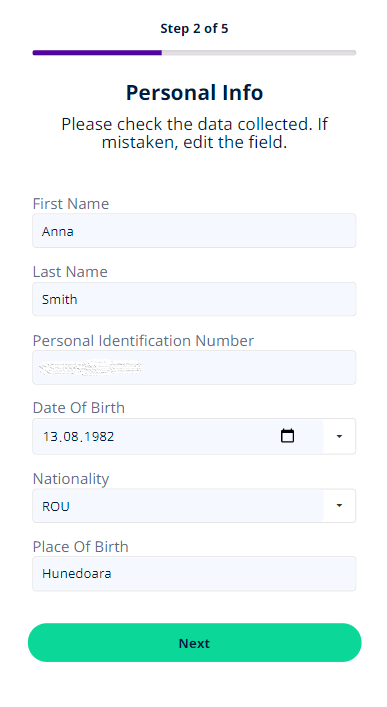
| Field | Data Type | Description |
|---|---|---|
| First Name | Text | Edit your first name. |
| Last Name | Text | Edit your last name. |
| Personal Identification Number | Text | Edit your Personal Identification Number. |
| Date Of Birth | Invariant Date | Select your birthday. |
| Nationality | Lookup | Select your nationality. |
| Citizenship | Lookup | Select your citizenship. |
| Place Of Birth | Lookup | Edit your place of birth. |
| Id Card Series | Text | Edit your ID card series. |
| Id Card Number | Text | Edit your ID card number. |
| Id Issue Date | Invariant Date | Edit your ID issue date. |
| Id Expiration Date | Invariant Date | Edit your ID expiration date. |
| Id Issue Institution | Text | Edit your ID issue institution. |
| Validity | Edit your ID validity. |
Click Next to open the ID card information.
2 ID card information
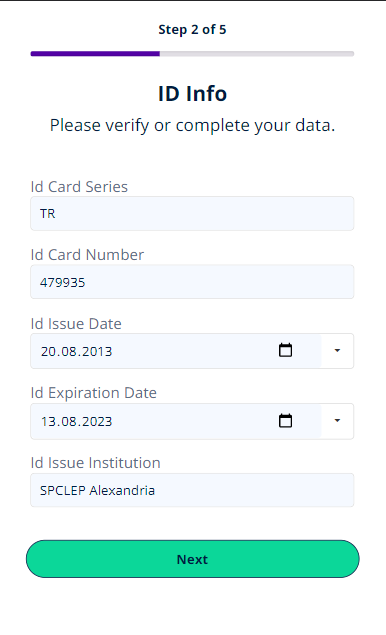
| Field | Data Type | Description |
|---|---|---|
| ID issue date | Text | Edit the date when the document was released. |
| ID series | Text | Edit the number of the document. |
| ID expiration date | Text | Edit the date from which the document will no longer be valid. |
| Institution who issued the ID | Text | Edit the institution who created the ID. |
Click Next to open the Address information.
3 Address information
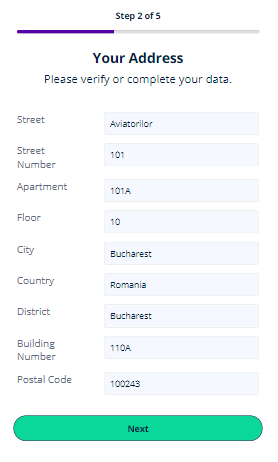
| Field | Data Type | Description |
|---|---|---|
| Country | Lookup | Select your country. |
| District | Lookup | Select your district. |
| City | Lookup | Select your city. |
| Street | Text | Edit your street name. |
| Street No | Whole Number | Edit street number. |
| Building No | Text | Edit the building number. |
| Floor No | Whole Number | Edit floor number. |
| Apartment No | Whole Number | Edit apartment number. |
| Postal Code | Whole Number | Edit postal code. |
| Stairway | Text | Edit stairway. |
Click Next to continue to the page Video Recording.