Consents
Once the video recording is successfully passed, the potential customer can navigate to the Consents page. It displays the following three documents:
- National Agency for Fiscal Administration Consent
- Credit Bureau Consent
- Terms & Conditions.
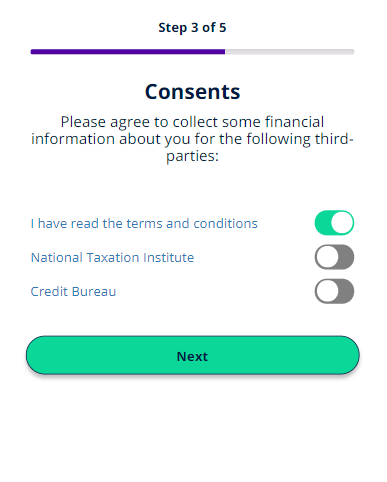
From this page, it is possible to read the documents by clicking the name and the accessing the documents downloaded locally on the device. Each document is presented by the bank to the customer for approval.
NOTE
Depending on the national framework and policies in place, the list of documents may vary. To see how to generate a document, see Configuring the Documents.
Depending on the national framework and policies in place, the list of documents may vary. To see how to generate a document, see Configuring the Documents.
To agree to the document, click Yes. If the potential customer does not agree to one of the following documents, then the flow ends here and they cannot proceeded.