Contact Info
The applicant is asked to insert their phone number and email address to send them two codes to verify the two contact addresses declared.
The following fields are displayed:
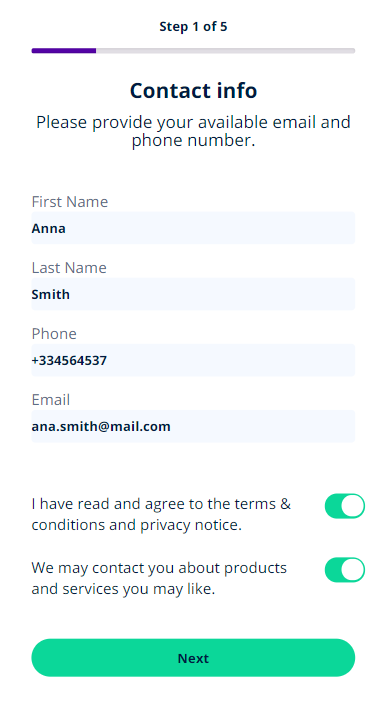
| Field | Description |
|---|---|
|
First Name |
Insert your first name. |
|
Last Name |
Insert your surname. |
| Insert your email address. | |
| Phone Number | Insert your phone number. You can insert the number without a country code for Romanian numbers. |
Two consents are presented to the customer: Terms& conditions & privacy (mandatory) and Marketing (optional) consents. Toggle them as needed.
Click Next to continue the process.
For details on how this was configured, see Configuring the Digital Flow Settings.
Insert codes
As instructed, insert the two codes which have been sent automatically by the system.
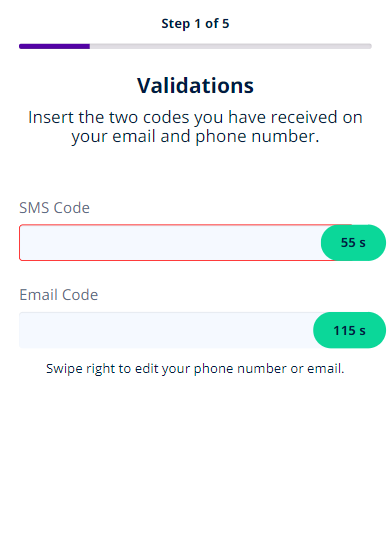
To validate the code, be it SMS or email, simply insert it and click outside of the text-box. The timer stops and displays Validated or Resend and in () brackets the number or attempts left. Click Resend to generate the code again.
When you reach the maximum attempts, the system displays a toast message.
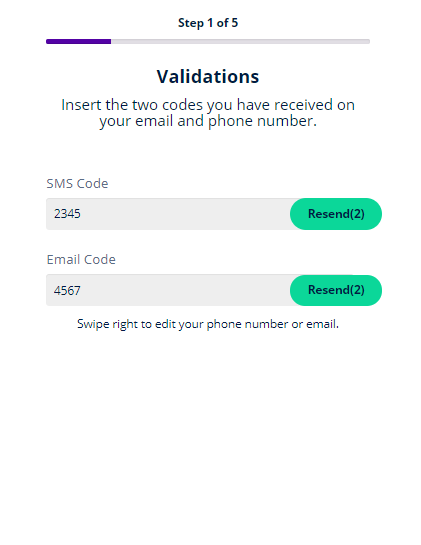
There are 60 seconds available for count-down when the user can insert the SMS code and 120 seconds for the email code. A customer can retry 5 times to insert the codes.
For details on the process, see Configuring the Digital Flow Settings. Using settings for the OTP, codes with 4 digits are generated, and the system records the pending, validated and failed statuses of the confirmation of the channel: email and SMS in the entity FTOS_DFP_OTP.
Swipe right to change email or phone number in case the codes were sent to the wrong address or phone number.
Click Next to continue to the page Know Your Customer.