Dashboards
Dashboards are an easy way to bundle together data views that are either needed more often than others or they simply have priority, in your everyday work. Dashboards are also a flexible way to work with your data since they can be updated easily, when needed - for example, when a flow must be given priority over other flows due to an increase in the frequency of its use.
The Billing and Collection solution comes with a configured dashboard, displayed in your portal. The dashboard provides links to the most important flows, making it easier for you to access the Unallocated Payments List, the Direct Debit Mandates List or to insert Bank Statements. The dashboard also displays views of the Invoices List, the Outgoing Payments Requests List and the Payments List allowing you to rapidly inspect the latest payment data listed in any of the mentioned sections.
Below, you can see the an example of a dashboard:
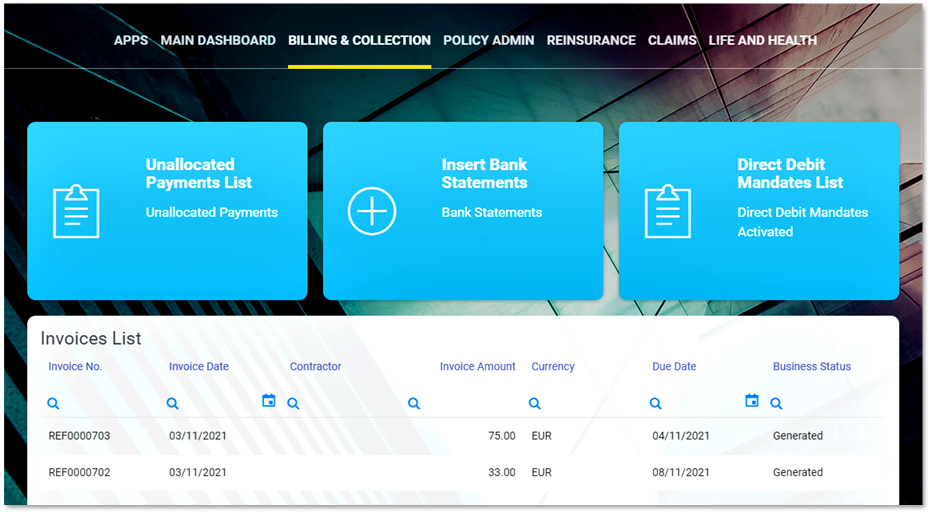
Depending on your level of authority (security role), you might have access to different FintechOS insurance solutions, functionalities or processes, Billing and Collection being just one of them. As you can see in the image above, the portal dashboard is yet another way to help you smoothly navigate between the insurance applications that you use.
Finally, since Dashboards are functionality that can be easily adjusted in Innovation Studio, you also have the means to configure the Billing and Collection dashboard to respond to your particular needs. So, if more widgets or less views are needed in order to help you keep your financial data organized, accessible, and comprehensible this is easily done with Innovation Studio.
For more details about adjusting your dashboards, consult the Dashboards documentation.