Remove UI Components and other Customizations
The FintechOS Platfom allows you to hide the default layout components of your Digital Experience Portal.
Remove Components from the Portal Layout
To do so, you must set values for the following system parameters:
| Parameter Name | Description |
|---|---|
| sys-hide-dashboard-tabs | Shows/hides the dashboard tabs. |
| sys-hide-app-dashboard | If true (or 1), it hides the application dashboard and also the TV shown when shortcut links are deactivated in settings. |
| sys-hide-shortcuts-navbar-left | Shows/hides the navigation bar. |
| sys-hide-header-navbar-default | This parameter is set by default to false (or 0).If true, it hides the page header default navigation bar that contains components like logo, menu, feed and approval task shortcuts, account dropdown, and so on. |
| sys-hide-footer | Shows/hides the page footer. |
| sys-hide-menu | Shows/hides the menu. |
| sys-hide-company-logo | Shows/hides the company logo. |
| sys-hide-my-profile-link | If true (or 1), it hides the My profile link from the right top corner, under the User Profile panel. |
| sys-move-language-to-user-profile | If true (or 1), it displays the selected language and language selection options in the User Profile panel. |
| sys-hide-user-settings | If true (or 1), it hides the user settings (right top corner, Select Theme and Select Palette options); |
| sys-hide-search-in-menu | If true (or 1), it hides the search option in the application menu. |
| sys-show-feed-shortcut | Possible vales: true or false.If true it displays the mail icon on the top right of the screen for the feed’s notifications. |
Enable/Disable Menu Items and Dashboards
When creating portal profiles, you can chose what menu items and dashboards to be displayed in the Digital Experience Portal. You can do this by selecting them in the corresponding sections from Add Portal Profile page:
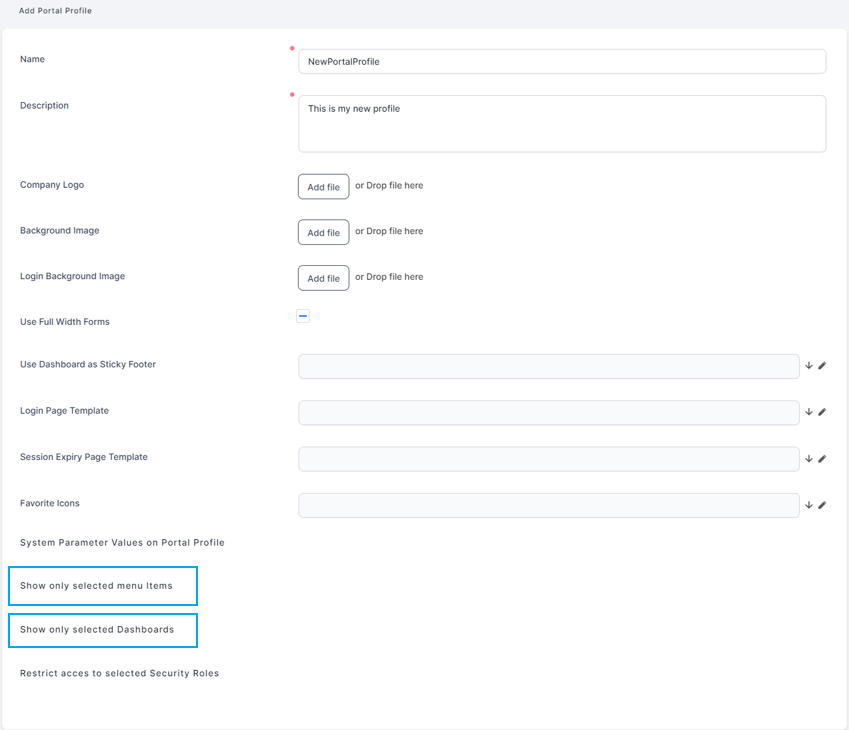
- Show only selected menu items: Use this grid to indicate the available menu items and if they are temporarily disabled or not.
- Show only selected Dashboards: Use this grid to indicate the available dashboards and if they are temporarily disabled or not.
HINT
Leave the grid empty to have all dashboards or menu items displayed.
Leave the grid empty to have all dashboards or menu items displayed.
Other Portal Customizations
You can use other customizations when defining your portal profile such as:
- In the Add Portal Profile page, in the System Parameter Values grid, set:
- the
sys-hide-form-titletotrue(or1) system parameter to hide all title forms. - the
sys-disable-record-insert-update-delete-messagesystem parameter to disable insert/update/delete messages.
- the
- In the Configuration Manager, set the following key to
trueto disable the F5 key refresh option: - In the Configuration Manager, set the following key to
trueto show all returned rows in grids for B2C portal profiles without any pagination: .
| Key Path | Key Name |
|---|---|
| kv/<environment>/<FintechOS Portal instance>/app-settings | disable-F5-refresh |
| Key Path | Key Name |
|---|---|
| kv/<environment>/<FintechOS Portal instance>/app-settings | feature-show-all-pages |