FintechOS Studio 8.0 CTP
User Guide
FintechOS Studio is an IDE which gives business users and software engineers the tools to build, customize, and extend digital solutions on top of the FintechOS environment.
Using FintechOS Studio, you can configure all the components required to deliver a comprehensive digital experience. This includes creating personalized banking and insurance products, customer workflows, and back-office applications.
Core Capabilities
- Product Factory allows you to create banking and insurance products by customizing product types tailored to your business requirements. Once a product design is finalized, you can test it, approve it for production, bundle it into commercial offers, track its performance using analytics, and enhance it through iterative updates and successive versions.
- Workflows enable business users to create, modify, and deploy digital solutions for your business (customer flows and back-office flows) without requiring deep technical expertise. After defining a workflow, developers can enhance it by refining the user interface and implementing client-side and server-side customizations.
Additional Features
- Data Models provide tools for data modeling. You can create, browse, and manage data structures by defining entities, attributes, and relationships.
- Frontends allow the creation and configuration of front end components such as dashboards, menus, themes, or portals.
- Automation Blocks are advanced pre-built features that you can customize and include in your digital solutions. They cover common use cases, such as OCR extraction, identity verification, video streaming and collaboration, campaign management, electronic signatures, and digital document handling.
- Analytics deliver business intelligence tools to aggregate and analyze data through charts, reports, and advanced BI features.
- Configuration Management enables you to control the ownership, versioning, deployment, and import/export of all components associated with a specific business need, such as workflows or shared data models.
- Business Services provide developers with advanced tools, such as scripts, libraries, sequencers, or database tasks, to support custom development.
- Security covers the organizational structure, security roles, and management of system users and service accounts.
- The Admin module provides a set of administrative features that allow you to manage the FintechOS environment.
FintechOS Studio Main Page
When no feature is currently open in FintechOS Studio, the main page is displayed.
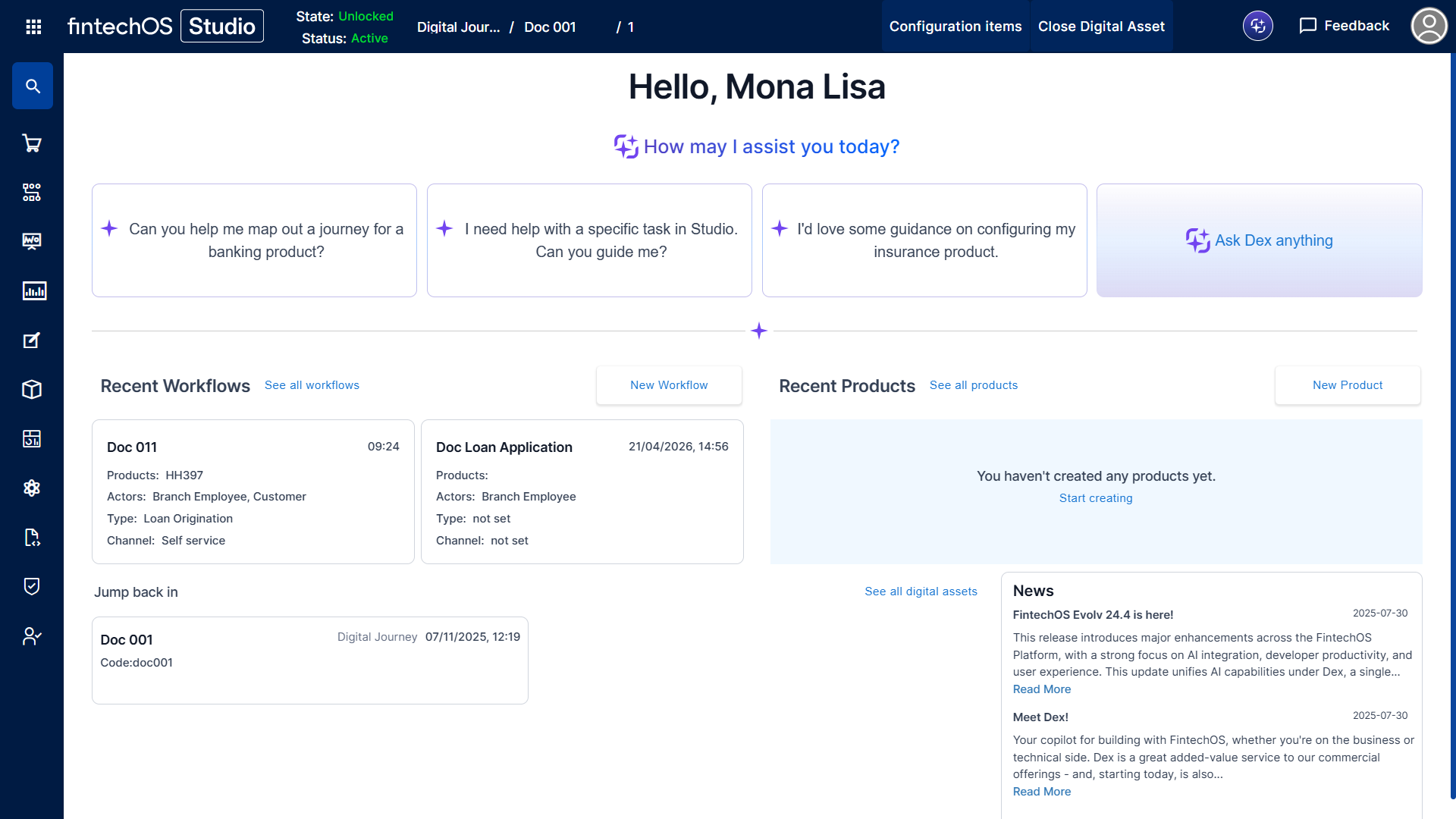
The page provides a dashboard for quick access to frequently used features:
- Access Dex, the FintechOS AI assistant, as well as suggested example queries
- Browse, resume working on, or create: