FintechOS Platform 24.2
September 19th, 2024
This release of the FintechOS Platform unveils the Journey Designer, a robust tool featuring an easy-to-use graphical interface for creating detailed digital journeys across a user’s entire experience on a digital channel.
Mandatory Changes
-
The upgrade to the Jint v3 JavaScript engine, causes some mandatory changes which you can mitigate by following the instructions in this guide. The switch can be made by configuring a specific system parameter.
-
Service banking and insurance solutions, also known as backoffice solutions, only work with Jint v3 JavaScript engine. Make sure to follow the instructions on this page for enabling Jint v3.
-
The ebs.addFormChangeEvent function in the Client SDK function now accepts a single optional input parameter for its event handler function that conforms to the
IChangeHandlerParaminterface. For more information, see Standardized Event Handler Parameters.
What's New
Journey Designer
This release introduces the Journey Designer, a powerful tool with an intuitive graphical interface designed for drafting comprehensive digital journeys across the entire user experience for a digital channel.
With the Journey Designer, you can craft a high-level overview of the digital journey, enabling previewing, testing, and stakeholder approval before development begins. Key features of the Journey Designer include:
- Contextual linking - Link products, actors, and channels to your journey to enhance context and receive relevant options during the design process.
- Comprehensive design elements - Incorporate all journey touchpoints, including user interface screens, navigation rules, integrations, back-office tasks, underwriting/eligibility checks, document generation, or omnichannel messages.
- Workflow integration:
- Preview the journey to visualize the user experience and secure stakeholder approval before development.
- Annotate each design element with detailed specifications, such as descriptions, validations, UX definitions, or error handling, then automatically generate a fully-formatted Functional Specifications Document (FSD) in line with the "Product is the Spec" philosophy.
- Publish the journey to automatically generate an associated mock-up form-driven flow, complete with steps, navigation rules, and actions, to jump start the development process.
The Journey Designer advances our "designer-first" approach, building on the success of the Product Designer for financial products. It provides business users with a streamlined, outcome-focused design experience that is:
- Simple and accessible
- Free from unnecessary distractions
- Collaborative, fostering seamless integration with development teams
Custom Events
You can now create user-defined events that can be triggered programatically in your client-side code. Use the new formData.registerEvent and formData.notify Client SDK methods to define custom event handlers and trigger custom events, respectively. The formData.registeredEvents property allows you to track all the currently defined custom events.
By separating the logic for triggering events from the logic for handling them, custom events enhance the event-driven programming paradigm, allowing developers to create application-specific event systems and improve code organization, modularity, and extensibility.
Custom Data Ownership
A new Support Data Ownership Custom Scope option has been added to the business entity editor. This enhancement enables you to programatically assign specific users access to particular entity records. By creating custom data ownership tags, you can associate these tags with the relevant user accounts and the entity records they are permitted to access.
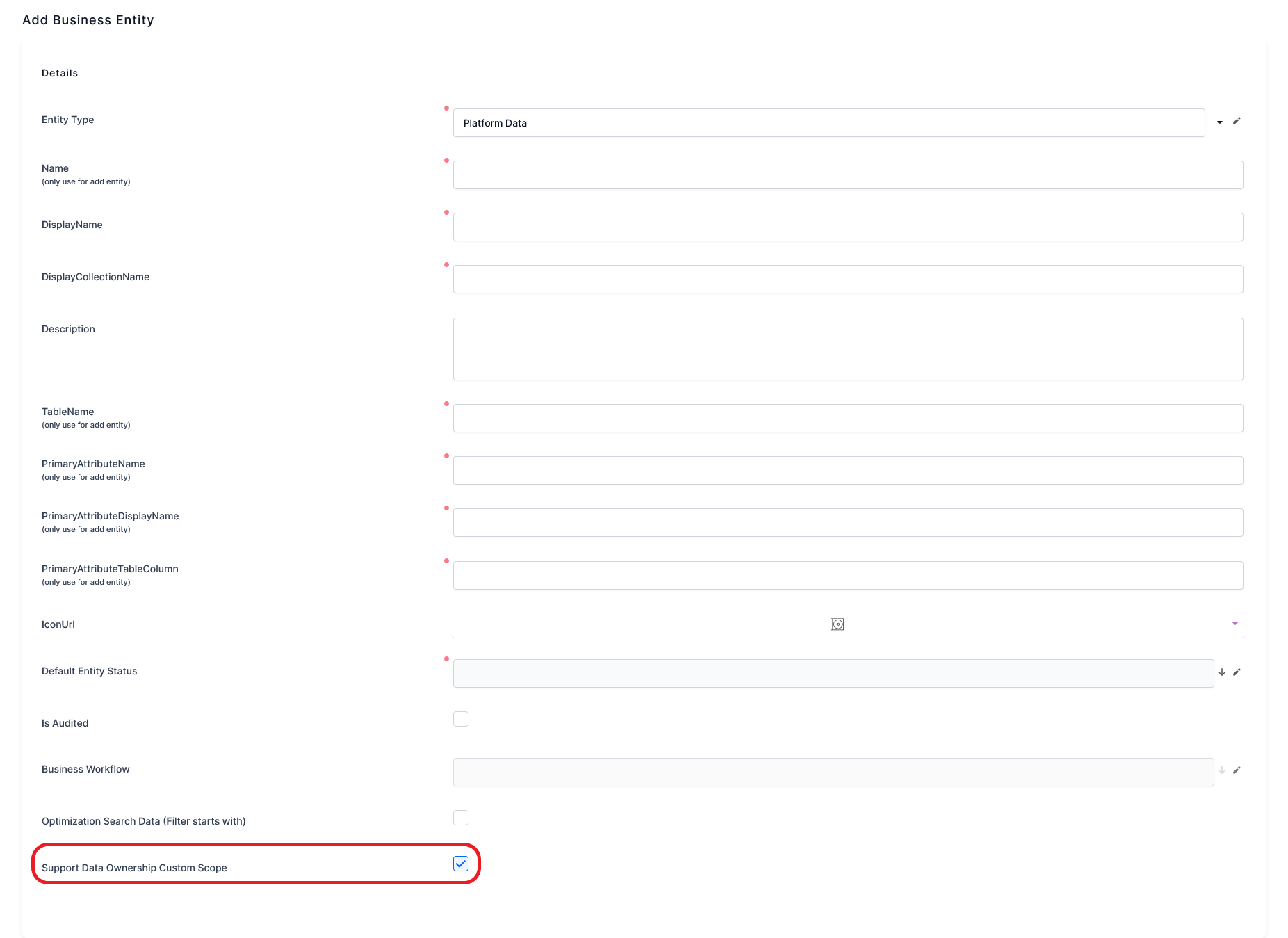
The following Server SDK methods have been added for this purpose:
- server.customSecurity.createGrantTag - Create a custom data ownership tag.
- server.customSecurity.setGrantTagOnRecord - Assign a custom data ownership tag to an entity record.
- server.customSecurity.getGrantTagOnRecord - Retrieve any custom data ownership tag assigned to a record.
- server.customSecurity.removeGrantTagOnRecord - Unassign a custom data ownership tag from a record.
- server.customSecurity.setGrantTagToUser - Assign a custom data ownership tag to a user account.
- server.customSecurity.removeGrantTagToUser - Unassign a custom data ownership tag from a user account.
Improved Separation Between Data Model and Form Fields
The formData.model Client SDK property now interacts directly with the entity record instead of the currently displayed form fields. This enhancement allows the property to:
- Read and write attribute values directly from/to the data model, bypassing the user interface.
- Operate on attributes that are not rendered in the user interface. However, an attribute field still needs to be present in the UI (e.g.: hidden attributes), otherwise its value will not be recorded when saving the form.
Additional improvements include:
- The ability to have multiple instances of the same attribute in the same form or section.
- The option to attach change handlers to attributes that are not displayed in the user interface.
Standardized Event Handler Parameters
The ebs.addFormChangeEvent function in the Client SDK now accepts a single optional input parameter for its event handler function that conforms to the IChangeHandlerParam interface.
interface IChangeHandlerParam {
  value: any,
  previousValue: any,
}
This enhancement standardizes and simplifies the process of passing an attribute's current and previous values to the event handler function. Previously, the implementation varied depending on the type of control used to display the entity attribute.
App Data Logic and Code Segregation
To abide by industry coding standards, the Advanced section of Data Forms, Data Form Steps, Form Driven Flows, Form Driven Flow Steps has been modified and improved. Therefore, there are now three sections:
-
UI: with the Custom UI drop-down for picking the UI template, and the Navigation styles tab, formerly known as wizard options, it encapsulates the Settings for the flow's appearance, including labels, navigation button positions, colors, and title bar
-
Client-side app logic: This section continues to hold the tabs for the event handlers remain, but also comes with code for Presenter, context data, data logic, service request logic, and UI Logic, such as behavior properties related to edit controls or form behavior properties. With this release, the code for Presenter and UI Logic is segregated.
-
Server-side app logic: with the Before Save and After Save tabs for adding code.
Read more about the Platform Architecture Design and the Code Execution documentation page.
Digital Journey API v2 Enhancements
- Two new API endpoints have been added to initiate and resume anonymous user journeys, respectively.
- The start journey, start journey with external ID, next step, and previous step API requests have been enhanced to return current step data in the response (field values, step actions, properties, etc.).
The legacy digital journey APIs are still available for backward compatibility.
Product Factory
New Product Templates
- Property Insurance for Business - You can now service business customers looking to insure properties or buildings.
- Personal Accidents - Allows you to provide insurance policies to individuals and their beneficiaries in the event of injuries, disabilities, or death resulting from an accident.
Bundle Insurance Products in Offers
You can now bundle multiple insurance products in a single offer. Only insurance products with a single pricing plan are eligible for bundling. For more information, see the FintechOS Studio documentation.
Adjustable Precision for Loan Installment Calculations
When generating a loan repayment schedule, the default calculation precision for determining the remaining balance of each installment is set to 10 decimal places (rounded to 2 decimals in the final payment schedule).
Now you can adjust this precision between 2 and 28 decimal places from the PricingRoundingDecimals key in the kv/<environment name>/mkexp-pfai/app-settings directory in the Configuration Manager.
Annuity and Repayment Schedule Calculation APIs
New generic APIs are available for calculating loan annuities and repayment schedules based on a loan's terms (interest rate, loan amount, maturity, payment frequency, etc.).
Evaluate Pricing, Underwriting, or Eligibility for Multiple Insurance Applications in the Same API Call
The product and offer APIs for pricing, underwriting, and eligibility have been enhanced to handle multiple insurance applications in the same call. The following APIs have been upgraded:
- Get offer pricing calculation
- Run underwriting rules for offer
- Run eligibility rules for offer
- Get product pricing calculation by product code
- Get product pricing calculation by product ID
- Run underwriting rules by product code
- Run underwriting rules by product ID
- Run eligibility rules by product code
- Run eligibility rules by product ID
Support for Optional Coverages and Sub-Coverages in Insurance Products APIs
The product and offer APIs for pricing, underwriting, and eligibility now include input parameters that allow you to specify which optional coverages or sub-coverages have been selected by the applicant. By default, the calculations are based only on the mandatory coverages and sub-coverages. The following APIs have been upgraded:
- Get offer pricing calculation
- Run underwriting rules for offer
- Run eligibility rules for offer
- Get product pricing calculation by product code
- Get product pricing calculation by product ID
- Run underwriting rules by product code
- Run underwriting rules by product ID
- Run eligibility rules by product code
- Run eligibility rules by product ID
Also, the product metadata and offer metadata APIs now return information about the optional coverages and sub-coverages configured.
Enhanced Performance in Pricing APIs for Banking Products
The Get offer pricing calculation, Get product pricing calculation by product code, and Get product pricing calculation by product ID APIs have been refactored to significantly improve performance when handling banking products. These enhancements result in up to a 3x reduction in response times compared to previous versions.
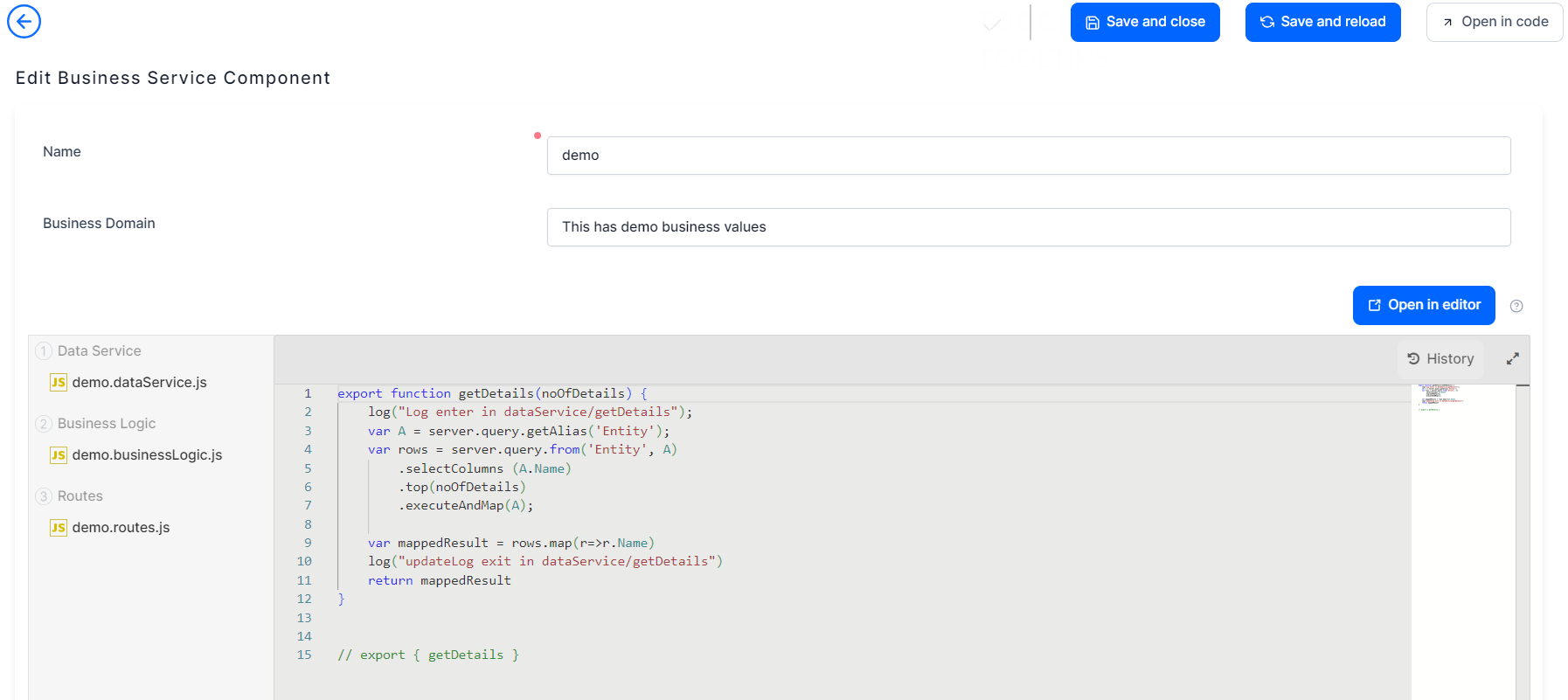
Introducing Business Service Components
Configured and managed in Studio, business service components help with a better organization of server automation code in medium and large projects. They come with three modules:
-
Data Service: for defining functions, inserting or updating data, calling data, run database queries or execute database tasks.
-
Business Logic: this layer contains the core logic of the code and supports SDK methods for importing libraries, uploading files, calling reports, changing business status, and more.
-
Routes: can be used to import modules from other server side components by referencing the module name.
More Configuration Items for Digital Assets
Starting with this version, you can add business workflow configurations as configuration items to a digital asset of type data model. Read more in the documentation.
Execute Maintenance Scripts after Digital Solution Package Import
A new switch, execute-after-import-maintenance-script can be used for automatically executing maintenance scripts after digital solution packages are imported on the environment using the FtosPackageDeployer.exe tool. Read more about this switch in the documentation.
Improve Checked Out Files Naming in FintechOS Explorer
To improve code readability in the Code Editor, the checked out files pane now displays more intuitive names for a number of files, such as journey steps.
Identify Locked Files Faster
The naming of locked files in Studio has improved, making it easier to identify the items in the Locked Files list. The naming now contains the parent item name, entity, attribute, username, and the date when the locked file was created.
IntelliSense Improvements
JSDoc comments are now displayed in IntelliSense for JavaScript functions. So, if you include comments in your server automation script libraries, they will be available in IntelliSense when using a library method in a script. In addition, IntelliSense for global variables is now available.
New getExceptionMessage SDK Method
We're introducing a new getExceptionMessage SDK method for generating an exception message while keeping code compatibility when switching between JavaScript engines (Jint, JintV3, V8).
Known Issues
Campaign Management
- The order of tabs in Audience and Audience Segment tabs is displayed incorrectly.
- There is an issue with creating stages after importing a list audience type and setting the following schedule type: Run for X days.
- Activities are not sent after approving a campaign containing a stage with multiple recurrences.
- When generating a preview execution plan for a campaign, the system throws an error.
- Campaign Management stops working if the number of stages currently exceeds 50,000. The limit was previously set at 5,000.
Fixed Issues
| No. | Summary |
|---|---|
| 58156 | In the Personalized Content Management processor, the message body field in the content template item editor was not visible. |
| 58197 | When transitioning a digital journey from a B2C portal to an authenticated portal, a session expired error message was displayed. |
| 61720 | Fixed an issue with using httpPost for adding a client certificate retrieved with server.clientCertificates.get function. |
| 61362 | Fixed an issue that prevented server.messaging.sendSMS from sending the OTP code in a SMS. |
| 57621 | The Set Password button in the System Users page in Studio was not visible. |