Quote
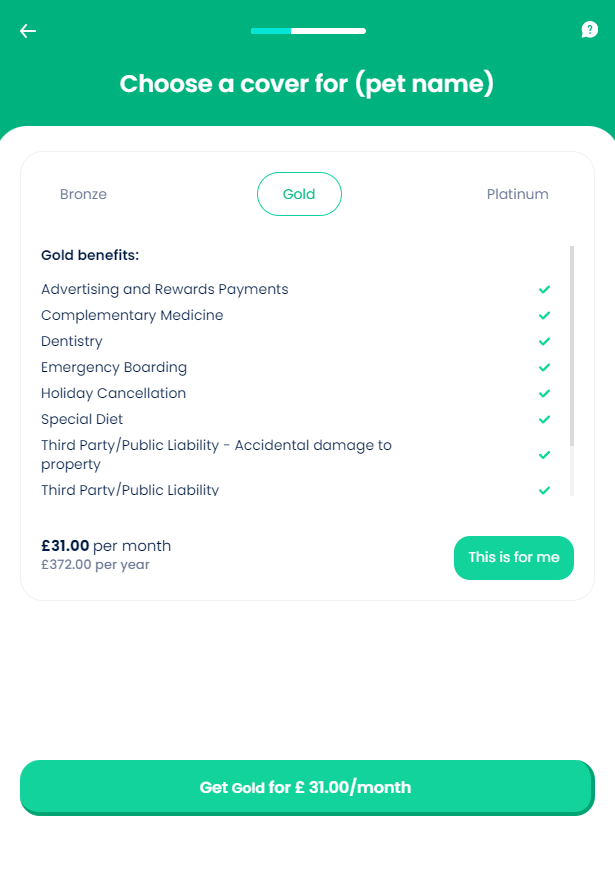
Given the pet met the eligibility and underwriting rules in the previous step, this screen allows the potential customer to consult the cover options available and their prices. The Pet Insurance product modules are displayed here, in a summary format. Providing different levels of cover and prices (based on certain assumptions and parameters) allows customers to chose a product that most closely meets their needs and budget.
For this step, the values inserted by the user are stored in the Pet Quote entity.
For more details about the product modules and covers, consult also the Product Configurations page.
From here: When the user clicks This is for me!, the Excess Amount page is displayed.
On-Screen Assets
The following user interface components are included with the Quote screen:
| UI Components | Description |
|---|---|
| Progress Bar | The progress bar gives the user a visual answer to the "How much till I get insurance for my pet?" question. |
| Back Button | The back button helps the user to re-take previous steps in the flow. |
| Help Button | The help button allows the user to find support for completing the flow. |
| Heading Title | The following heading title is displayed in the header section: Choose a cover for (pet name) |
| Benefits carousel | This carousel allows the user to navigate between the Pet Insurance product modules - Bronze, Gold, and Platinum. Bronze summary: Complementary Medicine Cruciate Ligament Treatment CT/MRI scans and Associated Costs Dentistry Life Cover - Accident Limited Third Party Liability Third Party/Public Liability - Accidental damage to property Time off work Vetinary fees Gold summary: Advertising and Rewards Payments Complementary Medicine Dentistry Emergency Boarding Holiday Cancellation Special Diet Third Party/Public Liability - Accidental damage to property Third Party/Public Liability Time off work Vetinary fees Platinum summary: Advertising and Rewards Payments Complementary Medicine Cruciate Ligament Treatment CT/MRI scans and Associated Costs Emergency Boarding Holiday Cancellation Special Diet Theft or straying Time off work Vetinary fees. |
| Action Button | This is for me - This button allows the user to indicate the desired cover. |
| Action Button | Get premium for £ (selected module price)/ month - This button is used to launch the policy configuration sub-flow. |
For details about the default UI style components used for creating the journey, consult the UI Style Components list on the Customer Journey page.
Below is an example of the Quote screen: