Digital Journey Settings
This section details the default Pet Insurance Digital Journey according to the Innovation Studio framework.
To access any digital journey record in Innovation Studio, take the following steps:
-
In Innovation Studio, navigate down the main menu to Digital Experience.
-
Click Digital Experience and next, click Digital Journeys, to open the Digital Journeys Menu, on the left.
-
Click Digital Journeys to open the Digital Journeys List page.
-
From the list, select and double-click the PetInsurance record to inspect the digital journey. When the form opens you can see all the digital flows attached to the Pet Insurance customer journey listed in the grid, at the bottom of the form.
Below is an example of such record:
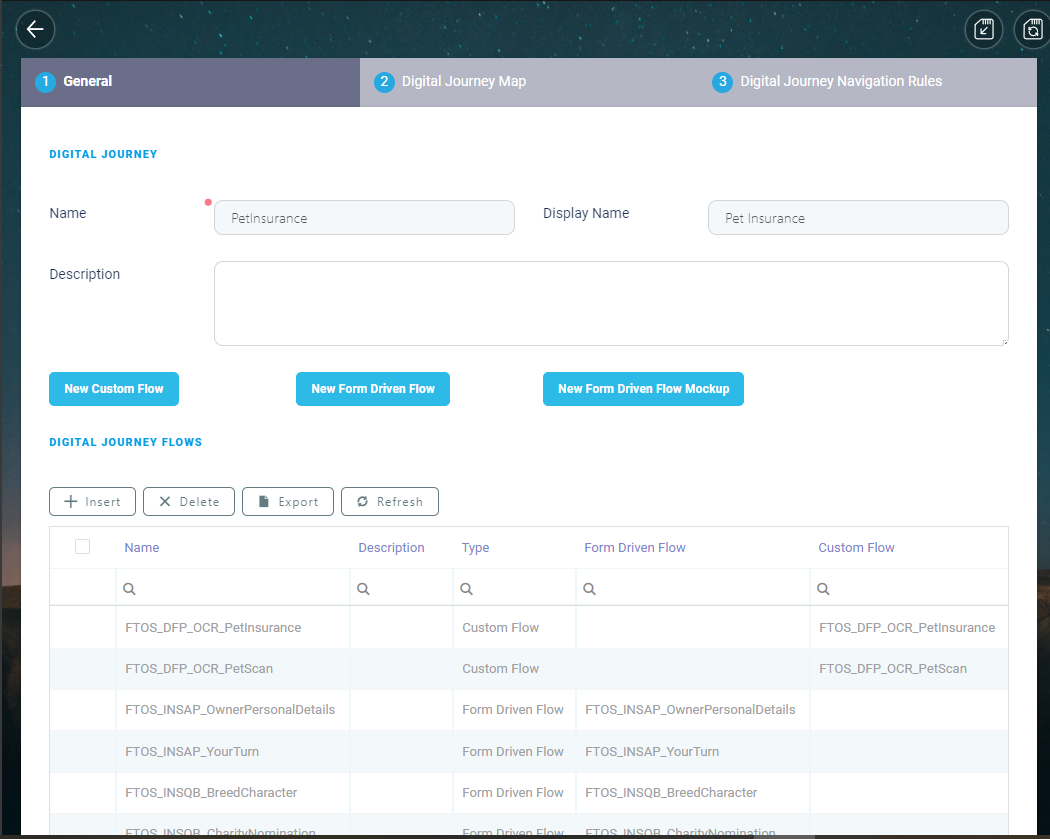
The Pet Insurance Digital Journey
The following are the settings for the Pet Insurance digital journey:
 General Information
| Item | Description |
|---|---|
| Name | PetInsurance |
| Display Name | Pet Insurance |
| Description | Fully digital quote and buy process for customers seeking to get insurance for their pets - cats and dogs, from their phone. |
Journey Flows
| Name | Description | Type |
|---|---|---|
| Landing Page | Landing Page | Form Driven Flow |
| FTOS_INSQB_PetName | FTOS_INSQB_PetName | Form Driven Flow |
| FTOS_INSQB_NextBestFriend | FTOS_INSQB_NextBestFriend | Form Driven Flow |
| FTOS_INSQB_PetScan | FTOS_INSQB_PetScan | Form Driven Flow |
| FTOS_DFP_OCR_PetScan | FTOS_DFP_OCR_PetScan | Custom Flow |
| FTOS_INSQB_PetScanResult | FTOS_INSQB_PetScanResult | Form Driven Flow |
| FTOS_INSQB_BreedCharacter | FTOS_INSQB_BreedCharacter | Form Driven Flow |
| FTOS_INSQB_ManualPetDetails | FTOS_INSQB_ManualPetDetails | Form Driven Flow |
| FTOS_INSQB_MorePetDetails | FTOS_INSQB_MorePetDetails | Form Driven Flow |
| FTOS_INSQB_PetQuote | FTOS_INSQB_PetQuote | Form Driven Flow |
| FTOS_INSQB_ExcessAmount | FTOS_INSQB_ExcessAmount | Form Driven Flow |
| FTOS_INSQB_ContactDetails | FTOS_INSQB_ContactDetails | Form Driven Flow |
| FTOS_INSAP_YourTurn | FTOS_INSAP_YourTurn | Form Driven Flow |
| FTOS_DFP_OCR_PetInsurance | FTOS_DFP_OCR_PetInsurance | Custom Flow |
| FTOS_INSAP_OwnerPersonalDetails | FTOS_INSAP_OwnerPersonalDetails | Form Driven Flow |
| FTOS_INSQB_PaymentDetails | FTOS_INSQB_PaymentDetails | Form Driven Flow |
| FTOS_PYMT_DirectDebit | FTOS_PYMT_DirectDebit | Form Driven Flow |
| FTOS_PYMT_CardPayment | FTOS_PYMT_CardPayment | Form Driven Flow |
| FTOS_INSQB_Congratulations | FTOS_INSQB_Congratulations | Form Driven Flow |
| FTOS_INSQB_GoodLuck | FTOS_INSQB_GoodLuck | Form Driven Flow |
Navigation Rules
| EntityForm | Entity Form Step | Flow Control Rule |
|---|---|---|
| FTOS_INSQB_Congratulations | Congratulations | charityNomation |
| FTOS_INSQB_PetName | PetName | haventGotAPet |
| FTOS_INSQB_ContactDetails | Contact Details | termsAndConditions |
| FTOS_INSAP_YourTurn | YourTurn | scanIdCheck |
| FTOS_INSQB_PetScan | PetScan | checkAddManually |
| FTOS_INSQB_PaymentDetails | PaymentDetails | checkDirectDebit |
| FTOS_INSQB_PetScanResult | PetScanResults | checkCorrectBreed |
| FTOS_INSQB_BreedCharacter | BreedCharacter | endJourney |
| FTOS_INSQB_PetScanResult | PetScanResults | checkWrongBreed |
| FTOS_INSQB_PetScan | PetScan | checkPetScan |
| FTOS_INSQB_MorePetDetails | MorePetDetails | Age > 10 |
Entity Forms
To inspect the Pet Insurance Forms, go to Innovation Studio > main menu, on the left > Digital Experience > Digital Journeys > Form Driven Flows > Form Driven Flow List Page. Use the Search by Name option to find a particular Form and double-click it to view general data, flow map, steps, field options, filtered fields, header items, actions, scripts and security roles attached to that Form.
The Pet Insurance customer journey uses the following Entity Forms:
| Nr. | Page Name | Current Entity | Display Name |
|---|---|---|---|
| 1. | FTOS_INSQB_LandingPage | FTOS_INSQB_Quote | Quote |
| 2. | FTOS_INSQB_PetName | FTOS_INSQB_Pet | Pet |
| 3. | FTOS_INSQB_PetScan | FTOS_INSQB_Pet | Pet |
| 4. | FTOS_INSQB_BreedCharacter | FTOS_INSQB_Pet | Pet |
| 5. | FTOS_INSQB_NextBestFriend | FTOS_INSQB_Pet | Pet |
| 6. | FTOS_INSQB_PetScanResult | FTOS_INSQB_Pet | Pet |
| 7. | FTOS_INSQB_ManualPetDetails | FTOS_INSQB_Pet | Pet |
| 8. | FTOS_INSQB_MorePetDetails | FTOS_INSQB_Pet | Pet |
| 9. | FTOS_INSQB_UnableToQuote | FTOS_INSQB_Quote | Quote |
| 10. | FTOS_INSQB_PetQuote | FTOS_INSQB_Quote | Quote |
| 11. | FTOS_INSQB_ExcessAmount | FTOS_INSQB_Quote | Quote |
| 12. | FTOS_INSAP_YourTurn | FTOS_INSAP_RetailApplicantData | Retail Applicant Data |
| 13. | FTOS_INSAP_OwnerPersonalDetails | ID Scan step | Retail Applicant Data |
| 14. | FTOS_INSQB_ContactDetails | FTOS_INSAP_RetailApplicantData | Retail Applicant Data |
| 15. | FTOS_INSQB_PaymentDetails | FTOS_INSQB_Quote | Quote |
| 16. | FTOS_PYMT_DirectDebit | FTOS_PYMT_DirectDebit | Direct Debit |
| 17. | FTOS_PYMT_CardPayment | FTOS_PYMT_PaymentCard | Payment Card |
| 18. | FTOS_INSQB_Congratulations | FTOS_INSQB_Quote | Quote |
| 19. | FTOS_INSQB_GoodLuck | FTOS_INSQB_Quote | Quote |
| 20. | FTOS_INSQB_CharityNomination | FTOS_INSQB_Quote | Quote |