Transferring Money
Within the Online and Mobile Banking solution developed by FintechOS, there is the transfer service where the user fills in the regular basic information: account number, name of the beneficiary, and the amount to be transferred and the system does the rest:
- Validating accounts and IBANs
- Auto-filling the bank’s name and details
- Verifying which of the payment schema types are implemented in the beneficiary bank
- Identifying the available payment schemas and be able to show:
- the expected date at which the money reaches the beneficiary account on each available payment schema
- the fee for each payment schema.
If there are multiple payment schemas available to make the same transfer the user selects the best option for them based on when they want the money to reach the beneficiary and the associated fees.
Transferring money in three simple steps:
- filling in the basic information about the beneficiary and amount (or selecting an existing contact/payment template), then selecting the payment schema when applicable
- reviewing the details
- signing the payment.
For SMEs and corporate customers, the payments can be initiated by a user and signed by the same or other user(s).
The Transfers Offered by FintechOS
- Local Currency Payments
From transferring money between own accounts (same currency) to sending money to another beneficiary within the same financial institution or other is easy to be done.
The system automatically knows which payment schema types are local according to the default currency of the financial institution.
For countries in the Eurozone, the SEPA and SEPA instant are considered local currency payments.
For countries outside the Eurozone, the specific schemas are already developed and they need minimal parametrization (no-code) in Innovation Studio to process BACS
 BACS Payment Schemes Limited (BACS), previously known as Bankers' Automated Clearing System, is responsible for the clearing and settlement of UK automated direct debit and BACS Direct Credit and the provision of third-party services. or faster payments for UK; RINGS, BISERA or BLINK (instant) in Bulgaria; Transfond, SENT or SCT Inst RON in Romania, etc.
 - Foreign Exchange
Exchange money between your account digitally.
- International & Foreign Currency Payments
For countries outside the Eurozone, the SEPA and SEPA Instant allow payments in EUR to be processed. The application is already covering all standard requirements and users can easily make transfers.
Alongside SEPA, TARGET2 and SWIFT payments are defined and ready to be connected to the Core Banking, all the specific fields and validations existing already in the Online and Mobile Banking solution.
- Beneficiaries & Payment Templates
Contacts and Payment Templates ease the payment initiation. They are a starting point for a payment towards a friend or a company they have already paid to in the past.
- Utility Payments
Utility payments enable users to easily pay their invoices. The lists of suppliers, from energy to telecom, are either brought from a third-party provider or from Core Banking or manually administrated.
- Bulk Payments
From paying salaries to more employees to sending the payments in bulk files from the ERP of your business customers, they all have a solution with the Bulk Payments in Online and Mobile Banking. You can define as many formats you need based on your current business and new ones when you need them.
Order List and Multiple Authorizations
Viewing all the transactions initiated online (executed or rejected or canceled) may be of use when users try to remember what happened with a payment they intended. The Order List helps users to have a clear history of every payment instruction. It serves as a central point for the SMEs and corporate customers, which rely on joint signatures for payment authorization, to see and be able to sign a transfer already inputted or signed by a peer within the company.
Possibility to Queue Payments (insufficient balance)
For small companies that need to receive payments from a customer to pay other suppliers, the solution offers the possibility to queue the payments while waiting for the credit. Rather than making the user log in several times in the same day to view the balance and only then to initiate the payment, the solution allows you to initiate a payment without the necessary balance. The system waits for the account to get the necessary funds, and then processes the payment. It can also help with Core Banking idle times and other situations when payments are delayed.
Types of Transactions Supported by the System
- Own Account transfers
- Domestic payments
- Budget Payments
- Foreign currency payments
- Bulk payments
- Open New Products.
Type of Payments Schemas Supported by the System
| Type of payment | Currency | Description |
|---|---|---|
|
Non-SEPA SWIFT
|
Any |
Payments in the SWIFT network:
|
|
Intra-Bank Own Account |
Any | Transfers between the accounts of the same person, but are administrated by the same bank. |
| Foreign Exchange | Any | Transfers between two different accounts with different currencies of the same person. |
|
Intra-Bank Other customers from the same financial institution |
Any | Transfers between different accounts owned by different people, but are administrated by the same bank. |
| Instant Payments | Local Currency | Local currency Instant Payments. |
| High-value domestic payments OR Urgency | Local Currency | Local clearance system high-value payments OR small-value payments with urgency. |
| Small value domestic payments | Local Currency | Local clearance system small value payments. |
| SEPA Instant SEPA Instant Credit Transfers or SCT Inst is a transfer that is executed 24/7/365 and reaches the recipient within seconds.
|
EUR | The sender and receiver banks must be connected to the SEPA Instant scheme. At the moment almost 3000 banks from 23 countries are part of the SEPA Instant scheme. |
| SEPA Single Euro Payments Area. European system of payments initiated by European Union to standardize the transfers. Payments |
EUR | Transfers to any person whose IBAN is managed by a bank in the 27 EU or 3 European Economic Area (EEA) countries – Iceland, Norway, and Liechtenstein or 6 non-EEA countries – The United Kingdom, Switzerland, Vatican City, Monaco, San Marino, and Andorra. |
| TARGET2 TARGET2 is the real-time gross settlement (RTGS) system owned and operated by Eurosystem. It is used for EUR payments ‘higher value’ payment OR urgent small value OR
towards some countries which might not be in EU.
|
EUR | Transfers between Eurozone members. |
These types can be edited within the Editing a Payment Type.
A user cannot issue a payment in the past. Therefore, the execution date can be the current date and up to 90 days.
Other services include:
- Products Overview & Details
- Account statements
- Utility Payments
- Beneficiary & Payment Templates.
Below is a UML diagram showing the main actions that the Online and Mobile Banking user can take and several decision points for the initiation of a payment.
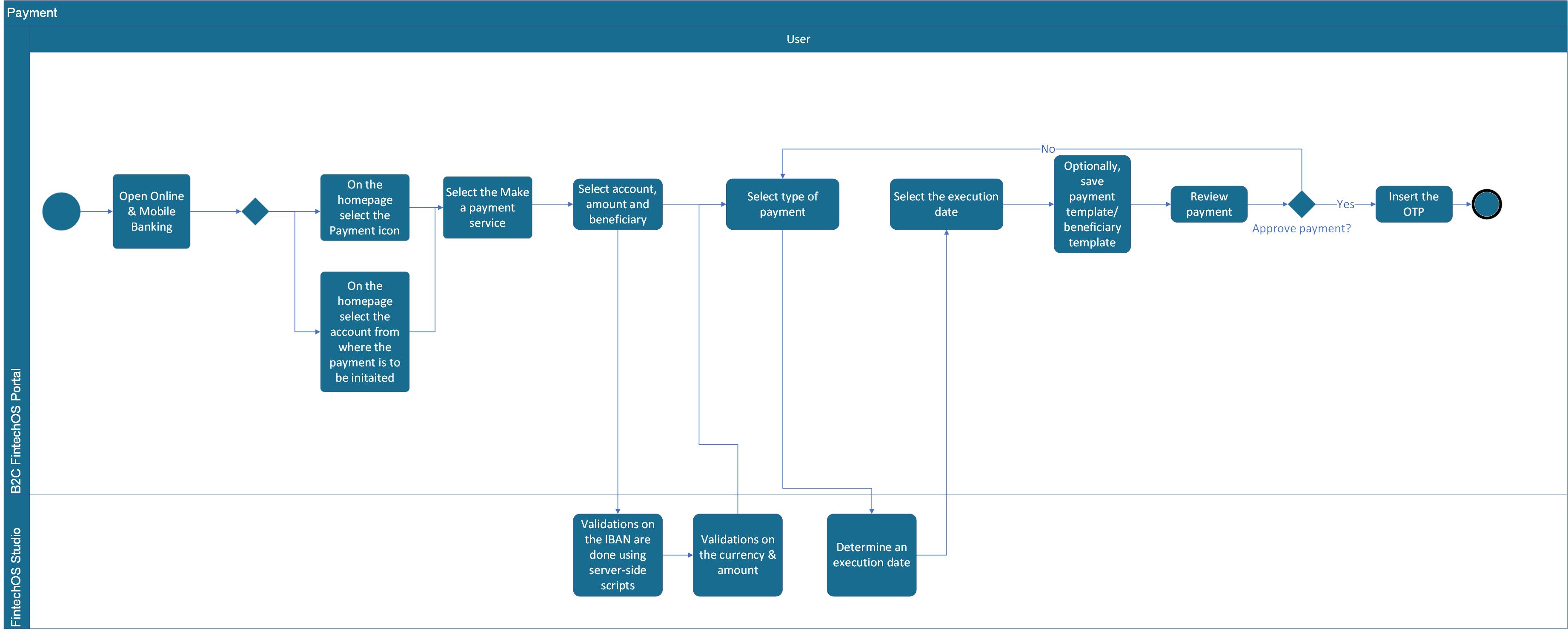
To download the diagram, click here.
Accessing Payments
Click Payments on the footer to initiate a payment. A pop-up opens with the following types:
- Make a payment. Click this button to initiate a payment.
- Utility Bills. Click this button to initiate a utility bill (see Utility Payments).
- Exchange. Click this button to initiate a foreign currency exchange (see Initializing a Foreign Exchange).
- Own Account Transfer. Click this button to initiate a transfer (see Initiating an Intra-Bank Own Account Transfer).
- Bulk payments. Click this button to initiate a bulk payment (see Bulk Payments).
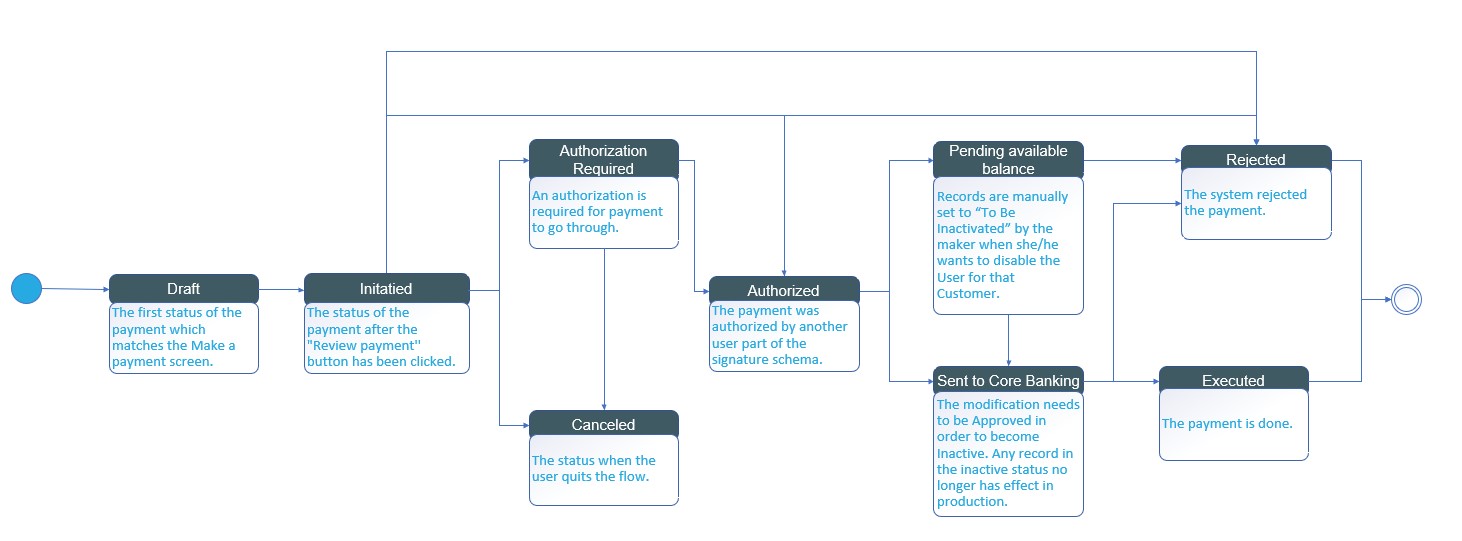
The image below describes a detailed Online and Mobile Banking workflow containing the statuses the record from the entity FTOS_IB_Payment.
Payment and Currency Cut-Off Time
Payments are executed depending on multiple factors: the date and hour. Depending on the type of payment, the execution date and time may vary. The time is influenced by the cutoff time, which is the time when the system stops the payments execution during a day and they are executed the next day. It uses Eastern European Standard Time.
Instant payments (SEPA/local currency), foreign exchange, intra-bank do not have a cutoff time.
The time set for the following types of schemas are:
- local small value payments: 16
- TARGET2: 13
- SEPA Credit: 15
- local high value payments: 16
Currencies have their cutoff time. SWIFT payments take into account the currency cutoff times. You can initiate a payment regardless of the cutoff time and regardless of the core banking system status.
During the cut-off time and core banking being Idle, the number of retries for a payment in the queue is not incremented.
Within the entities FTOS_IB_CurrencyExt and FTOS_IB_PymtTypes, the cut off time is set to 13 hours, UTC+3, for the currency BGN and for the Local Currency Small value payments it is set to 13 hours, UTC+3 as well.
On the other hand, queuing takes into account the system parameter Parameterization. The default value of this parameter after the installation is 04:00:00 AM.
Execution Date mechanism
There are two mechanisms in place if a customer initiates a payment and selects the current date, but the time of initiation is past the cut-off time and the payment type does not have a settlement date:
- the payment is executed the next working day in accordance with the holiday calendar
- the payment is executed the same day.
For the solution to know which mechanism to choose, it looks at the system parameter Parameterization.
At the time of payment initiation if the user or the automatically proposed one by the system selects execution date from the Make a Payment screen, the system stores if the payment should be executed at:
- system date - 1 (The system compares the execution date selected with the next available working day (including the current date) as per the holiday calendar. If they coincide to be the next working day, then the system selects this option).
or
- system date (The system compares the execution date selected with the next available working day. If the next available working day (excluding today) as per the holiday calendar of that payment schema type is not the next day, this option is selected).
Based on the outcome from system date and based on that parameter for execution date (v2), in the queue the evaluation of when the payment should be sent to the core banking system or rejected or other statuses is done:
- at execution date
A payment small value payment initiated after cut-off time with a date in the future (15th of May), for an account that has available balance, it is not sent to the core banking system today, nor on the 14th. It is sent to the core banking system at system date (15th of May).
or
- execution date -1
A payment small value payment initiated after schema cut-off time with current date as execution date for an account that has available balance is sent to core banking today (system date -1).
For payments with settlement type that do not have the SAME option available, then the execution date is the core banking date.
For payments without settlement type, the execution date is the execution date -1.
Exchange Rates for Payments
In the payment form, the conversion rates are as follows:
- When the currency of the From Account is local currency and the beneficiary is a foreign currency, the exchange rate pair for LCY - FCY (e.g., BGN to EUR) with BuyNonCash is used
- WHEN Currency of the From Account is a Foreign Currency and Payment Currency is the local currency, the exchange rate pair for FCY-LCY (e.g. BGN-EUR) with SellNonCash is used
- FixRate is applicable only for calculating the fees, (e.g., transactional limits use the FixRate).
For details on how to successfully initiate a payment and authorize it, see: