Importing Insurance Products
The Data Import Templates of the Product Factory solution allow you to add multiple types of product data on a FintechOS destination environment. The most important use case for this functionality is a fast bulk import into the system of numerous new insurance products - with all imported products being registered in Draft status. But this is not the only use case. For example, using the Data Import Templates provided by the FintechOS High Productivity Fintech Infrastructure, a user may want to import only some very specific data about certain product components. Consequently, templates are different depending on what kind of data needs to be added.
A newly imported product is registered in Draft status, meaning it is editable. After import, use Innovation Studio to complete your product configurations and also, to attach premium calculation and underwriting formulas to it. Once finished, approve your product in order for it to go live.
The following is an example of use cases for importing insurance products:
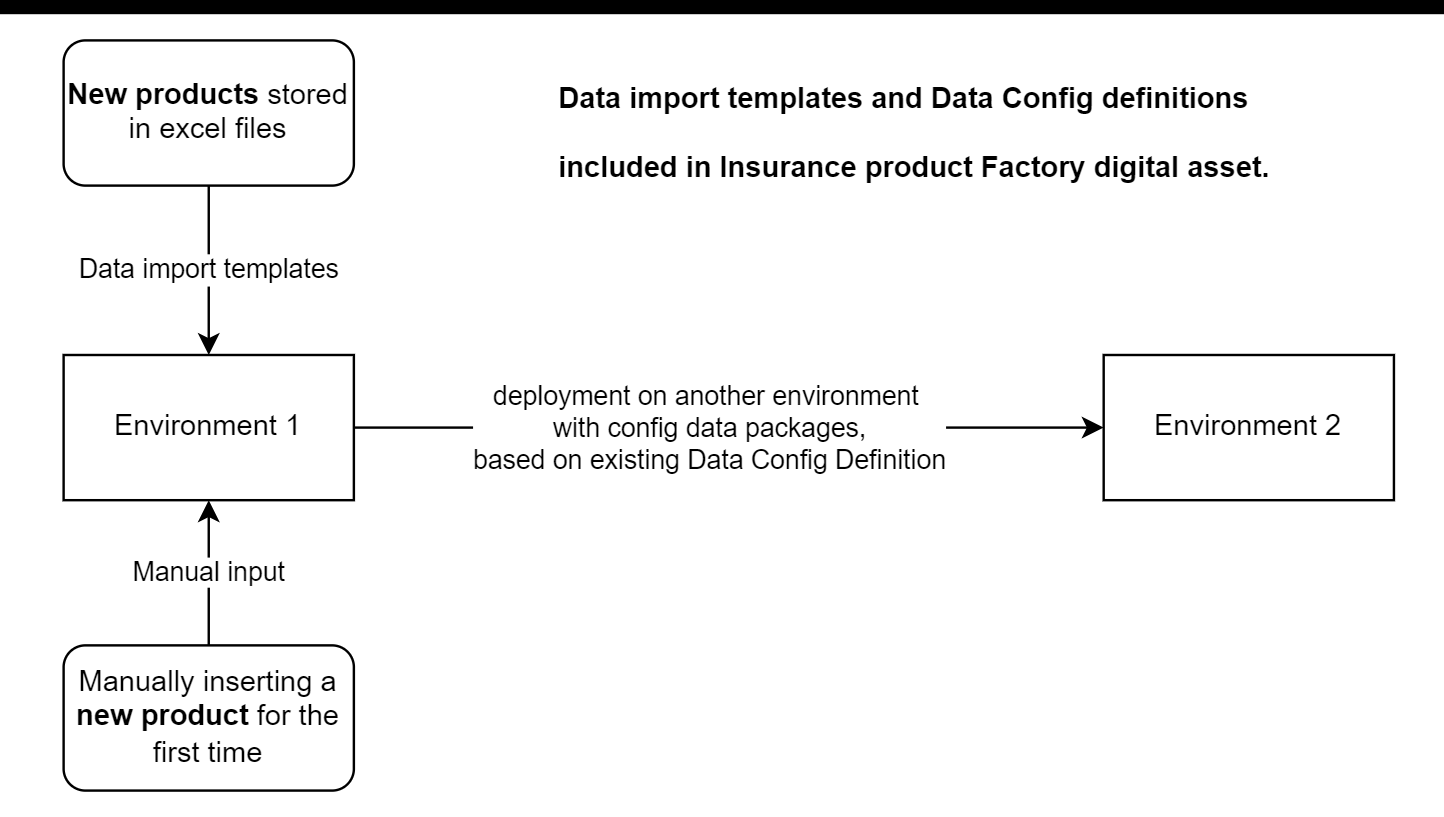
See bellow the Data Config Definitions and Data Import Templates available for the Insurance Product Factory solution.
Data Import Templates
Use Data Import Templates to import a product for the first time on a destination environment. However, for deploying changes on existing products, use Data Config Definition, as it has the versioning mechanism embedded.
For downloading a specific example template file listed below, click the corresponding link. For downloading all the files, click this DataConfigImport Archive - which includes also the DataConfigImport.xml file.
The following are the Data Import Templates available for the Insurance Product Factory solution:
FTOS_IP_InsuranceType - This template will import a new Insurance Type.
FTOS_IP_InsuranceProduct - This template will import a new Insurance Product.
FTOS_IP_InsuranceItemType - This template will import a new Insurance Item Type.
FTOS_IP_InsuranceProductItem - This template will import a new Coverage on an Insurance Product.
FTOS_IP_InsuranceProductItemModule - This template will import a new Module on a Coverage.
FTOS_IP_InsuranceRisk - This template will import a new Insurance Risk.
FTOS_IP_CoveredRisk - This template will import a new Covered Risk.
FTOS_IP_InsuranceCoveredRiskNew - This template will import a new Insurance Covered Risk on a Module.
After importing the files, additional checks or changes are need on product level, as not all the attributes from the entities are available in the excel files. Missing information needs to be filled in manually before approving the product. Also, premium calculation formulas and underwriting formulas should be manually attached on the product.
Data Config Definition
The FintechOSData Config Definition functionality allows the deployment of products to a destination environment, using the versioning settings. The same versioning rules running for the manual versioning process will run when importing the data with Data Config Definition as well.
When your Product is in Active status, changing it may be done only by adding a new version. When you choose to import the product changes in a Data Config Definition file, this functionality has the versioning mechanism embedded. This way you can be sure that your changes are deployed to the specified product.
The Data Config Definitions needed to export a product are available in the Insurance Insurance Product Factory Import digital asset. Examples are also attached on the Data Import files step of the digital asset. Not all the entities that are part of a product definition are included in the Product's Data Config Definition. For some entities, the data needs to be deployed using Data Import Templates.
The following deployment options are available:
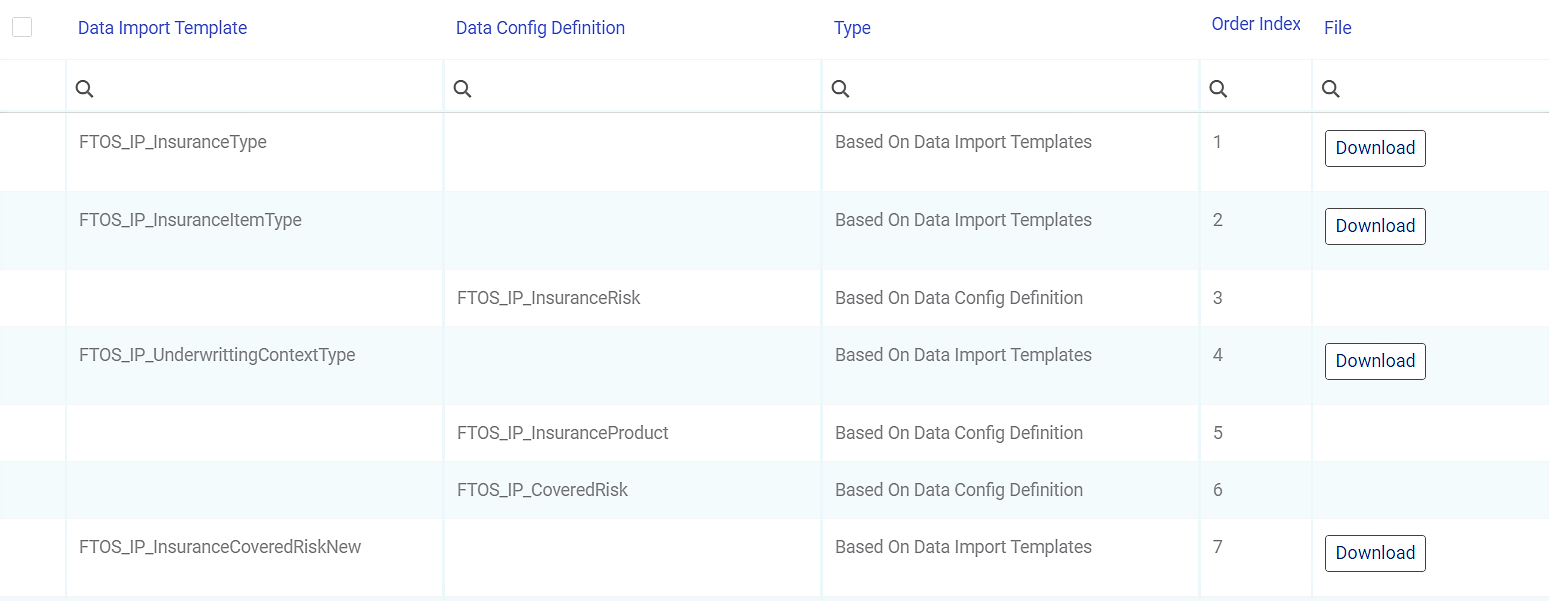
 FTOS_IP_InsuranceType
Use data import template to deploy the records.
FTOS_IP_InsuranceItemTypeUse data import template to deploy the records.
FTOS_IP_InsuranceRiskData config definition available, exporting data from the Insurance Risk entity.
FTOS_IP_UnderwrittingContextTypeUse data import templates to deploy the records.
FTOS_IP_InsuranceProductData config definition available, exporting data from the Insurance Product, Insurance Product Item (coverages), and Insurance Product Item (Modules) entities.
is Versionable flag enabled
Premium Amount Formulas and Underwriting Formulas will be exported as well. Make sure the Formulas are already available on the destination environment when you deploy the product.
- NOTE
The Insurance Product Factory Import Formulas Digital Asset contains Formulas used by the demo Product included in the Insurance Product Factory Import Digital Asset. - IMPORTANT!
Following import, links with Insurance Type, Insurance Item Type, and Underwriting Context Type entity records will be made, so the needed records from these entities must be imported first!
FTOS_IP_CoveredRiskData config definition available, exporting records from Covered Risk entity and creating a link to Insurance Risk records, previously imported.
FTOS_IP_InsuranceCoveredRiskUse data import template to deploy the records.
Below is an example of the Order Index for importing Templates and Definitions:
Troubleshooting Aspects
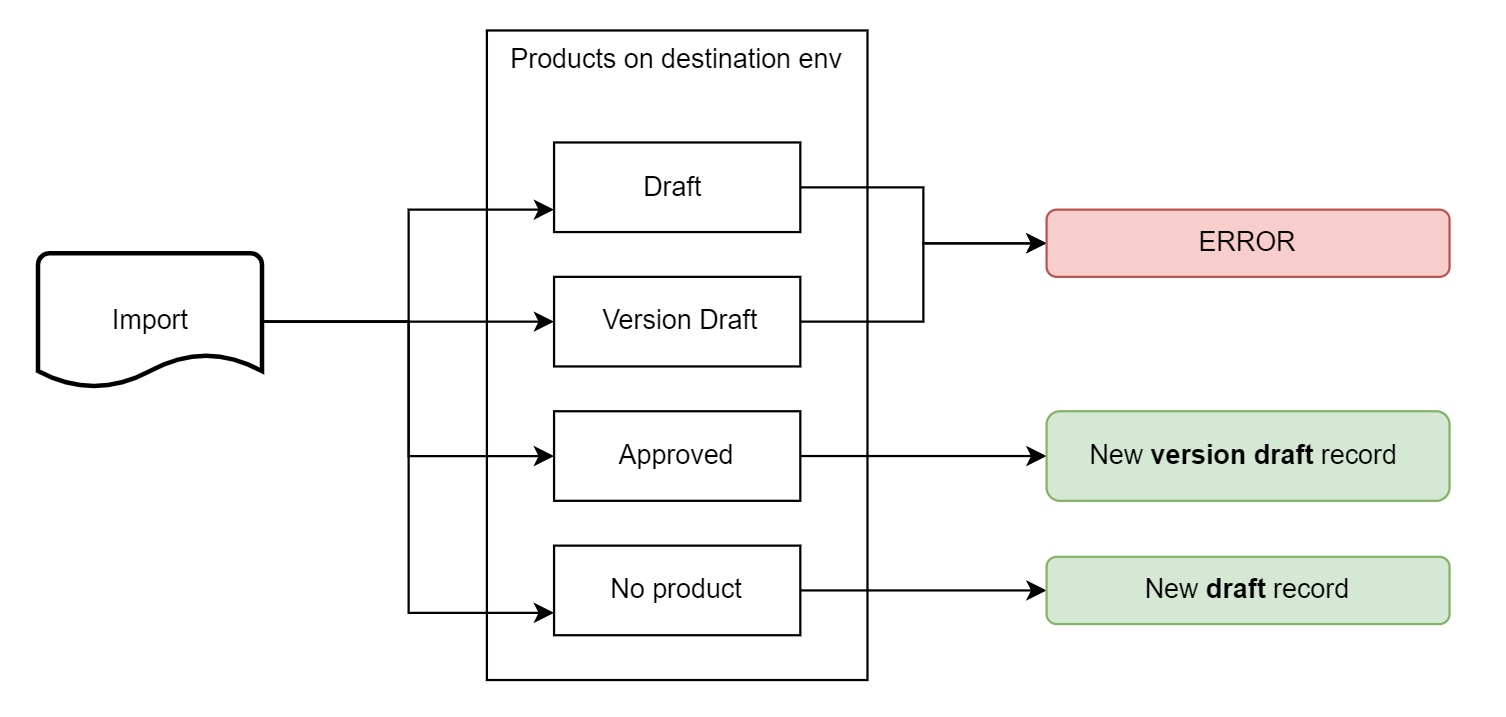
Since the definition used to migrate records from the Insurance Product entity has the is versionable flag enabled, and since the versioning mechanism is available on products, versioning rules are applying for each deployment.
If, on the destination environment, the Product is NOT available (identified by the unique constraint set on Insurance Product entity), then a new product with Draft status is added.
If, on the destination environment, the Product is already available (identified by the unique constraint set on Insurance Product entity) and its status is Draft, then the import is not possible, and an error is triggered.
If, on the destination environment, the Product is already available (identified by the unique constraint set on Insurance Product entity), and its status is Approved (with NO Version Draft records), then a new Product version (with Version Draft status) is created.
If, on the destination environment, the Product is already available (identified by the unique constraint set on Insurance Product entity), and its status is Approved (with Version Draft records), then the import is not possible, and an error is triggered.
Below is an example of results obtained by importing between environments:
Server Side Scripts
FTOS_IP_InsuranceProduct_BeforeCreateThe script checks if the Insurance Type attribute is filled in when adding a new product. It runs every time a new product is created, either manually or using the import capabilities.
FTOS_IP_InsuranceProduct_BeforeUpdateThe script checks if the Insurance Type attribute is filled in when updating a new product.
FTOS_IP_InsuranceProductItem_BeforeCreateThe script stops the user to insert new Coverages or Modules on Products that are not in Draft or Version Draft status. It also ensures the coverages and modules are imported in the right place - that is the product and the product version indicated by the user. Inside this script, the following functions are used:
setCorrectProductIdThis function ensures a Coverage is imported in the correct Product - in status Draft or Version Draft. When the user attempts to import a coverage on a product that is in other statuses (Approved, Closed, etc.), the following error message is thrown: “You can add a coverage only on draft or version draft products!”.
Input parameters: context - The context object received.
Output parameters: N/A
setCorrectCoverageIdThis function ensures a Module is imported in the correct Coverage, for a product in status Draft or Version Draft. When the user attempts to import a module on a product that is in other statuses (Approved, Closed, etc.), the following error message is thrown: “You can add a coverage only on draft or version draft products!”.
Input parameters: context - The context object received.
Output parameters: N/A
FTOS_IP_InsuranceCoveredRisk_ImportThe script ensures the Covered Risks are imported in the right place - that is the product and the product version indicated by the user. Inside this script, the following functions are used:
setCorrectModuleIdThis function ensures the Insurance Covered Risk is imported on the correct Module.
Input parameters: context - The context object received.
Output parameters: N/A
getModuleDataThis function fetches the initial module’s data.
Input parameters: insuranceProductItmeId - The Id of the insurance product item.
Output parameters: The initial module’s data.
getFinalModuleThis function fetches the correct module’s data.
Input parameters:
insuranceProductName- The name of the insurance product.coverageName- The name of the coverage.moduleName- The name of the module.
Output parameters: The correct module’s data.
For more details, consult also the Data Import Templates the Data Config Definition, and the Configuration Data Package documentation.