Commercial Credit Line
A Credit Line is a type of loan that allows a business to borrow money for funding working capital needs and ongoing operations. A credit line is especially helpful during times of revenue fluctuations since bills and unexpected expenses can be paid by drawing from the loan.
In the title field, enter a name for the product. Optionally, you can click the ellipsis button (...) to also provide a description and/or an availability period. Below, fill in the following product configurations.
Main Info
This section determines the amount, term, revolving, disbursement, refinancing Taking out a new loan to replace an existing loan, usually to obtain more favorable loan terms, such as a lower interest rate, extended repayment period, or different monthly payment amounts., and restructuring Modifying the original terms and conditions of the loan to provide a more affordable repayment plan, typically when a borrower is facing financial difficulties or is struggling to meet their loan obligations.
Can provide relief in the form of lower interest rates, extended repayment periods, deferred payments, changes in payment frequency, debt consolidation, waiving of penalties or fees, partial write-offs, etc. characteristics of the loan.
Taking out a new loan to replace an existing loan, usually to obtain more favorable loan terms, such as a lower interest rate, extended repayment period, or different monthly payment amounts., and restructuring Modifying the original terms and conditions of the loan to provide a more affordable repayment plan, typically when a borrower is facing financial difficulties or is struggling to meet their loan obligations.
Can provide relief in the form of lower interest rates, extended repayment periods, deferred payments, changes in payment frequency, debt consolidation, waiving of penalties or fees, partial write-offs, etc. characteristics of the loan.
| Parameter | Description | Default |
|---|---|---|
| Loan amount and loan term |
E.g.: Loan amount from 10,000 to 100,000 Euro with a term of 1 to 5 years. |
|
| Revolving (Is /Is not) | Allows a business to borrow money as needed for funding working capital needs and continuing operations such as meeting payroll. | Is |
| Disbursement |
|
Allows only one. |
| Refinancing |
|
Allows refinancing. |
| Restructuring |
|
Allows restructuring. |
Interest
The interest sets up the amount of money (which is distinct from the principal repayments) that the borrower pays as a cost for borrowing money when repaying the loan. You can set up both regular and penalty interests Additional interest charged when a borrower fails to make timely payments on a loan (misses a payment deadline or makes a payment that is less than the agreed-upon amount)., with interest rates The interest rate is the amount a lender charges a borrower and is a percentage of the principal (i.e., the amount loaned). that are fixed, variable or based on a formula.
| Parameter | Description |
|---|---|
| Interest |
Click + Add interest to set up an interest for the loan based on the desired interest rate(s).
E.g.: Interest is fixed at 5% for the first 6 installments and then variable indexed to EURIBOR 3M with a margin of 1% until end. NOTE
If you define multiple interests, the user will have the option to select one of them during the application. |
| Penalty |
Click + Add penalty to set up a penalty interest for the loan and the reference value it is applied to (principal, interest, front end fee, etc.).
E.g.: Penalty is 1.5% from Loan Interest. NOTE
|
Fees
- Click +Add fee.
- Select a predefined type of fee from the list, or click Create new to define a new fee type (you can also rename an existing fee by clicking the fee name). The type of fee determines parameters such as the the conditions under which the fee is applied, how often the fee is charged, whether the fee is refundable or not, etc. For more information, see Fee Types.
- Enter the amount of the fee:
- value - a fixed value in the specified currency.
- percentage - a specified percentage of either the remaining value, financed value, payed value, unused amount, used amount, overdraft limit amount, or amount.
- based on formula - Allows you to set fees based on Product Formulas.
You can set up multiple fees that will be charged independently, based on their Fee Types. E.g.:
- Front-end fee is 25 $.
- Repayment fee is 4% over remaining value.
This will always charge the borrower a $25 fee on loan application. If, during the loan, the borrower decides to repay the loan in advance, a 4% fee is charged over the loan's remaining value.
Insurances
Insurances are required for borrowers that meet certain risk criteria, in order to cover the potential losses if they default on the loan.
To set up an insurance for your product:
- Click +Add insurance.
- Select the Bancassurance Class (e.g.: Credit Insurance, Life Insurance, Home Insurance or Other Insurance).
- Select the periodicity for the insurance premium, e.g.: 30 Days, Once, Monthly, Weekly, Trimestrial, or Annual.
- Select the amount to insure:
- value - A fixed amount in the specified currency.
- percentage - A specified percentage of either the remaining value, financed value, payed value, unused amount, used amount, overdraft limit amount, or amount.
- based on formula - Allows you to set the insurance amount based on Product Formulas.
- Select when the insurance should be issued based on the value of a specified Lexicon Term.
You can set up multiple insurances that will be issued independently, depending on whether they meet the issuance condition. E.g.:
- Life insurance paid monthly of 100% over remaining value when Age is over 60 Years Old.
- Other Insurance paid once of 50% over financed value when In BlackList is In BlackList.
This will issue a monthly insurance over the remaining loan value if the applicant is older than 60.
If the applicant is marked as In BlackList, which is a boolean lexicon term, an insurance of 50% over the financed value is issued when extending the loan.
Remember to go to the Provided Documents section and add a document template to be signed by the customer for each insurance you've configured.
Repayment
The Repayment section determines the periodicity and repayment schedule for the loan's installments Regular payment that a borrower is required to make to the lender to repay a loan over time., and how the repayments are impacted by holiday shifts Adjustment of installment due dates that coincide with public holidays by moving the due date to the last working day prior or first working day after the holiday. and grace periods A specified period of time during which a borrower is not required to make regular loan payments without incurring late fees or penalties. Typically granted immediately after the loan disbursement or before the start of the regular repayment schedule..
| Parameter | Description |
|---|---|
| Repayment |
Sets up the periodicity and schedule type of the repayment.
E.g.: Repayment is performed on monthly in equal installments with schedule Equal Installment Monthly 365_TLU. NOTE
When generating a repayment schedule, the default calculation precision for determining the remaining balance of each installment is set to 10 decimal places (rounded to 2 decimals in the final payment schedule). You can customize this precision between 2 and 28 decimal places by configuring the PricingRoundingDecimals key within the kv/<environment name>/mkexp-pfai/app-settings directory in the Configuration Manager.NOTE
You can add multiple repayment schedules that the applicant can choose from by clicking +Add repayment repeatedly. |
| Holiday Shift |
Determines what happens if an installment's due date overlaps a public holiday.
|
| Grace Period |
Determines what expenses are exempted during the grace period and how long the grace period is.
E.g.: Grace period interest 2 installments. |
Discounts
In the Discounts section, you can define discounts on any of the already configured interest items, commission items, or on all pricing elements.
There are three ways to create discounts:
- Follow the sentence-based interface to configure a condition based on a dictionary attribute (e.g., Age >18), for which you define a discount. Note that you can also create new attributes, extending your dictionary (+Add discount > Create New).
- Add a Dataset based on one, two, or more attributes for a pricing item. You can add more data sets, one for each pricing item. For more details on how to create Data Sets, see Product Data Sets.
- Add a formula to define discounts with more advanced conditions based on mathematical expressions, data sets, and other inputs. You can add more formulas, one for each pricing item. For more details on how to create formulas in Product Designer, see Product Formulas.
A discount does NOT override the previous value of a pricing item, but is applied to it, decreasing the pricing item's final value. For example:
- A discount of 10% applied to an existing 10€ commission results in a new value of 9€ for the commission;
- A discount of 2€ applied to an existing 10€ commission results in a new value of 8€ for the commission.
Collateral
You can determine the collateral An asset or property that the borrower pledges to the lender as security for the repayment of a loan, giving the lender the right to take ownership of the pledged asset in the event of default. cover used to secure a loan as a percentage of the loaned value. For example, a collateral cover of 25% indicates that the applicant must provide collateral in the amount of at least 25% of the loan amount.
- Add the desired loan percentage in the Collateral cover field. Select the allows partial release option if you wish to allow the partial release A partial release of collateral means that if the borrower has met specific requirements or paid off a portion of the loan, the lender may release a part of the collateral while still holding the remaining part as security. of collateral once certain conditions are met.
Once the collateral cover is set, the +Add guarantee button is enabled. - To configure the guarantees Specific asset used to secure a loan as part of the collateral coverage. that are part of the collateral, click +Add guarante. Select one of the available guarantees, and add the maximum accepted coverage as a percentage.
- Add multiple guarantees, as needed.
Underwriting
The underwriting rules determine an applicant's eligibility for the product and whether or not a manual approval process is required (available only for underwriting rules based on Product Data Sets).
There are three ways to add Underwriting rules:
- Add Rule - Follow the sentence-based interface to configure a condition based on a Lexicon Term (e.g. Property Condition is Good or Excellent).HINT
In the attributes' pop-up window, you can click +New Attribute to quickly add a new lexicon term or Product Settings to edit the current lexicon term. - Add Formula - Use Product Formulas that return a boolean result ("True" for approval and "False" for rejection);
- Add Data Set - Use Product Data Sets for the evaluation. This is mandatory if the rule can return an outcome where the application must go through a manual approval process. The data set can return only the Approved, Derrogation, or Rejected results (or an equivalent terminology defined in the Underwriting Data Set Values, e.g. Passed, Manual Analysis, or Not Passed).
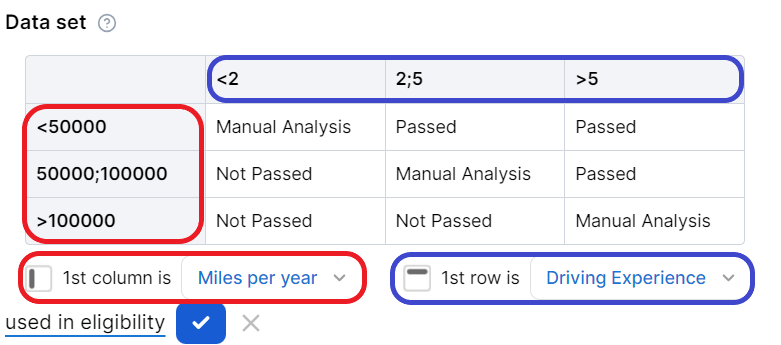
For each rule, you can select the used in eligibility option to mark it as a knock-out rule, which automatically disqualifies the applicant if its condition is not met. Otherwise, the rule is submitted to the final approval review.
For the manual approval result, you need to configure the journey to direct the application to a back-office manual approval process. If you are using Multi-Dimensional Data Sets based on cascading data sets, the manual approval outcome must be defined in the top-level data set.
Documents
Specify the document types required from the applicants (and/or others involved in the origination process, e.g. codebtors Individual who assumes joint responsibility for repaying a loan alongside the primary borrower. If the primary borrower defaults on the loan, the codebtor becomes liable for the remaining debt.), as well as the document types provided to the applicants.
| Parameter | Description |
|---|---|
| Required from customer |
Documents that the applicant must provide in order to verify identity, income, product eligibility, etc. To add a required document:
E.g.: Income statement mandatory for debtor and mandatory for co-debtor. |
| Provided to customer |
Documents that must be provided to the applicant typically in order to obtain an agreement and/or signature. To add a provided document:
E.g.: Terms and conditions is static requires accord and requires signature. |
Service
The Service section is used to define the configuration structure and characteristics of your banking product. The following options are available:
- Commission on unused amount: The number of months after which the system starts calculating commissions for any unused amount.
- Disbursement allowed: The number of months for disbursing funds to the borrower.
- Minimum principal for early repayment: Minimal principal allowed for early repayment.
Once you’ve configured all the fields, change the status from Draft to Approved to save your SME Business Working Capital/Revolving product. For details on versions, see Product Life Cycle.