Use Service Pipes Container Apps
Connectors cannot run independently unless integrated in a Service Pipes container application. This chapter shows how to create a Service Pipes Project and run your own Service Pipes container application.
Prerequisites
In order to create a Service Pipes Project, you need to the following:
- A code editor such as Visual Studio Code or IntelliJ IDEA.
- Latest versions of Java Development Kit, Git, and Apache Maven installed.
- Submit a request to the FintechOS ITSupport to obtain access to FintechOS-ManagedServices Azure Devops Artifactory (service-pipes - Azure Artifacts) and the GitHub template.
Create the Service Pipes Project and start it locally
To define create the project, you need to:
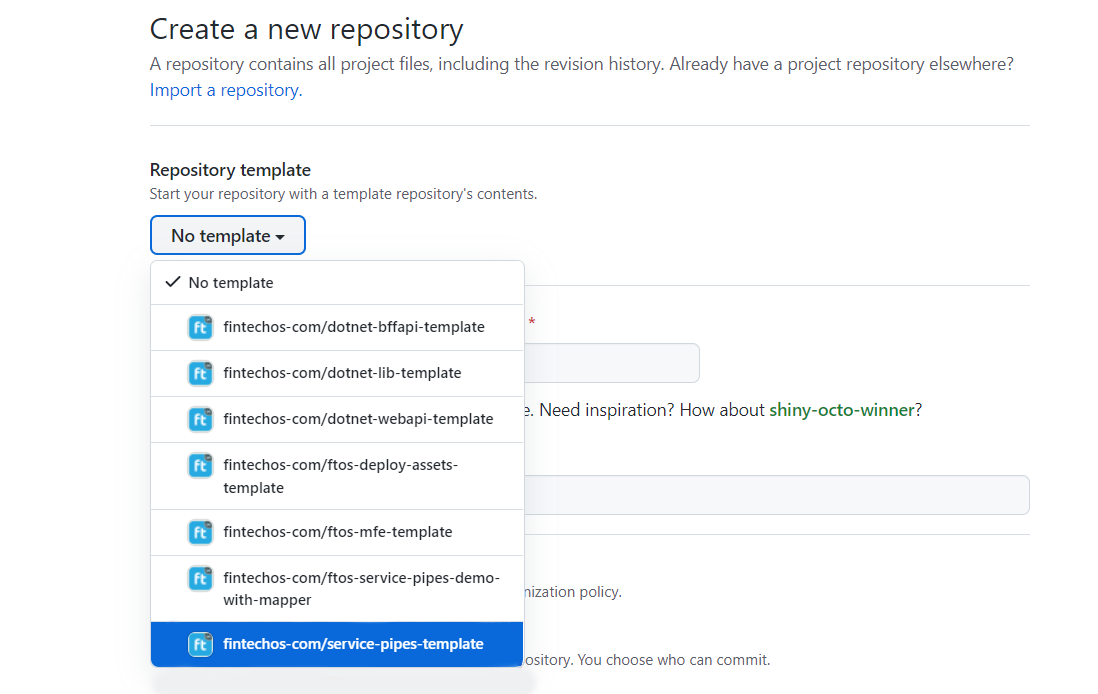
- Create a new repository in Git and use service-pipes-template.
- Use the steps in the Readme to create and configure your project.
The Service Pipes Container created has a pom.xml file that has the following structure:
<parent>
<groupId>com.fintechos.servicepipes</groupId>
<artifactId>service-pipes-dependencies</artifactId>
<version>1.0.2</version>
</parent>
<artifactId>service-pipes-app</artifactId>
<version>1.0.0-SNAPSHOT</version>
<name>Service Pipes Template</name>
<scm>
<tag>head</tag>
</scm>
<properties>
<service.pipes.version>1.1.0</service.pipes.version>
<docker-repository>acrcloudservices.azurecr.io</docker-repository>
<service-pipes-codat.version>1.0.0-SNAPSHOT</service-pipes-codat.version>
</properties>
<dependencies>
<dependency>
<groupId>com.fintechos.servicepipes</groupId>
<artifactId>service-pipes-core</artifactId>
<version>${service.pipes.version}</version>
</dependency>
<dependency>
<groupId>org.apache.camel.springboot</groupId>
<artifactId>camel-spring-boot-starter</artifactId>
</dependency>
<dependency>
<groupId>com.fintechos.servicepipes.connectors</groupId>
<artifactId>service-pipes-codat</artifactId>
<version>${service-pipes-codat.version}</version>
</dependency>
</dependencies> Parent Dependency
A parent dependency on service-pipes-dependencies.
<parent>
        <groupId>com.fintechos.servicepipes</groupId>
        <artifactId>service-pipes-dependencies</artifactId>
        <version>1.0.2</version>
</parent>The Service Pipes application name and version information.
<artifactId>service-pipes-app</artifactId>
    <version>1.0.0-SNAPSHOT</version>
<name>Service Pipes Template</name>Here, you can add the connectors versions that you are developing and put them in the Service Pipes application container.
    <properties>
        <service.pipes.version>1.1.0</service.pipes.version>
</properties>Here, you can add the connector references of the connectors you want to include in this service pipes container.
This structure also needs to contain the service-pipes-core dependency.
<dependencies>
        <dependency>
            <groupId>com.fintechos.servicepipes</groupId>
            <artifactId>service-pipes-core</artifactId>
            <version>${service.pipes.version}</version>
        </dependency>
        <dependency>
            <groupId>org.apache.camel.springboot</groupId>
            <artifactId>camel-spring-boot-starter</artifactId>
        </dependency>
        <dependency>
            <groupId>com.fintechos.servicepipes.connectors</groupId>
            <artifactId>service-pipes-codat</artifactId>
            <version>${service-pipes-codat.version}</version>
        </dependency>
    </dependencies>
Run the Service Pipes Container Application
Use the below steps when running the Service Pipes Container Application.
- Add all your connectors as reference/ dependencies in the
pom.xml. - Open the
application-local.yaml. - Populate existing and add the needed keys, so that the app container can mock them and serve them to your application.
Once the connectors are referenced inside the container’s pom.xml and the configurations are inside application-local.yaml, open cmd.exe and run the following command inside the repository root folder:
mvn spring-boot:run "-Dspring-boot.run.profiles=local"
The connectors inside the Service Pipes container application need to be already published:
- locally (installed in your local .m2 repository)
- available in the Azure DevOps repository
The port on which the Service Pipes container application runs is configurable in the application yaml files. The default values are:
- port: 8080
- base path: http://localhost:8080/services/api/XXXXXXX. where XXXXXX is a placeholder for the routes defined in your integrated connectors.
Enable Debug Mode
To enable the debug mode, you need to uncomment or add the following section in the service pipes app' pom.xml:
    [...]
    <build>
        <plugins>
            <plugin>
                <groupId>org.springframework.boot</groupId>
                <artifactId>spring-boot-maven-plugin</artifactId>
                <!-- uncomment this to enable debug -->
                <!--
                <configuration>
                    <jvmArguments>-Xdebug -Xrunjdwp:transport=dt_socket,server=y,suspend=n,address=5005</jvmArguments>
                </configuration>
                -->
            </plugin>
        </plugins>
    </build>
    <profiles>
        <profile>
    [...]
The <configuration> tag with <jvmArguments> for -Xdebug enables the debug port on the java virtual machine
The port is specified in the section, for the above example it is 5005.
With the section added / uncommented, run the application. The debug mode is a prerequisite when debugging connectors.