Manage Reinsurance Contracts
The Reinsurance Admin solution enables contract managers and operators to efficiently organize their reinsurance data for analysis and operational purposes in an easy way.
To access the reinsurance repository, in FintechOS Portal, go to Main Menu > Reinsurance > Reinsurance Contracts. The list of all existing reinsurance records is displayed.

Reinsurance Admin Statuses and Transitions
The Reinsurance Admin solution enables you to achieve efficiency, gain flexibility and organize your reinsurance contracts for analysis and operational purposes in an easy way.
 Business Workflow
FTOS_INSPA_ReinsuranceContracts is the business workflow that handles the different types of changes affecting a contract during its lifetime - like transitioning the contract through different business states (from Draft to Terminated).
Below, an example of the this business workflow - as it is displayed on FintechOS Studio:
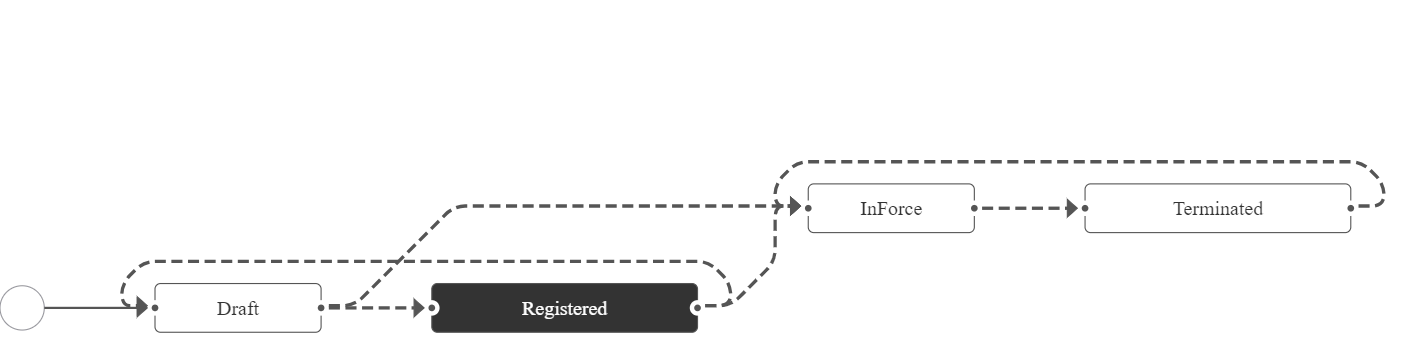
Reinsurance Admin records that are in Terminated business status, meaning their coverage is finished, are not erased automatically from the system. If you need to, you have to delete those records manually. For more details, consult also the Terminating Contracts page.
Statuses
The Reinsurance Admin module covers the following business statuses:
| Status name | Type | Description |
|---|---|---|
| Draft | Initial | Status for every record generated into the system - when the user presses Save before attaching any Insurance Type to the contract. |
| Registered | Initial | For records that have at least one Insurance Type in the Insurance Type grid. |
| InForce | Ongoing | For records that satisfy the following conditions:
|
| Terminated | Final |
For records that satisfy the following conditions:
|
Transitions
Here is a description of the transitions managed through the Reinsurance Admin module:
| Transition | Description |
|---|---|
| _Draft | The first status for every record generated into the system. |
| Draft_InForce | Automatic transition - based on verifying the Begin Date saved on the form, when registering the reinsurance contract into the system. The FTOS_INSPA_ReinsuranceContracts job transitions all records from Draft to InForce status, when the records satisfy the following conditions:
|
| Draft_Registered | Automatic transition before reaching the InForce status, for records that satisfy the following conditions:
|
| InForce_Terminated | This transition can be triggered in 2 different ways: Automatically - when the current date is the End Date of the reinsurance contract. Manually, by updating the End Date for the selected record. |
| Registered_Draft | Automatic transition triggered during editing the form, when the user deletes all of the Insurance Type from the Insurance Type Grid. |
| Registered_InForce | Automatic transition triggered for records that satisfy the following conditions:
|
| Terminated_InForce | Manually, by updating the End Date (registering a new end date) for the selected record. |