Terminate Contracts
The transitioning of Reinsurance Admin records into the Terminated business status is done either automatically or manually.
Automatic Termination
When the reinsurance contract has reached the End Date - as it is stored by the corresponding record, the process of transitioning is performed automatically by the FTOS_INSPA_ReinsuranceContracts scheduled job. This job verifies the stored End Date against the current date and changes the business status to Terminated.
Manual Termination
For the case when a reinsurance contract is terminated sooner than its initially agreed End Date, you need to manually trigger the Terminated business status for that specific record. Follow the steps below to terminate a reinsurance contract:
-
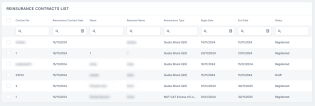
In FintechOS Portal, go to Main Menu > Reinsurance > Reinsurance Contracts. The list of all existing reinsurance records is displayed.
-
Double-click a record to open it.
-
Click Edit in the form.
-
Insert a new date in the End Date field.
-
Click Save and close. When the
FTOS_INSPA_ReinsuranceContractsscheduled job makes its next run, it verifies the stored End Date against the current date and changes the business status to Terminated.
