FintechOS Release 24.3
February 7th, 2025
This release introduces a reorganized SDK for improved developer experience, AI-powered assistants for Product and Journey Designers, and back-office flows that combine the flexibility of app data forms with the task-oriented focus of digital journeys. Additional updates include new Product Factory configurations, automated login theme deployment, detailed identity provider metrics, custom fonts for document templates, and other improvements to usability and performance.
See below the main highlights of FintechOS 24.3 release and read the detailed release notes in the FintechOS 24.3 page:
What's New
Digital Journeys
-
BackOffice Flows - dedicated digital journeys that users can trigger from the form on demand. Back-office flows run within the data context of the app data form that initiated them
-
AI Assistant to examine your requirements and suggest a relevant template to pre-populate the journey flow and data configurations
-
Existing integrations are now displayed in a catalog with filter and search options
-
Attribute fields now include help bubbles with the definition of the attribute
Products Improvements
-
Product Designer now includes an AI assistant that can examine your requirements and help you select a relevant template for your product
-
Create custom templates tailored to your business requirements
-
Configure claim rules to handle multiple occurrences of an insured event (peril)
-
Customize the claim rules for a specific plan
-
Set the duration of insurance coverage and define up to three term options
-
Configure the payment frequency for insurance premiums
-
You can now test insurance products and offers
-
Product Factory APIs support exporting and importing a list of product definitions
-
Endpoint to calculate the annualized IRR from a sequence of monthly cash flows
Developer Productivity
-
SDK methods have been restructured into more comprehensive and logically organized domains, with some methods further grouped into specific subdomain
-
New digital asset type, Products, for including financial products in digital solution packages
-
Automatic deployment of login theme for Studio to accelerate time to market
- Enhanced Identity Provider login metrics:
Login Error Metrics
Login Insights
User Login Details
System Performance Metrics
HTTP Server Errors
- Enhanced Identity Provider login metrics:
-
Inactive account deactivation - configure a period after which accounts with no activity are automatically deactivated
-
Multi-factor authentication through FintechOS IDP is now done via DCI service
Loan Management
See below the main highlights and read the detailed release notes in the Loan Management page:
-
We've added a new transaction type, Internal Transfers for current accounts, for moving funds from one account to another.
-
For one type payments, you can now select the Once payment schedule type on the contract form if the selected product and its Admin Config have a Once Payment schedule defined. However, the variable interest will not be included in products with periodicity payment Once. This use case is available for short term loans only.
-
There are now categories for system parameters. When creating a new parameter, make sure to assign a category to it from the list of available ones. Such categories are Analytics, Arrears, Calendar, Dashboard, Facility, Invoice, etc.
-
The Early settlement figure, the amount to be paid for the loan to be cleared in full is added in the Contract Event form for Full Early Repayment transactions.
-
You can now add the date when the customer informed the financial institution that they would like to perform a loan transactions, such as full or early repayment. This notification date is now available in the Contract Event form.
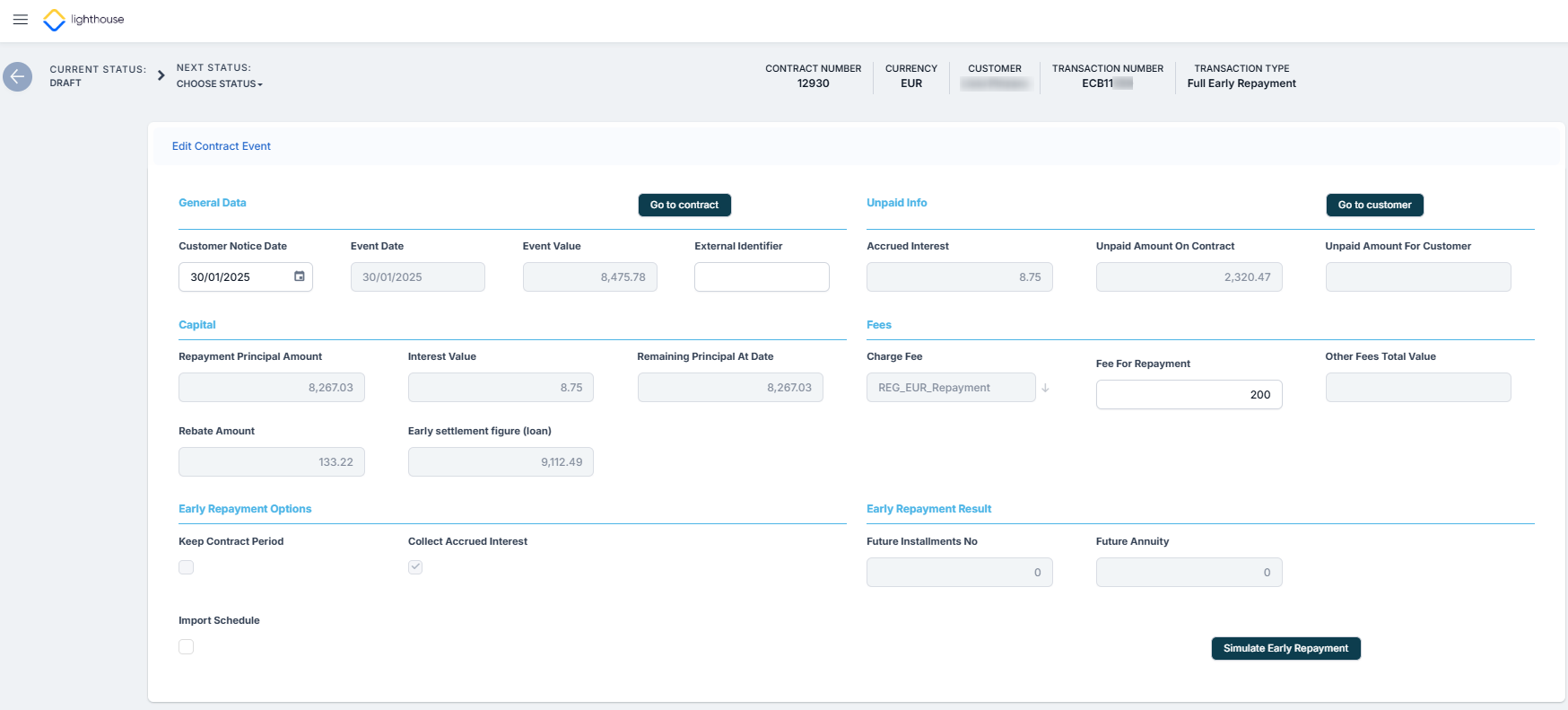
Implemented enhancements to the transaction system to improve the handling of repayment schedules, early repayment transactions, and product configuration settings.
Support for Custom Transactions in Contracts
Some of the contracts backoffice APIs have been enhanced with an optional transactionName parameter, which allows you to specify a custom transaction, overriding the default transaction associated with the endpoint (as long as it has the same event process type). For instance, the FTOS_CB_AddContractTransfer endpoint, which is typically associated with the "Transfer between my bank accounts" transaction, can now be customized to meet specific requirements by changing its transaction.
Policy Administration
See below the main highlights and read the detailed release notes in the Policy Admin page:
-
You can now choose the preferred day for the due dates generated in the policy payment schedule.
-
You can add specific grace periods to each of the payment type associated to a policy.
-
Sub-coverages are now displayed in the Modules section inside policies.
-
We've improved the user experience when working with Masterpolicies and made it easier for you to quickly access several operations with such policies. The Initiate Alteration, Reinstate, and Cancel buttons are now available at the bottom of the form when viewing a Masterpolicy.
-
You can make alterations to policies created with the new Product Factory.
-
An error message will be displayed if you attempt a policy alteration that leads to failed underwriting. The same applies if manual underwriting analysis is needed after attempting a policy alteration. This ensures that only alterations that pass underwriting analysis are processed.
APIs
Integration with Product Factory APIs and Decoupling from Proposal Configurator
To improve performance and reduce dependency on the Proposal Configurator, backoffice APIs have been refactored to use Product Factory APIs to process requests.
Quote Admin
See below the main highlights and read the detailed release notes in the Quote Admin page:
-
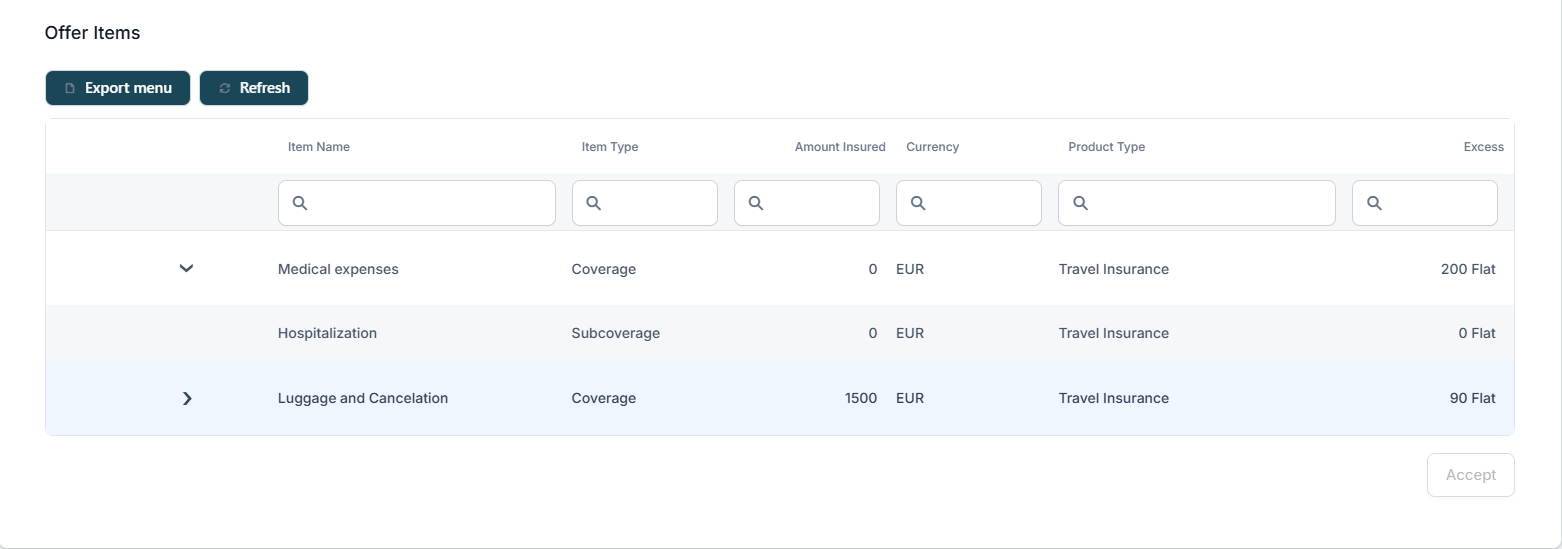
The Offers section part of Quotes now displays the insured amount, excess, currency for each coverage part of the offer.
-
The Audience Input is displayed in the Client Needs and Risk Details section of quotes for those created with the latest v24 version, and consequently with the new Product Factory. Quotes created in previous versions are still displayed with the Client DNT questions.
-
Details such as amount insured, excess, currency are displayed for each sub-coverage in an offer, together with the main coverages. For example, Medical expenses coverage part of a travel insurance may have hospitalization attached as a sub-coverage, and now, its details are displayed in the offer.
APIs
Integration with Product Factory APIs and Decoupling from Proposal Configurator
To improve performance and reduce dependency on the Proposal Configurator, backoffice APIs have been refactored to use Product Factory APIs to process requests.