Backoffice Insurance 8.1
August 28th, 2026
This release introduces multi-instance policies, enabling you to manage multiple insured objects within a single policy. You can add, modify, and remove insured objects directly through the MTA flow, with premium recalculations applied automatically to reflect policy changes. The release also includes a redesigned Quote Admin module, new APIs for evaluating and accepting offers, and improvements to payment schedules, cancellation handling, and policy validity tracking to help keep policy data consistent throughout the policy lifecycle.
What's New
Backdated Policy Date Improvement
For policies imported through intermediaries with past issue/start dates, payment schedules could previously mark premiums as overdue immediately at import. A new system date override now lets the payment schedule engine use the policy import date as the reference for due dates, preventing false overdue statuses and ensuring customers receive correct payment windows from the moment the policy is activated in the system. This is configured in the Product Admin Configuration.
How it works
- For eligible backdated policies, the engine treats the import date as the effective activation date in the system.
- All calculated due dates in the payment schedule are aligned to this import date.
- As a result, no installments are incorrectly flagged as overdue at the moment of policy creation/import.
Benefits
-
Prevents false overdue premium statuses for backdated policies imported from intermediaries.
-
Ensures policyholders receive accurate payment windows starting from the moment the policy is effectively activated in the system.
-
Reduces manual corrections and operational friction for backdated portfolio migrations and intermediary imports.
Default Collection Day Configuration Enhancement
When a Default Collection Day is defined in the Product Admin Configuration, it takes precedence over the value previously set on the Payment Schedule Type. The payment schedule generation logic has been updated to reflect this change, ensuring that the collection day is consistently sourced from the product configuration across the platform.
Bindable Offers API
The new getBindableOffersEvaluation API introduces synchronous and asynchronous offer evaluation in Quote Admin, enabling you to streamline pricing and underwriting workflows at scale.
-
IsBindableOffersAsync: You control whether offer evaluation executes synchronously for real-time results or asynchronously for high-throughput batch processing, reducing response bottlenecks on multi-source quoting scenarios.
-
BindableOffersWebHook: You define the callback endpoint as a JSON configuration, so your system automatically receives pricing and underwriting results when async processing completes, eliminating the need for polling.
Smarter Premium Recalculations
Premium recalculations for policy coverages are now triggered only when the insured amount or excess is changed, replacing the previous automatic background process. This gives the system more precise control over when premiums are recalculated, improving reliability and predictability when editing coverage details.
Refund and Compensation Rules for Master Policy Cancellation
This release changes master policy cancellation so you now receive refunds calculated per individual policy instead of only at the master level. Each policy’s refund is based on its unearned period and contractual rules, and the master refund becomes the sum of all individual refunds. On each policy, the refund appears as a negative installment.
For future‑dated chronological policies, cancellation triggers cloned sub‑policies and generated refund installments. You also see the message confirming approval and explaining that reimbursement will be created on the effective date, and that revoking the cancellation removes pending transactions.
In the async approval flow:
-
If no compensation applies, all negative installments are marked as Refund;
-
If compensation is required, negative installments are allocated as Compensation across policies until the total compensation amount is covered;
-
In some cases, the final policy may include a split into two negative installments: one covering the remaining compensation and one representing the residual refund amount;
Calculated Amounts:
-
Returned Premium Amount = sum of all negative installments
-
Compensation Amount = sum of negative installments marked as Compensation
-
Final Refund Amount = sum of negative installments marked as Refund
Business Benefits:
-
Policy-level traceability: Enables detailed audit and reconciliation by calculating refunds per individual policy.
-
Financial accuracy: Reflects true earned versus refunded premium at the policy level.
-
Schedule consistency: Ensures the master policy schedule always equals the sum of individual policy schedules.
-
Regulatory transparency: Supports clear customer communication and compliance with fair treatment requirements.
-
Clean premium history: Maintains accurate earned and refunded records for each sub-policy, supporting future adjustments or reissuance.
Quote Admin Redesign
We've restructured the Quote Admin module to give you a clearer, more flexible way to manage offers and products. The flat quote/offer model has been replaced with a granular Offer → Product → Item hierarchy, along with updated forms and a seamless data migration path.
Data Model Updates
-
You now have a dedicated Quote Admin Offer Product entity to store per-product details like pricing, commissions, and schedule
-
Your insured object data is stored in the new Insured Object entity as compressed JSON
-
You can track underwriting status directly on offers via the new uwStatus attribute
-
Note that pricingResultJson and uwResultJson are available in v8.1 but will be removed in v8.2
Redesigned Forms
-
Your Quote Admin header now uses "Offer" terminology — Offer Number, Offer Type, and Start Date replace the old naming
-
You get a new Products view on the Offer form, replacing the previous Coverages/Pricing/UW sections
-
You have separate edit forms for Insurance (premium, discount, coverages) and Banking (APR, installments, commissions)
-
Your Offer Participants and Insured Objects are now managed at the correct hierarchy level
Migration & Compatibility
-
Your existing data is automatically migrated via the FTOS_QA_MigratePassedQuotes job
-
You don't need to manually move records — the FTOS_QA_MigrateQuote procedure handles the transition
-
Your export workflows are updated with a revised DATA CORE SQL procedure
You can upgrade seamlessly with the included backward-compatibility script.
Auto-Issue Policies on Payment
When a payment is allocated to a policy in Proposal status, the system automatically updates the policy status to Issued, provided that an invoice has been generated for that policy.
Previously, this transition required manual intervention, where users had to update the policy status after payment allocation. This could lead to additional operational effort and the risk of policies remaining incorrectly in Proposal status.
With this enhancement, the status update is performed automatically upon successful payment allocation, improving process efficiency and ensuring data accuracy.
Supported payment methods:
-
generatePayment API
-
Manual allocation via BackOffice
-
MT940 automatic allocation
Manual Payment Allocation Update
You can manually allocate payments more efficiently with these improvements:
-
Chronological Processing: You will see installments filtered by the earliest due date first, ensuring your allocations follow a strict sequence.
-
Automatic Proposals: Once you finish allocating one date, the system automatically suggests the next one for you.
-
Simplified View: You can view aggregated amounts grouped by policy and currency, while the unnecessary "Installment NO" column has been removed.
-
Clearer Labels: You will find the "Due Date" field is now labeled "Next Due Date" to help you track your progress.
Policy Data Model Revamp
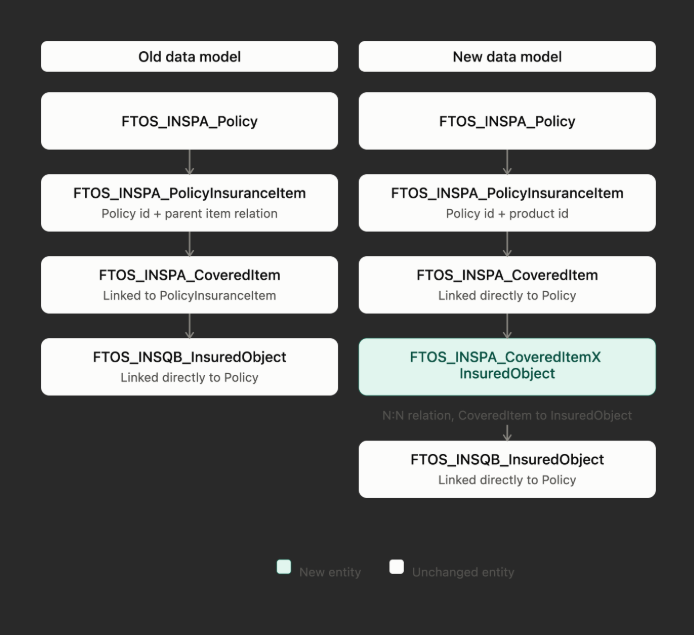
The policy data model has been enhanced to support coverage management at the insured object level instead of the policy level.
What changed:
-
Card identification and optional attributes are now stored at the insured object level,
-
Covered items are linked to insured objects, each with individual start and end dates,
-
Policy items now store aggregated coverage sums across all insured objects,
-
Backward compatibility is ensured through automatic data migration scripts.
Why this matters:
-
Enables multi-instance policies where a single policy can cover multiple assets,
-
Provides granular control over coverage periods and attributes per insured object,
-
Reduces the need to manage separate contracts for each asset.
Dynamic Dimensions on Policies
You can now save and update dynamic dimensions directly on your policies. Previously, dynamic dimensions were only available at the plan level in Product Factory. With this update, they flow all the way through to Policy Admin.
What changed:
-
Dynamic dimension values from your product plans now persist on policies during quote migration
-
You can view and edit dimension values on the Policy Admin coverage cards
-
The Update Coverage MTA flow supports modifying dimensions after policy creation
-
Quote Admin offer product forms display card names alongside dynamic dimensions
Dynamic dimensions let you configure default pricing inputs (like deductible amounts, coverage percentages, or risk categories) per plan without hardcoding. Until now, those values were lost when moving from quoting to policy administration. This update closes that gap, giving you a consistent view of plan-level defaults across the full policy lifecycle.
Supported dimension types:
-
Numeric (flat value)
-
Numeric (percentage of another term)
-
Text
-
Option set
UI Changes
On the Quote Admin journey (Payment Details step), for decision type manual, you now see new fields based on payment frequency:
-
If frequency is not weekly (monthly, quarterly, etc.):
-
Default Collection Day: pick the day of the month for collection (defaults to today's date day, editable)
-
Apply Default Collection Day First Installment: checkbox to apply the same day to the first installment (defaults to unchecked)
-
-
If frequency is weekly:
-
Day Of Week: pick the day of the week for collection (defaults to today's day of the week)
-
Day Of Week First Installment: checkbox to apply the same day to the first installment (defaults to unchecked)
-
Only one pair is visible at a time based on the selected frequency.
API Updates
Four new optional keys are available under paymentDetails, split across two APIs:
Client Decision API v2 (ftos_qa_clientdecisionapiv2):
-
defaultCollectionDay: returns an error if frequency is weekly -
applyDefaultCollectionDayFirstInstallment: boolean, tied to defaultCollectionDay -
dayOfWeek: returns an error if frequency is not weekly -
dayOfWeekFirstInstallment: boolean, tied to dayOfWeek
Policy Generation API (PolicyGenerationAPI + generatemasterquote):
-
Same four keys, with fallback: if a value is not provided, the schedule type configuration is applied
-
If values were saved on the Quote (from Client Decision API), they are passed through automatically
Bindable Offer API Configuration
You can now configure the setDecisionBindableOffer API directly from Product Admin, giving you more control over how quotes transition to contracts when your core system is external.
Why this matters:
If you manage products outside FintechOS or use an external servicing system, you no longer need custom workarounds to finalize quotes and generate contracts. This streamlines your end-to-end offer-to-contract flow for both banking and insurance.
What's new:
-
New Product Admin fields: serviceBSC, generateContractRoute, and adminIsExternal (Servicing system is external);
-
When adminIsExternal is set to true, the Validate payment details and Issue policy buttons are automatically hidden in Quote Admin;
-
Insurance products use the new configuration in Policy Rules;
-
The API extracts current functions as routes and updates the existing PAC based on product type.
-
When upgrading to this version, the PACs must be updated with the routes from the BSC.
MTA Change Insured Object
You can now modify insured objects directly within the MTA flow using the new Change Insured Object alteration type. Select a specific insured object on a policy, view its properties dynamically, and submit changes without leaving the MTA. For single‑object policies the insured object field is prepopulated and read‑only. You can include changes for multiple insured objects within the same alteration. The MTA effective date is locked to the current date.
Async evaluation and pricing
-
When an alteration requires pricing or underwriting, clicking Validate starts an asynchronous evaluation and the alteration moves to Evaluation Pending while the system processes the request,
-
The system builds the request JSON for all insured objects, calls Product Factory for pricing and underwriting, processes the response, and then moves the alteration to In Progress,
-
If an insured object has multiple cards, pricing is calculated per card and the final premium is prorated,
-
Removing an alteration triggers a re-evaluation of the remaining changes,
-
The Choose MTA type button is disabled while evaluation is in progress; use the new Refresh button to check evaluation status.
API and data model changes
-
API updated: ftos_ins_policyChangeV2,
-
insuredObject is now an array in the request/response payload,
-
New mandatory property insuredObjectName is required for changeType = Insured Object and is validated against the policy (insuredObjectName must exist on the policy).
Availability and requirements
This feature is available only for products that define the insured object as JSON and include InsuredObjectForm on the PAC.
Why this matters
This enhancement removes previous manual workarounds by allowing users to update insured‑object details (for example, construction year, building type, usage) directly inside the MTA flow for active policies, with automated pricing and underwriting validation.
Add Insured Object MTA
You can now add a new insured object to an active policy using the Add Insured Object mid-term adjustment type. This alteration allows you to:
-
Define a new insured object with all its attributes
-
Select a coverage card from the offer linked to the policy
-
Configure coverages for the new insured object
-
Add multiple insured objects in a single alteration group
What changed:
-
A new alteration type, Add Insured Object, is available for policies
-
The
coverageDetailsparameter in the API is now an array and must include the insured object name -
Both
insuredObjectandcoverageDetailsare mandatory when submitting through the API -
A new Allow Multiple Changes setting on the alteration type lets you register multiple changes of the same type on one alteration group
-
On validation, the system updates the status to Evaluation Pending
Why this matters:
This feature lets you cover newly acquired assets under an existing policy without creating a new contract. It streamlines the process for policyholders who need to insure additional objects, reducing manual effort and keeping all coverage details consolidated on a single policy.
Remove Insured Objects
You can now remove one or more insured objects from an active policy using the new Remove Insured Object mid-term adjustment. What you can do:
-
Initialize the alteration to see a grid of all insured objects on the policy
-
Mark objects for removal by toggling the Is Removed column inline
-
Validate the alteration to recalculate the premium for the remaining objects
-
The
ftos_ins_policychangeV2API has been updated. You can now passchangeType = "Remove Insured Object"to perform the removal programmatically.
Rules to keep in mind:
-
At least one object must be marked for removal
-
At least one object must remain on the policy
-
If the policy has only one insured object, the Validate button is disabled
-
Objects already edited or added in the current alteration group are filtered out
-
When using the API, the specified insured objects must exist on the policy
This gives you more flexibility to manage policies over their lifetime. Instead of cancelling and reissuing a policy, you can simply remove objects that are no longer needed while keeping the policy active and the premium accurate.
MTA Update Coverage Improved
You can now update coverage cards and coverages per insured object on multi-object policies with more flexibility and visibility. The new Summary step and Simulate action help you review premium impacts before validation. The ftos_ins_policychangeV2 API has also been updated.
Why it matters
This improvement lets users manage coverage changes independently per insured object, simulate premium calculations before committing, and work more efficiently on policies with a single insured object.
Policy Validity Updates
We have improved how policy validity is tracked when a policy changes through a start date adjustment, cancellation, or cancellation revocation. Validity is now managed at the level of each covered item and insured object combination, so the policy reflects exactly what is covered and for which period, without gaps or overlaps.
When a policy already has a future-dated cancellation and a new change is added, the system automatically adjusts premiums and the payment schedule based on the cancellation date. If the cancellation is later revoked, premiums are recalculated across all affected periods so the correct amount is applied throughout the policy lifecycle.
What changed
-
Validity is now tracked per covered item and insured object combination,
-
Premiums are recalculated across all periods when a cancellation is revoked,
-
Payment schedules automatically respect future-dated cancellations.
Why this matters
This update removes a previous limitation and gives you more flexibility to manage policy changes even when a cancellation is already scheduled. It also ensures premiums and payment dates stay accurate after a cancellation is revoked.
Master Policy Cancellation Updates
When you add new policies under a master policy with a pending cancellation, the system now automatically includes them in the inactivation process. Reactivation also evaluates all policies, including newly added ones.
What changed:
-
New policies under a master with pending cancellation are automatically covered
-
Reactivation applies to all policies, including those added after cancellation
-
Alteration groups can transition to Inactive from Draft, Pending Register, In Progress, and Pending Approval
Why this was implemented:
Ensures cancellation and reactivation always account for all policies under a master, preventing inconsistencies.
New Offer Decision API
A new API, setDecisionBindableOffer, allows you to submit accept or decline decisions for bindable offers across insurance, banking, or bundled products in a single call. You send your decision per insured item, specifying which offer card is accepted. Only one card can be accepted per item. On acceptance, the relevant policy or banking contract is created automatically. For bundles, a single customer record is used across both. On decline, the quote status is updated. The process runs asynchronously and returns a response via webhook on completion.
What changed:
-
New setDecisionBindableOffer API for accepting or declining offers
-
Supports insurance, banking, and bundled product types
-
policygenerationapi replaced by policygenerationapiv2
-
Allow partial Issuance setting (renamed from MQ Issuance for Passed Quotes) controls whether policies are created as insured objects arrive or only when all are received
Why this was implemented:
Provides a single, consistent API to handle offer decisions across all product types, replacing separate flows and simplifying integration for consumers.
DLQ Messages Now Separated by Solution
You can now view failed async requests per solution, each in its own dedicated monitor.
Previously, DLQ messages from all solutions appeared in the same monitor. With this update:
-
Quote Admin failed requests appear in Quote Admin Monitor
-
Policy Admin failed requests appear in Insurance Monitor
This makes it easier to identify and investigate failures relevant to your solution, without sifting through messages from other solutions.
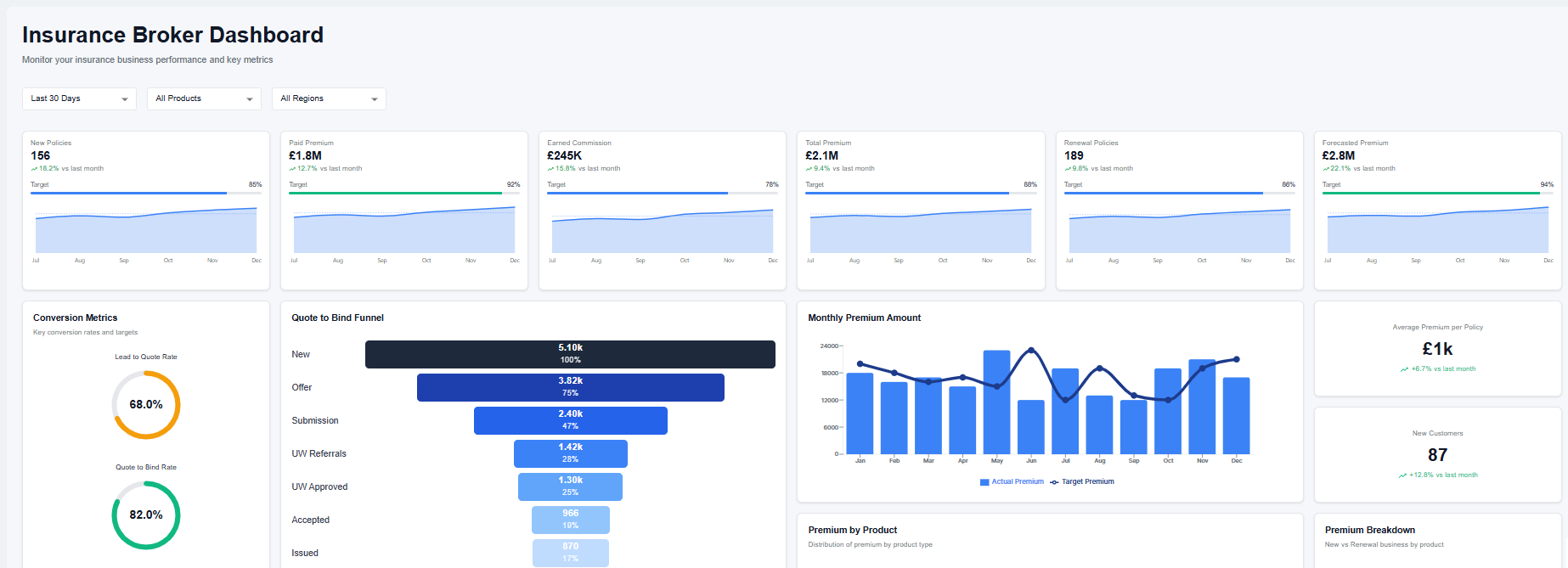
Insurance Dashboard Enabled Automatically
The Insurance Dashboard is now enabled automatically when the Insurance Servicing package is installed. No manual configuration is required, providing immediate access to the dashboard upon installation.
Data Core Sync
You can now automatically send record data to the Data Core. When a process is triggered, the system captures the specific record and its current stage, then processes it in the background to ensure the Data Core is updated.
What you need to do
To control this feature, you must update the BO_ActivateDataCoreSync system parameter:
- Set to 1: Enables the automatic sync. The system will process and send data for your records.
- Set to 0: Disables the sync. No data will be sent to the Data Core.
Automated Zero-Amount Invoice Settlement
You can now automatically settle invoices with a zero balance, ensuring your billing cycles remain accurate without manual intervention.
-
Automated Compensation: The system now identifies invoices where positive and negative installments result in a zero total and automatically marks them as paid using a new "Compensation" payment type.
-
Prevent Lapsing: You no longer need to worry about wrongful policy suspensions or lapses caused by unallocated zero-amount invoices.
-
Enhanced Data Integrity: Developers can leverage updated SQL procedures and business logic services that handle these allocations at the database level, ensuring consistent state across the Statement entity.
-
Controlled Management: You will find the "Remove" button disabled for these system-generated compensation payments to maintain a reliable audit trail.
Mandatory Changes
Insured object JSON
FintechOS is transitioning to a JSON‑based model for storing insured object data. All policy generation and alteration processes now rely on this structure. The legacy insured object extensions and mapping entities in Product Admin Configuration are deprecated.
Key Changes and Guidelines
-
Policies generated using policygenerationapiv2 now support the insured object JSON format.
-
Product formulas must reference only keys defined in the insuredObject. You can add the name of the parameter in formula input or the name of the lexicon term. Both options work. The system automatically includes:
-
paymentFrequency, paymentType, validity, validityType, and each coverage’s insured amount inCoverageName_IndemnityLimitformat. -
these keys must not already exist in the object definition.
-
-
Insured object mapping and data mapping configuration steps are no longer required in Product Admin Configurator.
-
MTAs use all keys from insuredObject, along with the default keys (
paymentFrequency, paymentType, validity, validityType) and all insured amount keys in theCoverageName_IndemnityLimitformat, and all of these are sent automatically. -
MTAs that are changing insured object properties should work with Json attribute.
-
In the ChangeInsuredObject MTA, selecting Specific Form by Product moves form configuration to Product Admin Configuration (PAC).
-
Any custom form in PAC can include its own validations. The MTA opens the insured object from the cloned policy version when that form is used.
-
All custom scripts/libraries that are searching properties of the insured object should be changed to search the values in JSON attribute.
-
Custom forms must include Discard and Validate buttons.
Deprecated Components
The following legacy entities and mappings are decommissioned:
FTOS_INSQB_InsuredObjectHealthFTOS_INSQB_InsuredObjectPersonFTOS_INSQB_InsuredObjectPropertyFTOS_IP_InsuredObjectMappingFTOS_IP_InsuredObjectTypeDimension
Data model changes
-
Quote Data Updates: Update all custom forms, views, scripts, and libraries that interact with the quote admin data structure to ensure compatibility with the new format.
Feature
Old Data Model
New Data Model
Offer Structure Offer items sit directly under QuoteAdminOffer.Offers are grouped by insured object, with products tracked per object combination. Granularity Limitation: No dedicated insured object layer within the offer structure. Improvement: Adds a specific layer for insured objects and products before reaching offer items. 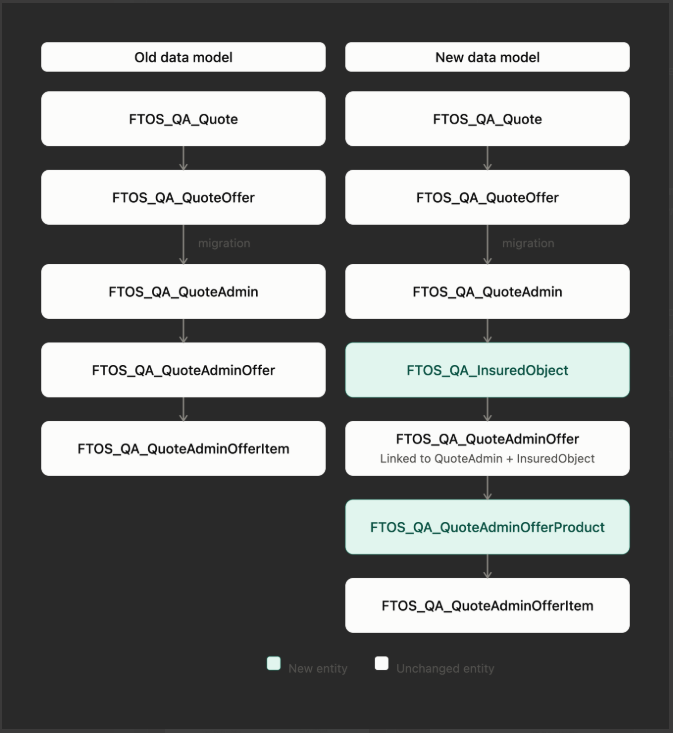
-
Policy Data Updates: Adapt all custom forms, views, scripts, and libraries that read or save data to the policy data structure to align with the new requirements.
Feature
Old Data Model
New Data Model
Coverage Structure Coverage history is stored in CoveredItemlinked toPolicyInsuranceItem.CoveredItemstores policy-level details, while a new relationship table links coverages to specific insured objects.Key Improvement Limitation: Lacked an explicit N:N layer for coverage-to-object combinations or validity intervals. Benefit: Adds coverage validity per insured object using StartDateandEndDateon the new relationship entity.Master Policy & Payments Master policy, links, installments, and payment schedules are kept separately. No Change: These elements remain structurally the same as the old model.
New forms
-
Menu and Form Configuration: Policy Admin includes new menus and forms by default; if you wish to retain your existing versions, you must manually reconfigure them under FintechOS Studio > Menu Items.