FintechOS Platform 24.3.2
May 29th, 2025
This release brings security and performance updates as well as multiple enhancements to Journey Designer, Product Factory, and platform features.
Mandatory Changes
bindingName Parameter Removed from importWebApiClient
The bindingName input parameter has been removed from the importWebApiClient Server SDK function, as WSDL library support has been discontinued in version 24.
Deprecated Entity Versioning
Entity versioning has been enhanced with expanded capabilities and a simplified configuration process. For details, see Record Cloning and Simplified Record Versioning. The legacy entity versioning is still available for backward compatibility, but is not compatible with the new versioning mechanism.
Phone Placeholder UI Templates Parameter Rename
The preferredCountries parameter for phone placeholder UI templates has been renamed to countryOrder, allowing you to define both the country formats displayed at the top of the list and their display order. For details, see Enhanced Phone Placeholder UI Templates.
Mandatory Library Import for the dxDataGrid UI Component
When using the dxDataGrid DevExtreme widget, if you wish to enable the export functionality, you must import the dxDataGridExportReferences library. For more information, see the FintechOS Studio documentation.
What's New
Journey Designer
Services Orchestration
The new Services Orchestration service type allows you to coordinate and integrate multiple components (such as back-office services, core systems, external service providers, and tasks) to deliver a specific business outcome.
Each orchestration service contains a sub-flow representing the full orchestration logic, but appears as a single element on the Journey Designer canvas.
For more information, see the FintechOS Studio documentation.
Data Domain
The Data Domain allows modeling of client-side context data used by the Presenter Component through configurable Technical Variables and Data Entities.
For more information, see the FintechOS Studio documentation.
Drag-and-Drop Support for Entire Flow Branches
Journey elements now include two grab handles above each element: one for moving the individual element and another for moving the entire sub-flow between that element and the end of the current stage.
When moving decision elements, the decision node is detached from its original location and reattached at the new position along the If navigation path. The Else and Else If branches remain connected to the decision node and are moved along with it.
Simplified Navigation Paths Management for Decision Elements
You can now easily reorder navigation paths within a decision element using the grab handles on the left of each path. Simply drag the paths in the desired position (top for If, bottom for Else, or in-between for Else If). Reordering the navigation paths also enhances control over the logic flow, since only Else If paths can be deleted and only Else paths can be linked to other decision elements.
For more information, see the FintechOS Studio documentation.
Quality of Life Improvements
- Elements' padding is now more consistent during hover, ensuring that text and icons remain centered.
- The font weight on tool tips is now more consistent.
- When adding an integration, the name of the integration is now displayed next to the integration logo, replacing the generic term Integration.
- The error message icon (!) is now aligned inline with the error message text.
- In the journey settings, the Actor input field is now a dropdown list instead of a text box.
- Stages that are left empty (e.g.: after moving all their elements) are no longer deleted automatically.
- The search bar design has been streamlined, with updates to the search icon's vertical alignment and the search drop-down's width and padding.
- When attempting to update a journey that has been modified by a different user, a warning message is displayed and the user is not allowed to edit the outdated journey.
- The background for the specifications drawer has been changed from gray to white to ensure consistency with other UI elements.
Product Factory
New Built-in Product Templates
The following product templates are now available out-of-the box in the Product Designer:
- Commercial CMR - Insurance policy for motor fleet owners that provides liability coverage for cargo loss or damage under the rules of the CMR convention.
- Personal Secured Loan - A personal loan secured by collateral, such as one or more guarantees, pledged until repayment.
- Personal Bike Insurance - Insurance policy for bicycle owners, protecting against risks such as theft, damage, and usage-related losses.
Enhanced Product Formula Management and Synchronization
Product formulas are now linked to their parent products, enabling:
- Automatic association with the correct product when importing the formula on a target environment.
- Synchronized states between formulas and their parent products.
- Automatic deletion of formulas when the associated product or product version is removed.
Advanced Product Formulas
For complex calculations, you can now use the formula editor to define product formulas that go beyond the basic expressions available in the product templates. This allows you to take advantage of the advanced business formulas capabilities, such as multi-step logic, built-in functions, recursion, and the ability to test formulas across various scenarios.
You can also:
- Start with a basic product formula in the product template interface and refine it further in advanced mode.
- Reuse product formulas within the same product.
- Clone business formulas, allowing you to build formula templates that you can customize for different products.
For more information, see the FintechOS Studio documentation.
Object and Array Data Types Support in Lexicon Terms
Lexicon terms support new object and array data types, enhancing data modeling for banking and insurance domain terms. The following data types have been added:
- Object – Structured data item with key-value field pairs.
- Numeric Array – List of numeric values.
- Object Array – List of objects.
- Text Array – List of alphanumeric strings.
For more information, see the FintechOS Studio documentation.
Lexicon Terms Classification
Lexicon terms now have a Data Category attribute which allows you to select a classification for the type of data that the lexicon term is modeling (personal information, digital and behavioral data, legal representatives, employment and financial information, etc.).
Custom Product Templates Enhancements
The following improvements have been made to custom product templates:
- Reorder sections in insurance product templates - You can now reorder the sections in an insurance product template (with the exception of the Main Info section which is always the first).
- Restrict the removal of critical sections from banking product templates - The Interest, Fees, and Underwriting sections can no longer be removed from banking product templates.
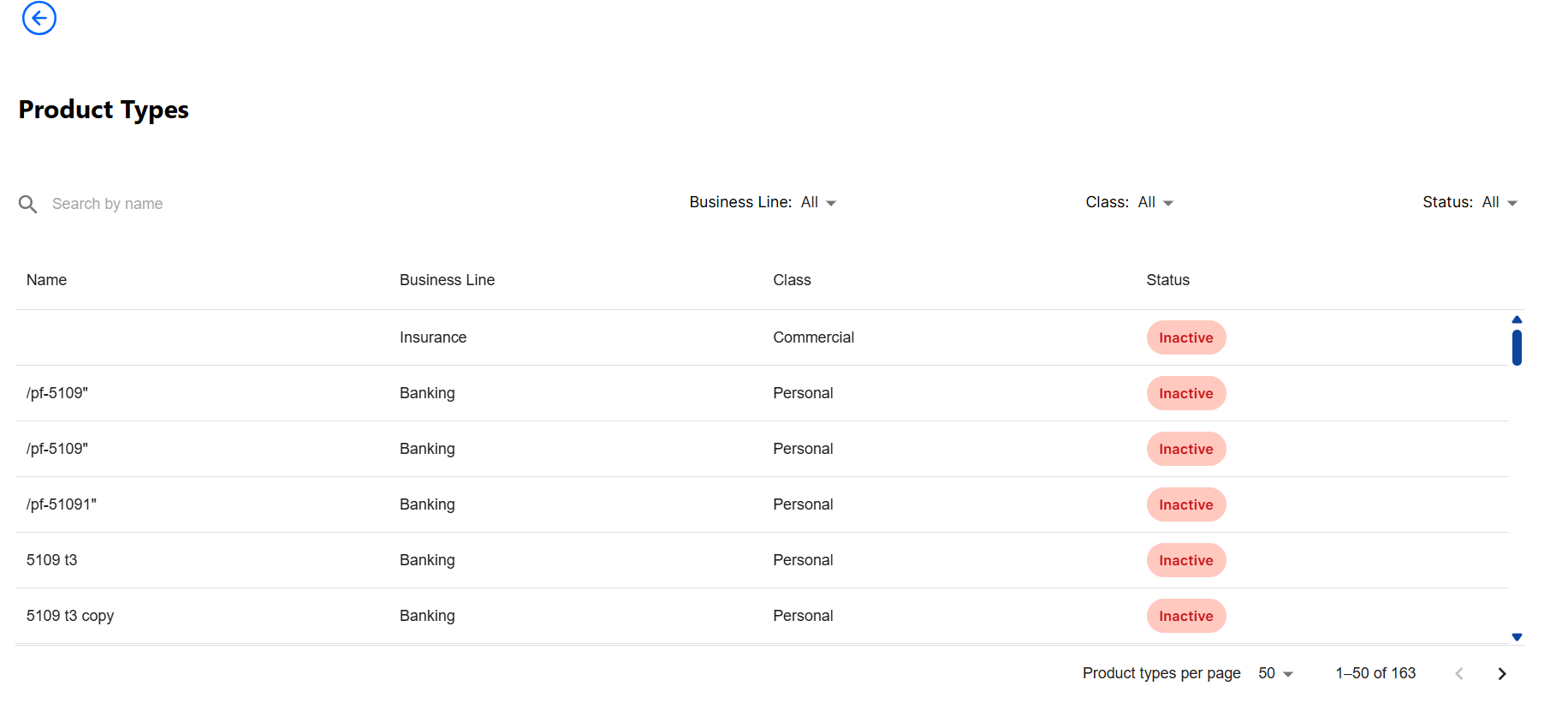
- Advanced filtering by product type - The Product Types screen now includes filters for Business Line and Class, allowing more precise product filtering.
More Robust Exports/Imports
The export/import context has been expanded to automatically handle key dependencies:
- Lexicon Term Exports now include associated product types, ensuring the relevant product types are automatically created or updated on the target environment.
- Product Exports now include related system formulas, option sets, and option set items, ensuring these dependencies are also created or updated automatically on the target environment.
These improvements eliminate the need to manually organize dependencies into dedicated digital solution packages and reduce the risk of import errors.
Products exported in versions prior to 24.3.2 cannot be imported onto 24.3.2 environments.
Product Factory API V2
The V2 relese of the Product Factory API brings several structural and functional enhancements, including:
- Standardized request format for product pricing - Product pricing has been split into dedicated pricing endpoints for banking products and insurance products. Input fields are aligned across both business lines to ensure consistency and simplify integration.
- Updated input formats for offer pricing requests
- The new offer pricing endpoint has a simplified input format with distinct fields tailored for banking products and insurance products respectively. The
audienceinput field is now dynamic, supporting customer-specific attributes (e.g.: age, income) that may affect the pricing. - A new API to retrieve data about multiple products
- You can now use the retrieve a list of products endpoint to get data about multiple products with a single API call. Each product entry in the response includes a
linkfield that points to its respective single-product retrieve endpoint. - Revised input formats for offer eligibility and underwriting - The new offer underwriting and offer eligibility endpoints have a simplified input format, with distinct fields tailored for banking products and insurance products respectively.
- Unified structure for product eligibility and underwriting - Product evaluations have been split into dedicated endpoints for underwriting rules for an insurance product, underwriting rules for a banking product, eligibility rules for an insurance product, and eligibility rules for a banking product. All endpoints use consistent input structures across business lines.
- Granular per-product parameters in offer evaluation - The new offer underwriting and offer eligibility endpoints accept inputs for amount, period, or custom inputs for each included product. These settings were previously supported only at the offer level.
- Consistent response formats across product and offer APIs - The response formats for endpoints such as banking product pricing, insurance product pricing, offer pricing, underwriting rules for an insurance product, underwriting rules for a banking product, eligibility rules for an insurance product, and eligibility rules for a banking product have been streamlined to ease integration and reduce implementation confusion. Some of the changes include:
- Removing the
isSuccessflag as it was inconsistently implemented and redundant in some of the endpoints (always true in product pricing APIs, duplicating the HttpStatusCode functionality, etc.). - Separate response formats for banking and insurance product pricing.
- Offer pricing responses adapted to include per-product pricing data, aligned with the product pricing APIs.
- Removing the
- Extended reference date support: All pricing, underwriting, and eligibility endpoints include a
referenceDateinput parameter. This enables retrieval of historically accurate responses based on the version of products, offers, formulas, datasets, and other dependencies active on the specified date. - Improved validations and error handling - The pricing, underwriting, and eligibility endpoints have better inputs validations and provide more meaningful error messages when those validations fail.
The original Product Factory APIs are still available. You can distinguish between V1 and V2 endpoints by their respective path segments (v1 or v2). E.g.:
- V1:
https://example.com/pfapi/api/v1/product/offer/{offerId}/underwriting - V2:
https://example.com/pfapi/api/v2/products/banking/{identifier}/pricing
Plan-Level Dimensions Included in Offer Pricing API
The Get offer pricing calculation API now returns an itemDimensions field, retrieving all plan-level dimensions for every coverage and subcoverage (customized or default). This provides full context for each card's pricing logic, including coverage related dimension customizations. Previously, the API returned only per-card pricing without dimension details.
Record Cloning and Simplified Record Versioning
Record management has been enhanced with the addition of record cloning and a streamlined versioning mechanism:
- Entity records can now be cloned. This helps eliminate redundant data entry, facilitates reuse of templates with pre-filled attributes, and enables replication of data for testing, training, and demos.
- A new record versioning mechanism has been introduced with simplified configuration. For more information, see the FintechOS Studio documentation.
Both cloning and versioning support custom suffixes for the primary key of the resulting records and are triggered via Server SDK methods: ftos.data.clone and ftos.data.version respectively. Legacy entity versioning is now deprecated, but remains available for backward compatibility.
Cloning Business Data Sets and Formula Inputs
In addition to business formulas, you can now clone business data sets and formula inputs. This enables you to use existing data sets or formula inputs as templates for related use cases.
Enhanced Phone Placeholder UI Templates
The phone placeholder UI templates have been updated to support filtering by connection type (landline vs. mobile) and to allow custom ordering of preferred country formats.
- A new
validationNumberTypeoption allows filtering by phone number type. Supported values are: "FIXED_LINE", "MOBILE", and "FIXED_LINE_OR_MOBILE". - The
preferredCountriesparameter has been replaced with a new parameter calledcountryOrder, which allows you to define both the country formats displayed at the top of the list and their display order.
For more information, see the FintechOS Studio documentation.
Toggle Switch Controls for Boolean Attributes
In the UI Designer, you can now display non-mockup boolean attributes using either the default checkbox or a new customizable toggle switch. The switch supports customizations for the label, description, on/off state text, and localization. For more information, see the FintechOS Studio documentation.
FintechOS Studio Quality of Life Improvements
Several enhancements that streamline common tasks and improve the user experience have been added to FintechOS Studio:
- When creating attributes, a display name is now automatically suggested based on the attribute name.
- The code editor for server automation script libraries now utilizes the full width of the window, improving code visibility.
- The default status for newly created entities is now set to Active.
SDK: Change the UI Localization
You can now change the user interface localization programmatically from both client-side and server-side scripts:
- Client SDK - Use the ebs.changeCulture function to change the localization.
- Server SDK - Use the ftos.identity.users.changeCulture function to change the localization.
Improved Export/Import for Business Formulas
Digital solution packages have been updated to improve the handling of business formulas during export and import:
- Only the latest active versions of the formulas are exported.
- Before exporting, each formula can be configured to be either activated (default) or imported as draft on the destination environment.
These improvements streamline the process and minimize conflicts when transferring business formulas between environments. For more information, see the FintechOS Studio documentation.
Improved Dependency Cleanup When Deleting Form-Driven Flows
Deleting a form driven flow now removes both the flow and its steps from the parent digital asset. Previously, the steps remained in the parent digital asset as orphaned configuration items, causing errors when attempting to export the digital asset.
Configurable Request/Response Data Rate Limits
Two new keys have been added to the Configuration Manager, to allow customization of the minimum data rate for request and response bodies:
minRequestBodyDataRateBytes- Minimum allowed request body data rate in bytes/second. Default: 240. Set to 0 to disable the limit.-
minResponseBodyDataRateBytes- Minimum allowed response body data rate in bytes/second. Default: 240. Set to 0 to disable the limit.
Timeout Support Added to importWebApiClient
The importWebApiClient Server SDK function now includes a timeoutSeconds parameter, which allows you to configure a maximum duration before the HTTP request expires.
Code Editor Improvements
-
After the Code Editor is enabled through the Configuration Manager, users with the Developer security role can now disable the code editor on a specific environment. To do so, log into Studio, go to the user profile, and check the Disable External Editor option. Read more in the documentation.
-
Furthermore, file syncing performance has been significantly improved for a faster and more efficient experience.
-
Starting with this version, use the
feature-external-editor-allow-form-html-template-editingkey in Configuration Manager > studio > app-features, to restrict saving Entity forms, App data forms (tabs), or Form driven flows (wizard), in the Code Editor. Enable the key to allow editing with the Code Editor.
Packages Enhancements
-
When uploading a digital solution package, files with the same name are not used on different Portals, as only the most recently copied file will be retained. To illustrate this, the user instructions on the Custom Files tab of Digital Assets were updated.
-
After import scripts are now automatically run if you add the
after-import-folderparameter in the FtosSysPackageDeployer configuration files. Find more information about this in the documentation. -
The new DigitalSolutionPackageMaxSizeInMB key allows only digital solution packages with a size of up to 50MB to be imported to an environment. In the Configuration Manager you can change this restriction and add a different size for packages.
-
The product code is displayed in the list of Products when creating a digital asset. This makes it easier to differentiate between products available on the environment and the ones that you want to include in the digital asset you are creating.
Generate Endpoints for Business Service Components
We've also added the possibility to generate an endpoint for export functions part of routes section in a business service component. Endpoints can be generated for each export function in the routes component, but keep in mind that you need to regenerate the endpoint if you make changes to said function. Check the documentation for more info.
Furthermore, when creating a new endpoint, you now have the option to link it directly to a business service component's route's section, specify it's input parameters and output structure.
SDK Methods Improvements
-
Emails can be sent through SMTP via the Jobserver. To do so, some settings must be made in the Configuration Manager.
-
The new client side SDK method ebs.callRouteAsync Executes via POST a business service component route asynchronously and returns a promise with a JSON result or an error.
-
Starting with 24.3.2, the ftos.backOffice.flows.close method has a new version without the
appDataFormIdparameter. -
A fatal error is no longer triggered when using the ftos.files.getTabularData server SDK function on an empty file. Instead, it returns an empty WorkflowTabularData.
Notifications for Operations
For receiving notifications for operations such as scheduled jobs, you must now go to Configuration Manager and configure the EmailTo and EmailCC fields.
Fixed Issues
| No. | Summary |
|---|---|
| 61464 | Intellisense is now available for form data in the Code Editor. |
| 62049 | In document-type reports, renaming the destination file to a name that included the original filename as a substring (e.g., renaming myFile to myFile2) caused the report generation to fail. |
| 64904 | Using a date-time field to filter a view only by date caused errors. When users entered a date without a time, the system attempted to convert it from DD/MM/YYYY to MM/DD/YYYY format. This resulted in errors, such as incorrect date filtering due to swapped day and month values or rejection of day numbers greater than 12. |
| 68872 | Web API client library imports failed when when processing OpenAPI schemas that used the oneOf construct. |
| 69355 | The ebs.getCurrentEntityData function returned date-time data types for date attributes. |
| 70153 | The phone placeholder UI templates settings for the default country and preferred countries did not work as expected, and were causing incorrect phone numbers to be displayed. |
| 70493 | The FintechOS Portal menu items did not refresh immediately after changing the language, resulting in a delay or failure to update to the selected localization. |
| 71230 |
Fixed an issue that prevented deployment package components from being displayed in Studio. |
| 71338 | On single step form driven flows with no custom navigation rules, the Next button did not transition the flow from insert mode to the edit mode. |
| 71569 | Analytics data sources based on SQL stored procedures caused data source parameters that were not marked as mandatory to behave as mandatory when generating the report. |
| 72111, 72456 | Using an entity view UI element to populate an entity different from the form's base entity (e.g., using the Insert button to populate a referencing entity) caused the Back button to bypass the form's editing history and return to the prior screen, exiting the form. |
| 72305 | Fixed an issue where attempting to check out a different JS file under the same Business Service Component after saving changes would result in an error message. You no longer need to resync to switch between files. |
| 72447 | Calling ebs.callReportByName on certain documents triggered a System.InvalidOperationException with the message "Content positions need to belong to the same document!". |
| 72505 | System jobs can now be deactivated from sealed digital assets by navigating to Studio > Main Menu > Scheduled Jobs. In the grid, untick the box next to the scheduled job in the Enabled column. |
| 72524 | Fixed an issue where, on the login screen, mismatched password fields displayed improper red icons. Now, the fields are properly rendered. |
| 72832, 73235 | When retrieving data for past product/offer versions (via the referenceDate parameter), Product APIs did not resolve all the historically accurate dependencies that were active at the specified date (such as product versions within offers, or formulas/datasets versions within products).The issue has been resolved with the introduction of Product Factory API V2, which has extended and improved reference date support. |
| 73052, 76169 | Bold styling in document templates did not work as expected. |
| 73205 | The phone placeholder UI templates incorrectly removed leading zeros on certain phone numbers, resulting in failed validations. |
| 73355 | After deleting a form driven flow, its steps remained attached as configuration items to the parent digital asset, causing errors when attempting to export the digital asset. |
| 73367 | Fixed an issue that prevented deploying assets containing DB objects with UTF-8 characters. |
| 73373, 73392 | The ebs.getCurrentEntityData Client SDK method did not return the correct data after inserting new data in the entity's extensions. |
| 73376 | A save changes warning was incorrectly triggered when clicking Back on forms with populated entity extension attributes, even if no modifications had been made. |
| 73389 | After a form transitioned from the insert mode to the edit mode, the Back button reverted the form to the insert mode instead of redirecting to the previous context. |
| 75071 | Fixed an issue that occurred when the HTTP response returned a raw PDF file instead of a base64 string, causing the uploadFile function to fail when uploading the file. |
| 75900 | When displaying tabular data using the dxDataGrid DevExtreme widget, the export functionality did not work. For information about the fix, see Mandatory Library Import for the dxDataGrid UI Component. |
| 75979 | Toast message warnings for invalid or out-of-range dates were not displayed. |
| 76383 | The minimum request body data rate limits were causing intermittent request errors in production environments. For information about the fix, see Configurable Request/Response Data Rate Limits. |
| N/A | Improved error message when moving one configuration item to another asset within the same solution and attempting to deploy the containing solution. |