Transactions Values For Accounting Entries
If you want to search for existing transactions or create new ones, use the Transactions Values For Accounting Entries menu, which holds the header items of a transaction. The Operation Transaction entity stores all the transaction data from the ledger. The transaction value types represent the details saved into the Operation Transaction Value section.
Creating Operation Transactions
-
In FintechOS Portal, click the main menu > Ledger > Operational Ledger > Transactions Values For Accounting Entries.
-
Double click an item to open the operation transaction.
-
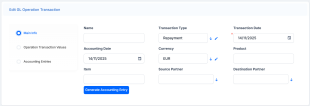
In the Main Info tab, fill in the following fields:
-
Name: Enter the name of the transaction.
-
Transaction Type: Select the type of the transaction.
-
Transaction Date: Select the transaction date.
-
Accounting Date: Enter the accounting date.
-
Currency: Select the currency of the accounting entry line.
-
Product: Enter the product of the transaction.
-
Item: Enter the transaction item.
-
Source Partner: Select the source partner.
-
Destination Partner: Select the destination partner.
To automatically generate accounting entries, click the Generate Accounting Entries button. The accounting entries generated are shown in the Accounting Entries section.
-
-
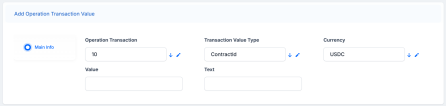
You can customize the details of each transaction in the Operation Transaction Values section. Store the detailed items of a transaction in the Operation Transaction Values section. To add a new operation transaction value, click the Insert button. Fill in the following fields:
-
Operation Transaction: Select the operation transaction ID.
-
Transaction Value Type: Select the value type of the transaction.
-
Currency: Enter the currency of the accounting entry line.
-
Value: Enter the value of the transaction.
-
Text: Enter the description of the transaction.
-
-
The Accounting Entries tab holds the accounting entries of an operation transaction value. From here, you can add, delete, or export accounting entries. For more information on creating accounting entries, see Accounting Entry.

