Accounting Entries
Manage the accounting entries generated from the operation transaction and the operation transaction value records in the Accounting Entries menu.
Creating Accounting Entries
-
In FintechOS Portal, click the main menu > Ledger > Operational Ledger > Accounting Entries.
-
Click the Insert button to create an accounting entry.
-
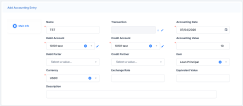
Fill in the following fields:
-
Name: Enter the name of the entry.
-
Accounting Date: Enter the date of the accounting entry line.
-
Debit Account: Select the debit account.
-
Credit Account: Select the credit account.
-
Accounting Value: Enter the value of the entry.
- Debit Partner: Select the debit partner.
-
Credit Partner: Select the credit partner.
-
Item: Select the accounting registration item.
- Currency: Select the currency of the accounting entry line.
-
Exchange Rate: Enter the exchange rate of the accounting entry line.
-
Equivalent Value: Enter the value after the exchange rate has been applied.
-
Description: Enter the description of the accounting entry.
-
-
Click the Save and close button.

You can add, delete, or export accounting entries.