Settings Dashboard
This dashboard is available to the System Administrators and it contains widgets with configurations for:
- Payment Types
- Budget Document Types
- IB Financial Limits
- IB Currency Extensions
- Instant Payment Error Codes
- GDPR Anonymization
- Message Queues
- Payments Queue.
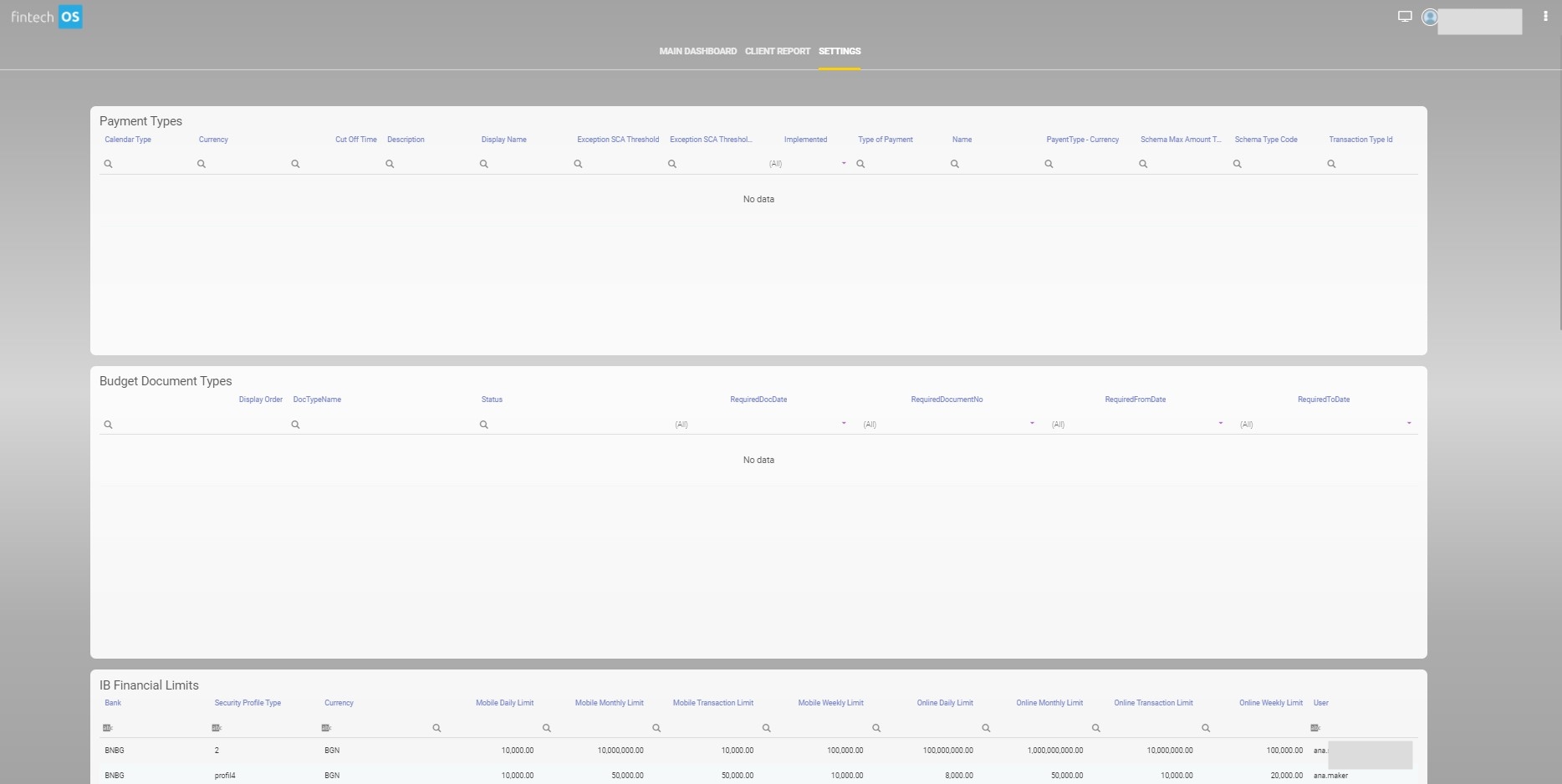
Payment Types
This widget contains the settings for the payment types that are supported:
- Calendar Type
- Currency Cutoff time
- Description
- Display Name
- Exception SCA Treshhold
- Implemented
- isInstant
- Type of Payment
- Name
- Payment System
- PayentType-Currency
- Schema Max Amount Threshold
- Schema Max Amount Threshold Currency
- Schema Type Code
- Transaction Type ID
Editing a Payment Type
To edit a payment type, double-click on one of the records from the widget to open the Edit Payment Type page.
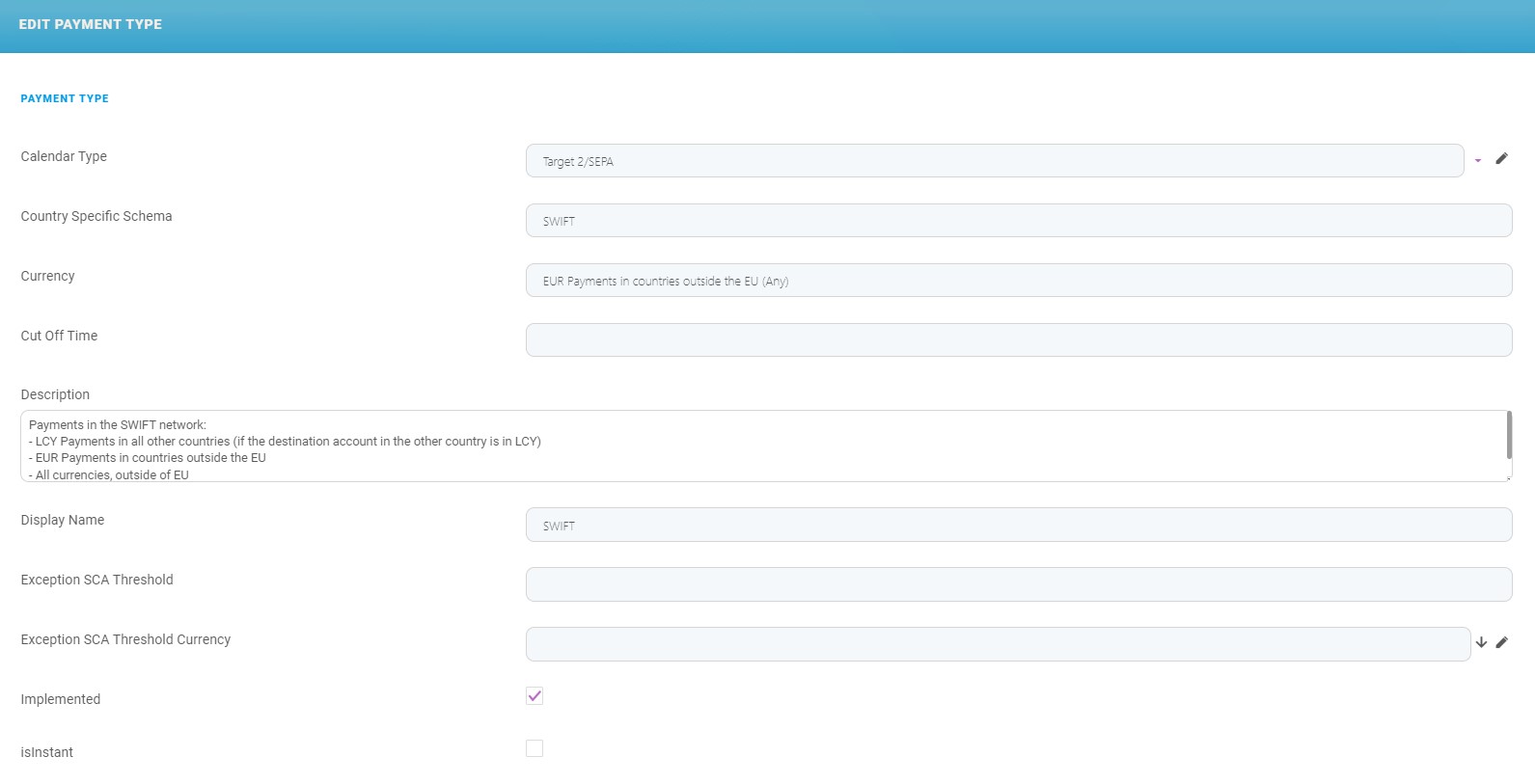
Edit the following fields:
| Field | Description | Example |
|---|---|---|
| Calendar Type |
Select from the drop-down list name of the calendar:
|
Target 2/SEPA |
| Country Specific Schema | Insert the name. | SWIFT |
| Currency | Insert the currency. | EUR Payments in countries outside the EU (Any) |
| Cut Off Time | Insert the time when the payment gets cut off. | 18:00:00 |
| Description | Insert a suggestive description of the payment type. |
Payments in the SWIFT network:
|
| Display Name | Insert the name displayed in the user interface. | SWIFT |
| Exception SCA Threshold | ||
| Exception SCA Threshold Currency | Insert the currency. | |
| Implemented | If the type is effectuated, then tick the checkbox. | false |
| isInstant | If the type of payment is instant, i.e., it is not placed in a queue, then tick this checkbox. | false |
| Type of Payment | Insert the full name of the payment. | Non-SEPA SWIFT Payments |
| Name | A | |
| Payment System | Insert the name of the system that is used. | SWIFT |
| PayentType - Currency | Insert the currency. | EUR Payments in countries outside the EU |
| Re-Try in Queue | Tick this checkbox, if for this payment, the system re-tries to execute the payment from the queue. | true |
| Schema Max Amount Threshold | ||
| Schema Max Amount Threshold Currency | Select from the option set the currency. | |
| Schema Type Code | Insert the code of the schema. | A01 |
| Transaction Type Id |
Select from the list the type:
|
Foreign Currency Payments |
These fields are followed by the grids:
- INSTANT PAYMENT ERROR CODES
- PAYMENT CATEGORIES
- PAYMENTFIELDLENGTH
- PAYMENTS (list with all the payments executed that belong to this type)
- FTOS_IB_PYMTTYPECURRENCIES
- FTOS_IB_TEMPLATES (list with the templates that belong to this type)
Click the Save and Close button to return to the Settings dashboard.
Budget Document Types
The widget contains the columns:
- Display Order
- DocTypeName
- Status
- RequiredDocDate
- RequiredDocumentNo
- RequiredFromDate
- RequiredToDate.
The existing document types are:
- Declaration Active
- Revision act Active
- Penal decree Active
- Advance payment Active
- Tax lot number of the property Active
- Decree for compulsory collection Active
- Other Active.
To edit one of the existing documents, double-click one and the page EDIT FTOS_IB_BGBUDGETDOCUMENTTYPES is displayed.
| Field | Description |
|---|---|
| Display Order | Insert the number for ordering. |
| DocTypeName | Insert the name for the document. |
| name | Insert the name. |
| RequiredDocDate | Tick thus checkbox if the document has a required date. |
| RequiredDocumentNo | Tick thus checkbox if the document has a required number. |
| RequiredFromDate | Tick thus checkbox if the document has a required from date. |
| RequiredToDate | Tick thus checkbox if the document has a required to date. |
Click the Save and close button.
IB Financial Limits
This widget contains the limit profiles for the users with the columns:
- Bank
- Security Profile Type
- Currency
- Mobile Daily Limit
- Mobile Monthly Limit
- Mobile Transaction Limit
- Mobile Weekly Limit
- Online Daily Limit
- Online Monthly Limit
- Online Transaction Limit
- Online Weekly Limit
- user.
Double-click an entry to edit the financial limit.
IB Currency Extensions
This widget contains the currencies and it is possible to mark the cutoff time for each currency. Double-click the entry, to edit a currency. The page EDIT IB CURRENCY EXTENSION is displayed. Edit the fields:
| Fields | Description | Example |
|---|---|---|
| Code | The code of the currency. | AED |
| Currency | The name of the currency. | AED |
| Cut Off Time | Insert the cut-off time. | |
| FCY Payment Allowed | Tick this checkbox to mark whether the foreign currency payment is allowed using this currency. | null |
Instant Payment Error Codes
This widget contains the error codes for instant payments with the columns Error Code and Error Message. Double-click an entry to open the EDIT INSTANT PAYMENT ERROR CODE page. To edit the existing error codes. modify the fields:
| Field | Description | Example |
|---|---|---|
| Error Code | Edit the code. | AB05 |
| Error Message | Edit the message displayed to the user. | Time out error, try again later! |
| Error Status | Edit the status. | RJCT |
| Name | Edit the name of the payment to which the error applies. | LCY Instant Payments |
| retryAction | Tick this checkbox to allow the user to retry. | false |
| Schema Type | Select the schema type for the drop-down list. | E |
GDPR Anonymization
Click this button to launch the manual request for anonymization of data that is explained in GDPR, Anonymization of Customer Data.
Message Queues
This widget displays the message queue with the columns:
To modify a message, click an entry. The EDIT MESSAGE QUEUE page is displayed. Edit the fields:
|
Fields |
Description |
|---|---|
| ToAddress |
Edit the email to whom the message is sent. |
| CC Addresses |
Edit the CC address(es). |
| BCC Addresses |
Edit the BCC address(es). |
| Subject |
Edit the subject. |
| Body |
Edit the body of the message. |
| Attachment or Drop file here |
Add the attachment here. |
| Channel Provider Params |
Add the channel provider params. |
| Communication Channel |
Add the channel from the drop-down. |
| Channel Provider |
GatewayEmailOTP |
| Start Date |
Select the start date. |
| End Date |
Select the end date. |
| Interval Min (Time UTC) | Select the minimum interval. |
| Interval Max (Time UTC) | Select the maximum interval. |
| Priority | Select the priority. |
| Retry Max Attempt | Select the maximum retry attempts to send the message. |
| Pool Time Retry (Time UTC) |
Select the pool time retry. |
| Message Status |
View the message status. |
| Channel Provider Status |
View the status. |
| Retry Attempt |
View the number of retry attempts there have been. |
| Last Attempt |
View the date of the last attempt to send the message. |
| External Id |
View the external ID. |
Click the Save and close button.
Payments Queue
This widget displays the payments queue containing the columns: Created On, Modified On, retryNo, paymentID.
Double-click an entry to view the page EDIT FTOS_IB_PAYMENTSQUEUE with the details for the queuing of a payment:
| Field | Description |
|---|---|
| Core Banking Execution Date | The date of execution of a payment. |
| CoreBanking TransactionId | The transcation ID. |
| Core Transaction Status Code | The status code. |
| details | The details about the payment. |
| Error Message | The error message of the payment. |
| From Budget Account | The source account of the payment. |
| FTOS Status | The status in the FintechOS database. |
| Is Budget | If true, then the payment is budget. |
| Is Utility | If true, then the payment is utility. |
| Name | The name of the payment. |
| paymentId | The payment ID. |
| reason | The reason why the payment failed to be executed. |
| retryNo | The number of times the system retried to execute the payment. |
| To Budget Account | The bank account number that is the source of the funds in case of budget payments. |
The grid named FTOS_IB_PAYMENTSQUEUE BUSINESS WORKFLOW TRANSITIONS displays the transitions between statuses.