Policies
The Core Policy Admin solution enables you to store and manage a virtually unlimited number of digital policies. Use Policies when you need to have an overview of the repository of policies from your environment. It is also here where you see the latest Policies generated into your system. However, for an in depth analysis of your portfolio, use Policies Report to extract the needed data.
For accessing the repository, follow the next steps:
- In your Fintech OS Portal, at the top left corner, click the main menu icon to open the drop-down.
- Click Policy Admin and then select Policies from the drop-down.
- When the Policies window opens, you can access the repository.
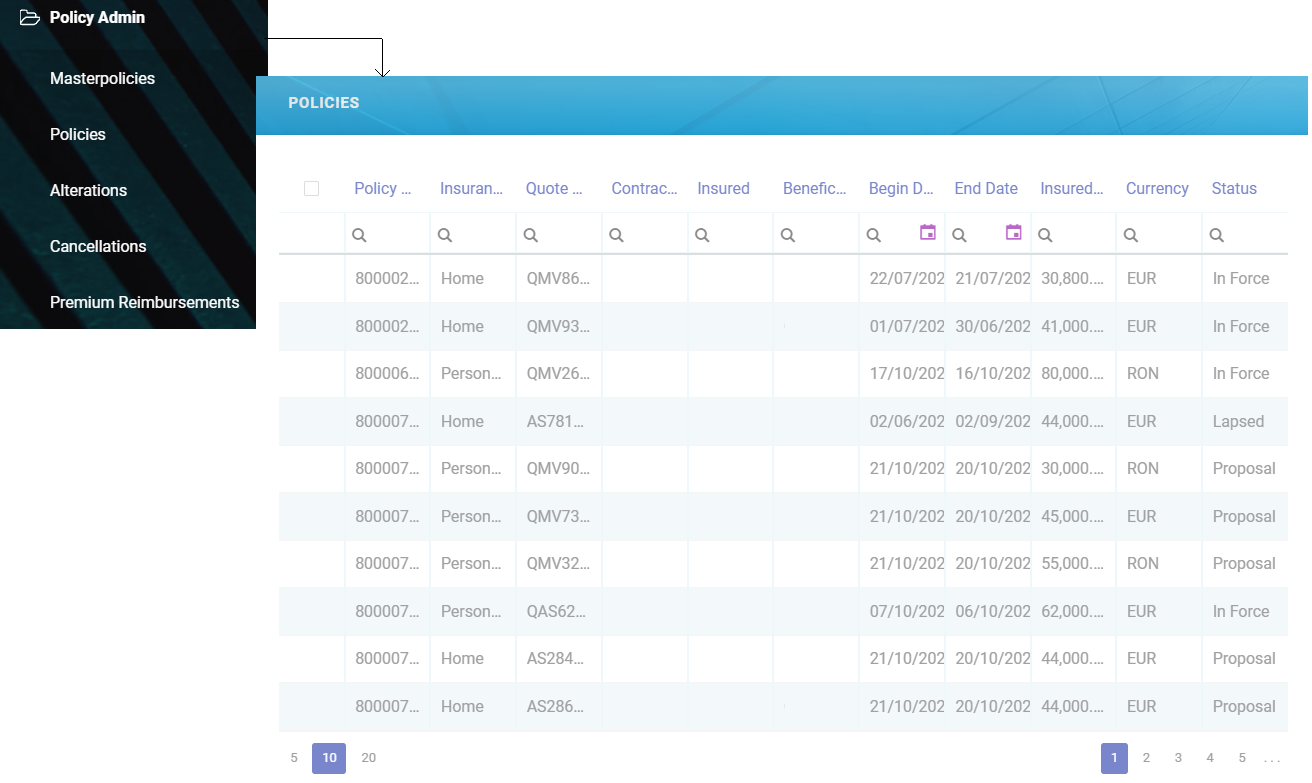
Term Life policies are also displayed in the list, once these are generated through the Policy Generation API.
 Creating a Policy
The policy issuance process represents the main Core Policy Admin functionality through which the insurance contracts are generated within the core system, laying the basis for other Core Policy Admin flows. From a business perspective, this functionality involves an end-to-end process that starts from the generation of an initial Policy through a specific endpoint, is updated through an update endpoint and then reaches the InForce status, according to the period of validity.
The policy issuance endpoint brings business value to the Core Policy Admin component by creating a connection between the core system and various external systems - such as websites, apps and other digital channels that you use in order to reach out to customers. Thus, once the integration with another system that sends in customer data is obtained, the policy is generated in the system according to the received information.
Within this endpoint, a policy generation object is structured to collect the necessary policy related information through the integration with an external system. Following the request made, the response body issues into the system the new data specific to the policy, in addition to those obtained during the data collection from a given external system.
For more details go to the Policy Generation API page.