Policies Report
The Core Policy Admin solution includes a clear-cut reporting functionality. Use Policies Reports when you need to generate reports required for business or regulatory needs. You can easily configure the reporting period and you can download the reports in Excel or CSV format.
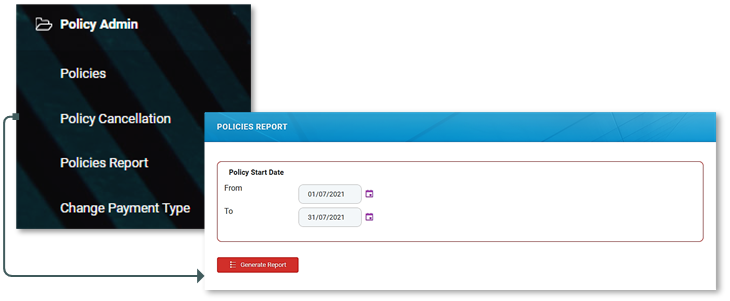
For generating reports containing policies related data, follow the next steps:
- In your Fintech OS Portal, at the top left corner, click the main menu icon to open the drop-down.
- Click Policy Admin and then select Policies Report from the drop-down.
- When the Policies Report window opens, you can see the Rapid Search menu. Here, you must use the option sets to declare a certain period of time for which to extract the policies related data.
- Press Generate Report. The window expands allowing you to have a general view over the requested data. The grid is organized as follows: Policy no, Insurance Type, Insurance Product Code, Issued Date, Policy Start Date, Policy End Date, Policy Status, Policy Currency.
- If you are satisfied with the view results, press Export Report to have all the data packed for downloading. If you are not satisfied with the results (or you just remembered that you must expand or shrink the reporting period), press New Report and start the flow again, from step 3.
- After pressing Export Report a new window opens and here, in the Name field, you can edit the title of the report, if you need to.
- Press the File link to download your data.