Business Workflows
Business workflows help organizations coordinate tasks between people and synchronize data between systems, with the ultimate goal of improving efficiency and responsiveness.
Workflow stages show the status of a record in the workflow and provide processing that must occur for the record to move to the next phase. The tasks, information or documents are passed from one status to another (from one participant to another for action) either manually or triggered by business rules or actions specified for that specific status.
 Policy Workflow
The Core Policy Admin management system allows policy operators to achieve efficiency, gain flexibility and organize their insurance policy data for analysis and operational purposes in an easy way.
Policy State Machine
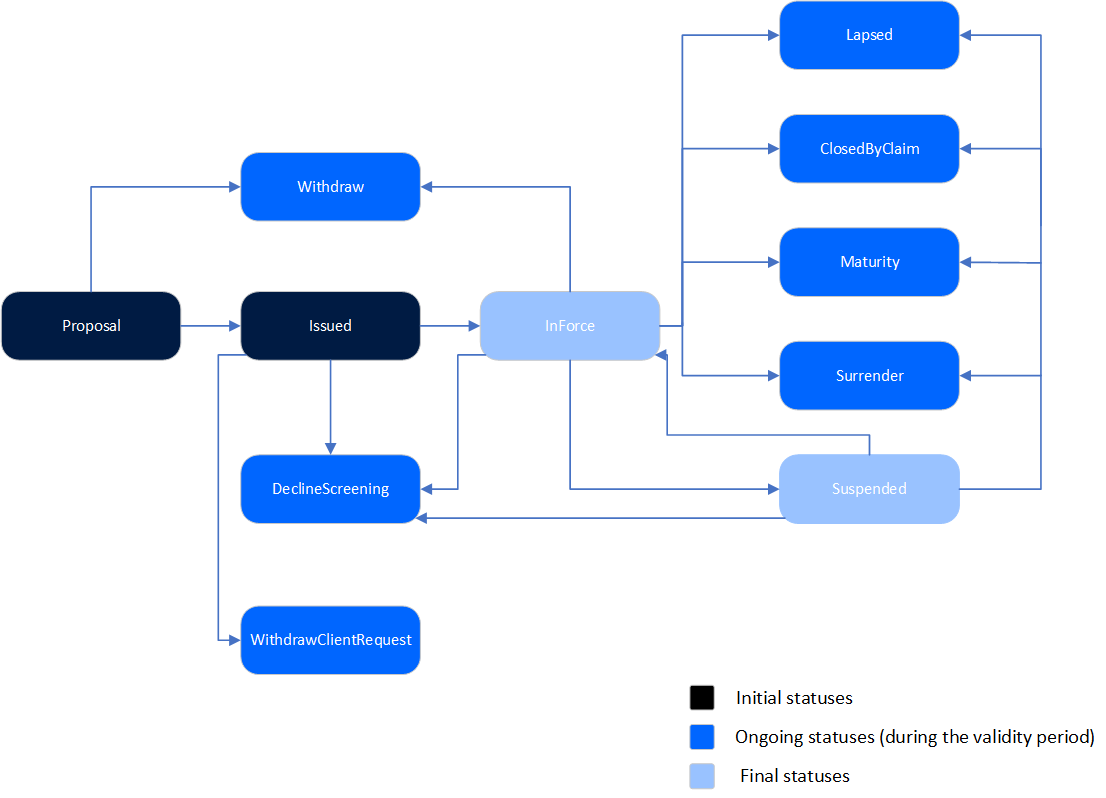
Here is a diagram with the transitions managed through the Core Policy Admin module:
Policy Statuses
The Core Policy Admin module accommodates the following business states for a policy:
| Status name |
Type |
Description |
|---|---|---|
| Proposal |
Initial |
The first status for every policy generated into the system. Can be tailored to apply to policies waiting for their first installment to be paid. |
| Issued |
Initial |
For policies that passed their first Paid premium. |
| InForce |
Ongoing |
For policies passed their Begin Date that also meet all their contract terms - for ex. current date is not the End Date of the policy, payments made on time and so on. |
| Withdraw | Final |
For policies closed before reaching the Issued status due to the following reasons: first premium not paid in a certain period following the proposal, conflicting parameter configurations between the insurance product and the policy or a system error - for ex. duplicated policy. |
| Surrendered |
Final |
For policies closed by the insurer for reasons other than those exposed in the . This status is reached through the cancellation flow only. |
| WithdrawClientRequest | Final |
For policies closed following the policy holder request. This status is reached through the cancellation flow only. |
| ClosedByClaim | Final |
For policies which exhausted their coverage to claims made by the policy holder. This status is reached through the cancellation flow only. |
| DeclineScreening | Final |
For policies being pursued by a high risk customer. This status is reached through the cancellation flow only. |
| Lapsed | Final |
For policies on which premiums were not paid, after the Payment Grace Period expired. |
| Maturity | Final | For policies passed their End Date. |
Policy Status Transitions
Here is a description of the transitions managed through the Core Policy Admin module:
| Transition | Description |
|---|---|
| _Proposal | The first status for every policy generated into the system. |
| Proposal_Issued | Automatic transition after policy generation in the system. Mention: This transition is properly used in a delivery project where the first paid installment triggers this status change. |
| Proposal_Withdraw |
Automatic transition before reaching the Issued status due to the following reasons: first premium not paid in a certain period following the proposal, conflicting parameter configurations between the insurance product and the policy or a system error - for ex. duplicated policy. This transition is triggered by FTOS_INSPA_Policy_AutomaticallyWithdraw scheduled job using the PWDAY parameter value. |
| Issued_InForce | This transition can be triggered in 2 different ways: Automatically - when the policy includes an insurance Product on which Automatic InForce is set to True, at product level, the FTOS_INSPA_Policy_IssuedToEnforced scheduled job moves the policies meeting the conditions for enforcement from Issued to InForce status. Manually - triggered by a specific request - for example Policy related endpoints, on policies that include Products with Automatic InForce set to False, at Product level. |
| Issued_DeclineScreening | Automatic transition triggered by choosing the Decline By Screening reason type, during the Cancellation flow. |
| Issued_WithdrawClientRequest | Automatic transition triggered by choosing the Withdrawal reason type, during the Cancellation flow. |
| InForce_Withdraw | Manual transition that can be made when the insurer decides that the policy needs to be cancelled and a Cancellation flow is not necessary - for example when policy duplication occurs due to operational mistakes. |
| InForce_WithdrawClientRequest | Automatic transition triggered by choosing the Withdrawal reason type, during the Cancellation flow. |
| InForce_Surrender | Automatic transition triggered by choosing the Surrender reason type, during the Cancellation flow. |
| InForce_Maturity | Automatic transition for policies that reach their contractual Policy End Date. FTOS_PA_PolicyTerminationProcess scheduled job verifies whether the condition Policy End Date is Current Date applies to the policy and triggers the status transition. After transitioning, the Core Policy Admin keeps the policy status updated. |
| InForce_Lapsed | Automatic transition for policies on which premiums were not paid for a number of days, after the Payment Grace Period expired. FTOS_PA_PolicyLapsed scheduled job verifies each policy having this condition and triggers the status transition. |
| InForce_DeclineScreening | Automatic transition triggered by choosing the Decline By Screening reason type, during the Cancellation flow. |
| InForce_ClosedByClaim | Automatic transition triggered by choosing the Closed By Claim reason type, during the Cancellation flow. |
Policy Status Transitions Map
Below is a map showing the transitions managed through the Core Policy Admin module in the FintechOS environment:
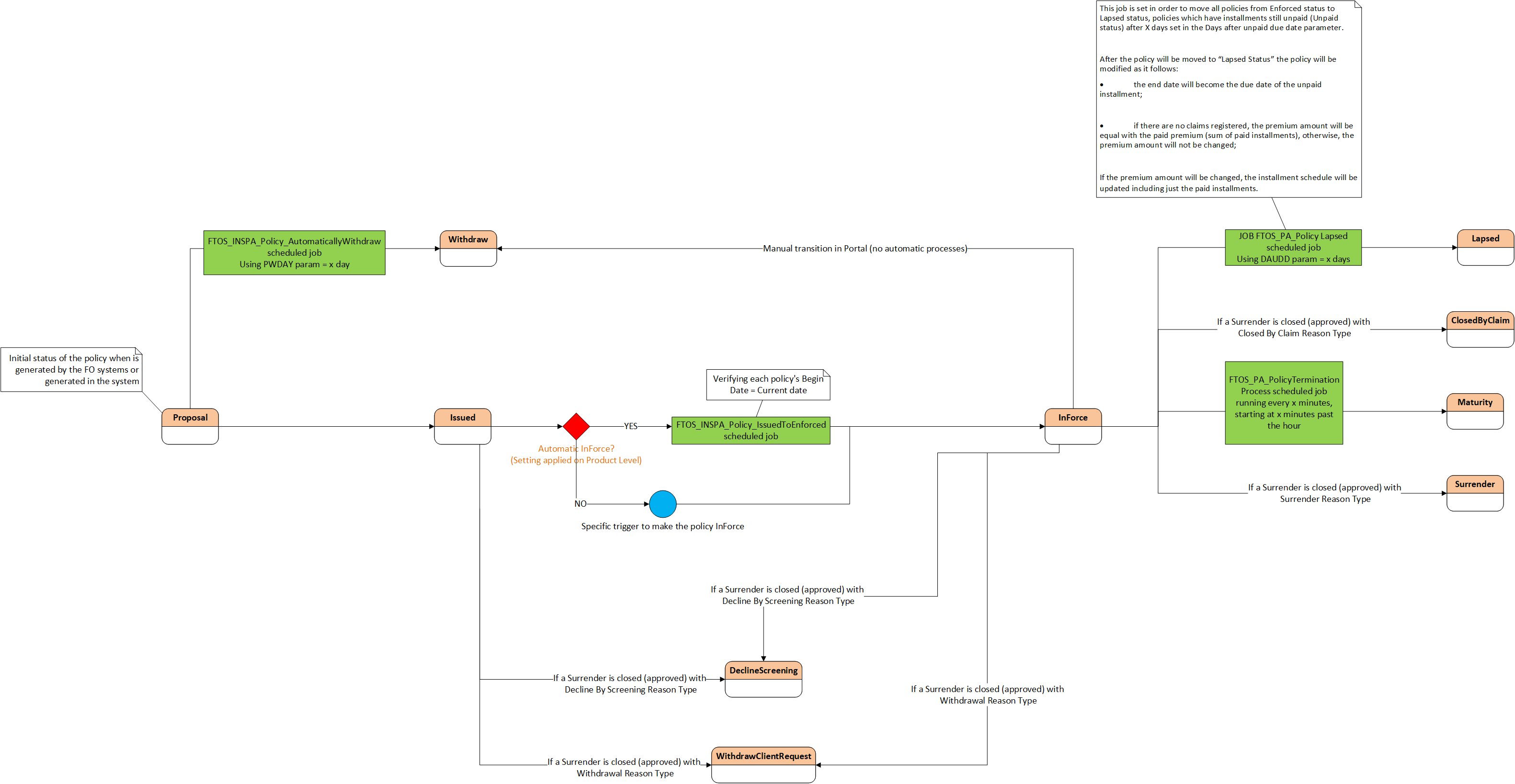
Click here to download the above diagram in Visio format (.vsdx)
Change Policy Request Business Workflow
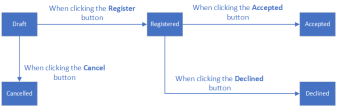
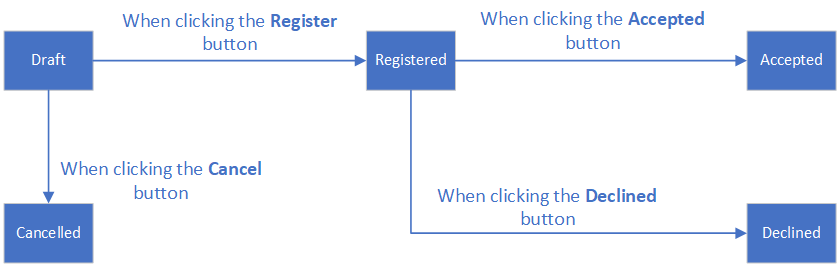
The business statuses for a change policy request are described below:
-
Draft: This is the initial status when inserting a new change policy request. In this status, all fields are editable, with a few exceptions.
-
Registered: This is the intermediary status for an MTA request when the user clicks the Register button. In this status, all the fields become read-only. In this situation, from a business perspective, is the decision of the MTA user if continues with the MTA request or not.
-
Cancelled: This is the final status if the user clicks the Cancel button in the interface. In this status, all the fields become read-only. In this situation, from a business perspective, is the decision of the MTA user if they continue with the MTA request or not.
-
Accepted: This is the final status if the user clicks the Accepted button. In this status, all the fields become read-only. In this situation, from a business perspective, is the decision of the MTA user if they continue with the MTA request or not.
-
Declined: This is the final status if the user clicks the Declined button. In this status, all the fields become read-only. In this situation, from a business perspective, is the decision of the MTA user if they continue with the MTA request or not.
 Multipolicies Contract Business Workflow
-
The first status of the master policy is Draft, after the user clicks the Insert button.
-
The status moves from Draft into Proposal automatically when the associated policies are generated.
-
From Proposal, the status can move to:
-
Issued, through a call from the Quote&Bind module.
-
Withdraw, automatically if the master policy status does not move from Proposal into Issued within a specific number of days.
-
-
From Issued, the status can move to Inforce, when the current date is the same as the start date of the master policy.
-
From Inforce, the status can move to:
-
Cancelled, due to different aspects, such as a duplicated policy, or on a client request but after the cooling off period.
-
Lapsed, when the installments are not paid until the due date.
-
Maturity, when the current date is the same as the end date of the master policy.
-
WithdrawClientRequest, on a client request for personal reasons, within the cooling off period.
-
Master Policy Payment Schedule Business Workflow
The trigger for the Master Policy installments status transitions are the installments statuses of the policies associated with said Master Policy.
There is a specific job, for Master Policies, which runs daily and checks the installments statuses of the policies that are included in a Master Policy and have the same due date.
Master Policy Payment Schedule Status Transitions
Here is a description of the transitions for the master policy payment schedule.
|
Transition |
Description |
|---|---|
|
_on time |
When generated, all the Master Policy installments are generated in this status for the entire period. They are available, but without an issued statement. |
|
on time_statement issued |
When the statement is generated, the statement is issued and all the installments are correlated on that statement, if all the installments of the associated policies have the Statement Issued status, then the Master Policy installment status is also Statement Issued. |
|
statement issued_paid |
If all the associated policies are paid before the due date, and they have the Paid status, then the Master Policy installment is also Paid. |
|
statement issued_unpaid |
If at least one associated policy is not paid before the due date and has the Unpaid status, then the Master Policy installment status is also Unpaid. |
|
paid_statement issued |
When a payment for at least an associated policy is deallocated, the statement of that policy is not covered anymore, so it becomes generated instead of closed or paid. The result being the Statement Issued status for the Master Policy installment also. |
|
paid_unpaid |
When a payment for at least an associated policy is deallocated, so the installment status for that policy becomes Unpaid, the installment status for the Master Policy also becomes Unpaid. |
Policy Lapsed Job for the Master Policy
The current job, called FTOS_PA_Policy Lapsed, which runs daily at 04:00 AM, is set in order to move all policies from Enforced to Lapsed status, policies that have installments still unpaid (Unpaid status) after X days set in the "Days after unpaid due date" parameter.
After a policy is moved in Lapsed status, that policy is modified as follows:
-
The end date becomes the due date of the unpaid installment;
-
If there are no claims registered, the premium amount is equal to the paid premium (the sum of paid installments), otherwise, the premium amount is not changed;
-
If the premium amount is changed, the payment schedule is updated and only includes the paid installments.
The system also checks the Master Policies payment schedule, as it does for policies, and, if there are installments that are still unpaid (Unpaid status) after X days for a Master Policy (X days since the due date of the last unpaid installment of the Master Policy), then that Master Policy changes its status from Inforce to Lapsed.
After a Master Policy is moved in Lapsed status, that Master Policy is modified as follows:
-
The end date becomes the due date of the unpaid installment;
-
The new premium amount is equal with the paid premiums (sum of paid installments);
-
Because the premium amount is changed, the payment schedule of the Master Policy is updated and only includes the paid installments.
The number of days is set in the "Days after unpaid due date" existing parameter, which is a generic parameter, set at portfolio or contract level.