Core Insurance Master 2.0
The Core Insurance Master solution is the foundation layer that controls major processes and configurations for different FintechOS end-to-end insurance solutions. It is a mandatory install in order to speed-up the automation and accurate execution of any of the FintechOS insurance solution that you use.
To view the details about the configurations that Core Insurance Master v 2.0 uses, go to your FintechOS Portal and click the main menu at the top left corner to open the drop-down. From the drop-down choose Settings.
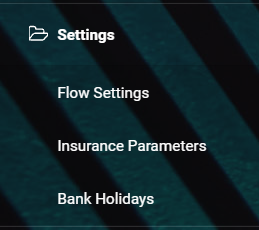
 Menu Items
The menu includes the following items:
| Name | Description |
|---|---|
| Settings | Main menu entry, visible on Portal. |
| Flow Settings | Sub-menu entry; displays the FTOS_DFP_FlowSettings platform entity. Flow Settings must not be edited or deleted. |
| Insurance Parameters | Sub-menu entry; displays the FTOS_PA_InsuranceParameter entity. Insurance Parameters can be edited. For details, consult the Insurance Parameters page. |
| Bank Holidays | Sub-menu entry; displays the FTOS_BankHoliday entity. Bank Holidays can be added, edited or deleted. For details, consult the Bank Holidays page. |
| Cancellation Reason Types | Sub-menu entry; displays the FTOS_INSPA_CancellationReasonType entity, belonging to the Policy Admin module. The Reason Type values can be added, edited or deleted. For details, consult the Cancellation Reason Types page. |
Data Config Definitions
The following definitions are used for:
| Name | Description |
|---|---|
| FlowSettings | Import flow settings in FTOS_DFP_FlowSettings and FTOS_DFP_ProcessorSettings entities. |
| InsuranceParameters | Import new versions of insurance parameters. |
You can find them in the Configuration Data Definitions List, in Innovation Studio.
Data Import Templates
The following templates are used for data import:
| Name | Description | Details |
|---|---|---|
|
FTOS_PYMT_Bank
|
Adds records in the entity with the same name. | A list of banks is automatically imported with this digital asset. |
|
Import_FTOS_CMB_ExchangeRate
|
Imports exchange rate values in FTOS_CMB_ExchangeRate. | A list of exchange rate values is automatically imported with the digital asset. Don’t erase RON-RON or EUR-EUR combinations. |
| Import_FTOS_CMB_ExchangeRateType | Imports a list of types of exchange rate. | A list of exchange types is automatically imported with the digital asset. |
| FTOS_IntegrationProcessScheduleTrigger | Imports job schedule triggers. | |
| FTOS_IntegrationProcessScheduleService | Imports job schedule service. |
You can find them into the Data Import Templates List, in Innovation Studio.
Sequencer
The AccountCodeSequencer is the sequencer used to fill in the code attribute from the Account entity.
Style Sheets
For minimal styling, Core Insurance Master uses the style sheet stored by FTOS_CLAIM_MainStyle - like all the other FintechOS solutions for insurance.
Installation Information
See the Installation page for details.