Co-browsing Architecture
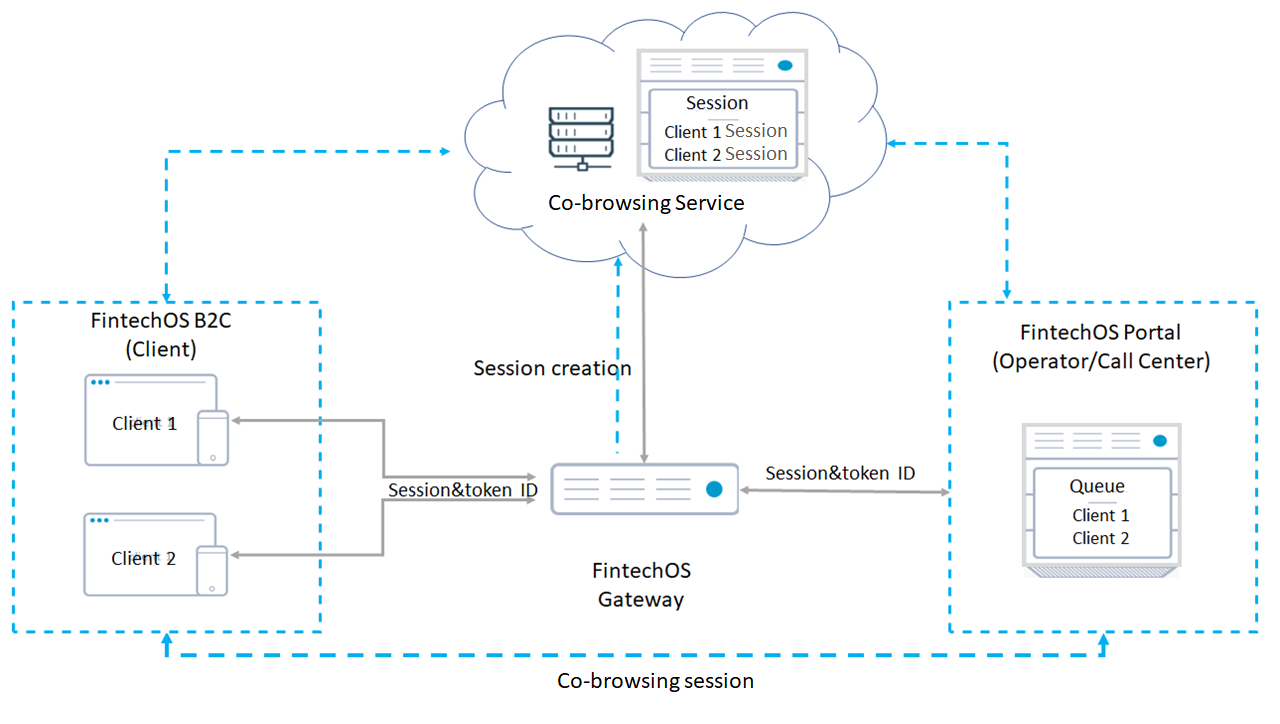
The co-browsing flow:
- The customer initiates a co-browsing session.
- The FintechOS Gateway tells the Co-browsing Service to create a co-browsing session.
- The Co-browsing Service creates a session and sends the session ID back to the FintechOS Gateway.
- The FintechOS Gateway creates a unique token and sends the session info to the FintechOS Portal and the customer is added into the queue.
- When an operator picks up the customer from the queue, the FintechOS Gateway sends the session ID and token to the customer.
- The customer uses the token to connect to the session.
- The co-browsing session starts and the participants (customer and operator) can start interacting in real-time.
 Example
If during a Digital Journey, the customer gets stocked and there is a need to co-browse, the operator can instruct the customer to initiate a co-browsing session.
- The customer initiates a co-browsing session.
- The operator selects co-browse call from the queue.
- The operator then clicks Take call to join the co-browse session.
During the session, the customer has the option to add more users to the session, switch control to the operator, or start video chat.
When control is given to the operator, they then get the same functionalities as the customer.