Create Products
The core of Product Factory is the Product Designer, FintechOS’ solution for building banking and insurance products. The products are based on types that allow you to customize key features like amounts, durations, fees, interests, etc., all streamlined in a unified user experience that is highly configurable and easy to use. To create products, you can either:
- Use Built-In Product Types that are available out-of-the box for a variety of use cases, such as BNPL, current accounts, mortgages, or insurances.
- Create your own Custom Product Types tailored to your specific business requirements.
- Use Templates which are based on existing product types, but also include pre-populated data that illustrates the supported capabilities and possible configuration options for that product type.
Create a Product Based on a Product Type
- Go to Main Menu > Products > Products.
- Click + New product.
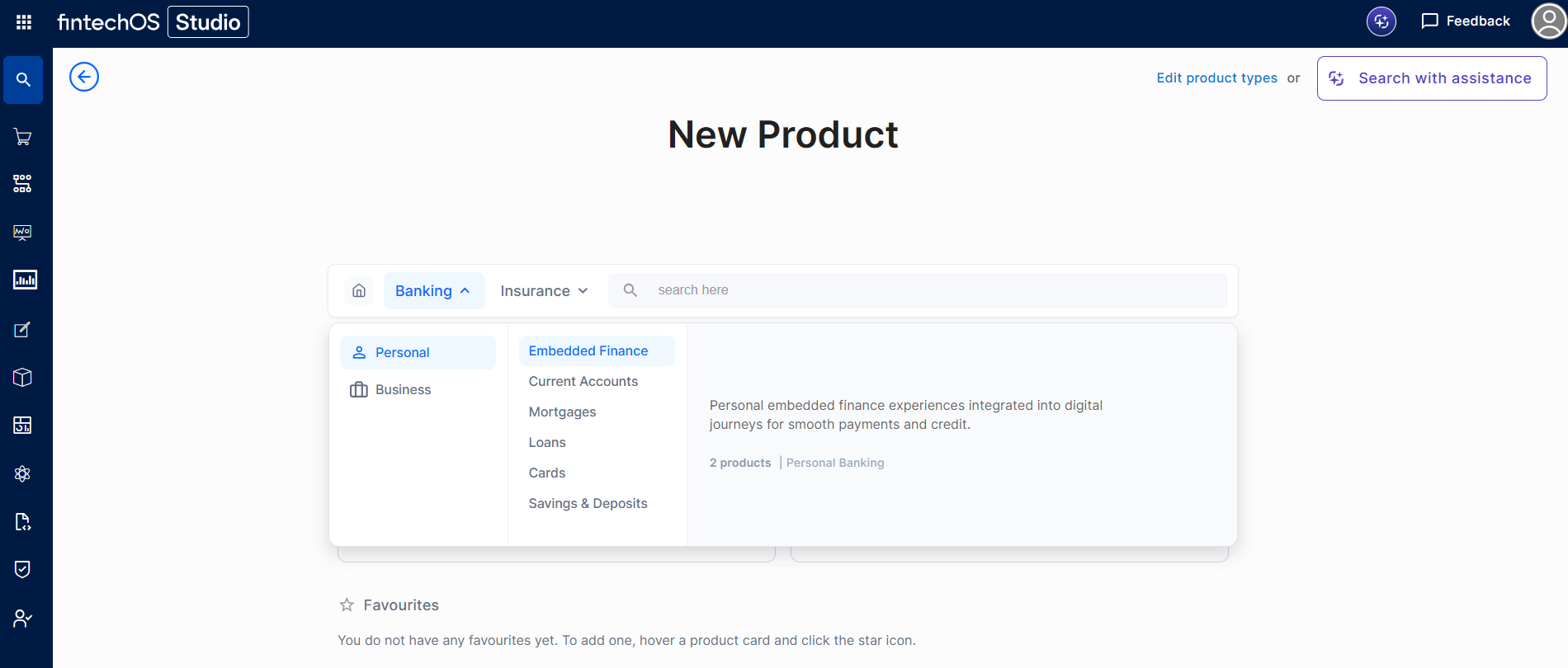
- Filter by Banking / Insurance, class, and subclass. A search bar lets you look up product types by name in real time. Product types appear as cards with a short description and a star icon to mark favorites
-
Clicking a card opens a details panel where you can review the product type and start creation.
- Use the sentence-based interface to configure your product (see Built-In Product Types for information on how to configure the various built-in product types).
NOTE
If you can't see any sections inside a product, check that your user has the right security roles (for example, Pricing Manager or Underwriting Manager). Each role only lets you edit certain sections of the product.
If you can't see any sections inside a product, check that your user has the right security roles (for example, Pricing Manager or Underwriting Manager). Each role only lets you edit certain sections of the product.