OpenAPI Domains
OpenAPI domains allow you to organize your endpoint and entity APIs for better usability. You can assign endpoints and entities to the same domain to group them together and you can define parent - child relationships between domains to create API hierarchies that are easy to understand and navigate.
The OpenApi domain works as follows: a user first defines a new OpenApi domain (whether in a digital context or not), and then assigns it to an entity or endpoint. These can then be added to a Digital Solution Package. Later, when exporting the package, the system automatically retrieves the information defined on the entity or endpoint and inserts the OpenApi domain beforehand, if it has not already been added.
You cannot manually add an OpenApi domain to a digital asset. It is automatically retrieved like a property from the entity or endpoint. It is not a root Configuration Item.
A single level of children domains is supported. A child domain cannot be a parent for other domains.
In the Swagger interface (<environment URL>/ftosapi/swagger by default), two API definitions are created automatically for each root domain: one for the domain's endpoints and one for the domain's entities, while subdomains are prepended at the beginning of the API names.
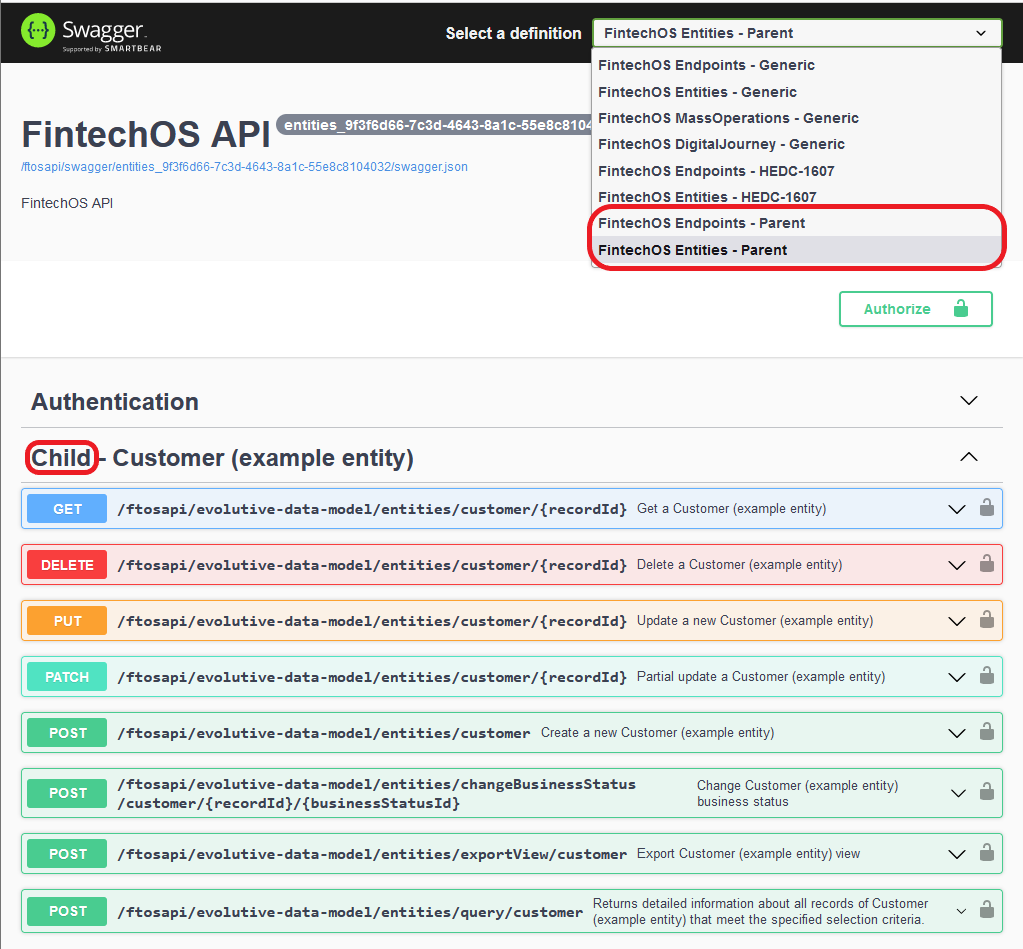
Generic definitions include digital journeys, mass operations, and endpoints/entities that are not assigned to a domain.
Create an OpenAPI Domain
- In FintechOS Studio, go to Main Menu > Business Services > OpenAPI Domains.
- Click Insert.
- Fill in the domain's details:
- Name - Unique identifier for the domain in the FintechOS environment.
- Domain Name - Domain name as displayed in the user interface.
- Description - Short description for the domain.
- Parent Domain - Select a parent domain if you wish to make this a subdomain of an existing domain.
- Click Save and close.
Assign an Entity to an OpenAPI Domain
- In FintechOS Studio, go to Main Menu > Business Services > OpenAPI Domains.
- In the Open API Domains list, double click the desired domain.
- In the domain editor, scroll down to the Open API Domain Entities section.
- Click Insert.
- In the Add Open API Domain Entity page, use the Entity drop-down to select the desired entity.
- Click Save and close.
- Click Save and close.
Assign an Endpoint to an OpenAPI Domain
- In FintechOS Studio, go to Main Menu > Business Services > OpenAPI Domains.
- In the Open API Domains list, double click the desired domain.
- In the domain editor, scroll down to the Open API Domain Endpoints section.
- Click Insert.
- In the Add Open API Domain Endpoint page
- Use the Endpoint drop-down to select the desired endpoint.
- Use the Http Verb field to indicate the HTTP request method used to call the endpoint, such as GET, PUT, POST, etc.
- Click Save and close.
- Click Save and close.