Use a Business Rule in a Digital Journey
After you configured and activated a business rule and configured its data mapping, you can use it in a journey or entity form.
Call Business Rules in Form Driven Flows (no code)
- Open FintechOS Studio, open the main menu and select Workflows > Form Driven Flows.
- Open the form driven flow you wish to work on.
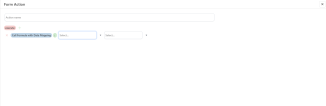
- Select the Actions tab, then click Insert.
- Click Insert and select the rule you wish to execute and the mapping you have configured.
- Click ''Save'' and then click ''Save and reload''.
- Continue to add as many as you need.
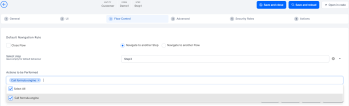
- Open the step and add the action by clicking the 'Flow control.
- In the section ''Actions to be performed'' add an action that calls the rule.
- Click Save and Reload .
Track form driven flows that are using a specific rule
After you configure a form driven flow to call a business rule, the form will be listed in the Form Tracking tab of the rule's page.

Call rules using server side scripts
Rules can be called from server side scripts using the following method:
Copy
/**
* Call formula by name
* @param formulaName is the name of the formula
* @param input is the input that must be provided in order to compute the formula
* @param options are the formula runtime options of type IFtosRunFormulaOption. A property that can be set here is referenceDate if you need to call a past version of the formula
* @return the object with the calculated values
*/
server.formulas.runFormula(formulaName: string, input: any, options: any): any Example
Copy
var input = {
    age: 20,
    region: "test"
}
server.formulas.runFormula("formulaName", input, {});
For more information, see the Server SDK Reference Guide.