Show Tooltips (for users)
Tooltips provide you useful information on what specific fields mean and help you understand what actions you should perform.
You can see tooltips in the Portal UI only if your portal has been customized to show tooltips. Two customizations are available for showing tooltips: to always show tooltips when available and to give you the possibility to choose if you want to show tooltips or not. If the Portal has been customized not to show tooltips, none of the two options previously mentioned are available.
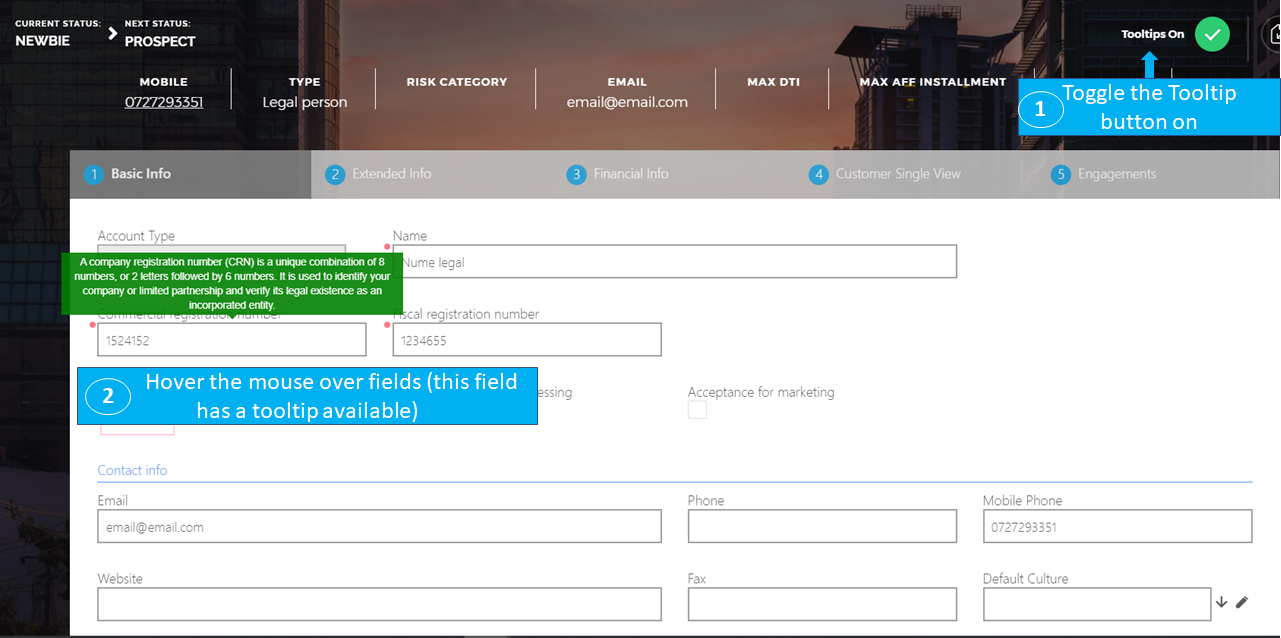
If you’ve been given the ability to decide whether you show tooltips or not, a Tooltips toggle button appears at the top-right corner of the UI. If the toggle is on, when hovering your mouse over a field that has a tooltip available, you will see the tooltip text:
If the tooltips were customized to always be shown in the UI, you will always see tooltips when hovering over fields that have tooltips available. You will not have the option to turn them off.