How to Execute a Fluent Query
To execute a fluent query in a server automation script:
- Use the
server.query.getAliasmethod to define an entity alias. - Use the
server.query.frommethod to run the query on the desired entity. - Use the
.selectColumnsmethod to select the returned attributes. - Use the
.execute()method to run the query.
var A = server.query.getAlias('Account');

var myFluentQuery = server.query.from('Account', A)
	.selectColumns (A.Name, A.Email)
	.execute();

log(myFluentQuery)
The code above will log an output similar to the following in the trace_roll.log file:
-[START]---------------------------------------
Timestamp: 7/1/2020 5:01:51 PM
 Message: INFO [CID=200524bb-8d28-4079-80c3-a003a9ecad7d] [
	{
		"values": {
			"A_Name": "Jane Doe",
			"A_Email": "janedoe@fintechos.com"
		}
	},
	{
		"values": {
			"A_Name": "Andrew Jones",
			"A_Email": "adrew.jones@fintechos.com"
		}
	},
	{
		"values": {
			"A_Name": "John Doe",
			"A_Email": "john.doe@fintechos.com"
		}
	}
]
 Severity: Information
-[END]---------------------------------------
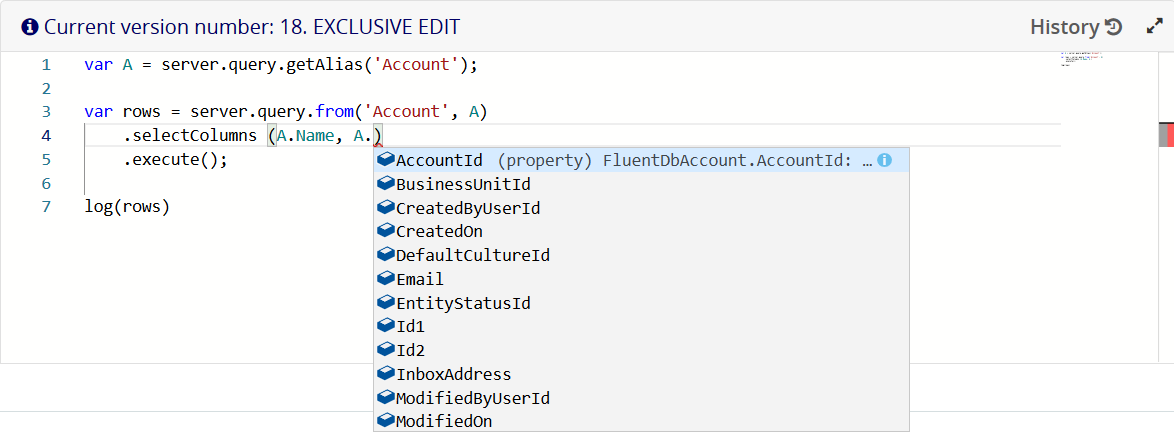
The entity alias definition enables intelligent code completion for the corresponding entity attributes:
Comparison Operators
The following comparison operators are supported in fluent queries: equals (eq), notEquals (neq), greaterThan (gt), greaterThanOrEquals (gt), lessThan (lt), and lessThanOrEquals (lte)
Logical Operators
The following logical operators are supported in fluent queries: and, or, andNot, and orNot.
Inner Joins
Use the .innerJoin and .on methods to define inner join clauses for the queried entities.
var O = server.query.getAlias('optionset');
var A = server.query.getAlias('attribute');


var myFluentQuery = server.query.from('attribute', A)
	.innerJoin('optionset', O)
		.on(A.OptionSetId.eq(O.OptionSetId))
	.top(5)
	.orderBy(A.Name)
	.execute()
Left Joins
Use the .leftJoin and .on methods to define left outer join clauses for the queried entities.
var O = server.query.getAlias('optionset');
var A = server.query.getAlias('attribute');

var myFluentQuery = server.query.from('attribute', A)
	.leftJoin('optionset', O)
		.on(A.OptionSetId.eq(O.OptionSetId))
	.top(5)
	.selectColumns(A.Name, O.DisplayName)
	.orderBy(A.Name)
	.execute();
Attribute Aliases (Projections)
To define aliases for the queried attributes, use the .selectProjection method instead of .selectColumns and the .executeAndMap method instead of .execute.
Projections are useful to customize the result set field names when different entities have similar attribute names or when attribute names are not expressive (see Working with Fluent Query Result Sets for more details about fluent query outputs).
 Example: Return customized field names in a fluent query result set
In this example, we return information about 5 random entity-attribute pairs.
var E = server.query.getAlias('entity');
var A = server.query.getAlias('attribute');

var P; //projection alias

var rows = server.query.from('entity', E)
	.innerJoin('attribute', A)
		.on(E.EntityId.eq(A.EntityId))
	.top(5)
	.selectProjection( P =
	{
		EntityName : E.Name,
		AttributeName : A.Name,
		Type : A.AttributeType
	})
	.executeAndMap(P);

log(rows)
The result set for the above fluent query will include the customized EntityName, AttributeName, and Type field names.
-[START]---------------------------------------
Timestamp: 7/2/2020 2:00:55 PM
 Message: INFO [CID=200524bb-8d28-4079-80c3-a003a9ecad7d] [
	{
		"EntityName": "Account",
		"AttributeName": "Phone",
		"Type": "0a39db15-7634-4af3-8bd8-004fcf27e8a6"
	},
	{
		"EntityName": "Account",
		"AttributeName": "Accountid",
		"Type": "ddce8347-794d-4a8d-b9d0-42437f653ae4"
	},
	{
		"EntityName": "Account",
		"AttributeName": "Email",
		"Type": "0a39db15-7634-4af3-8bd8-004fcf27e8a6"
	},
	{
		"EntityName": "Account",
		"AttributeName": "modifiedOn",
		"Type": "2e33740e-5026-43b5-919c-cc2d422c280f"
	},
	{
		"EntityName": "Account",
		"AttributeName": "Id2",
		"Type": "0a39db15-7634-4af3-8bd8-004fcf27e8a6"
	}
]
 Severity: Information
-[END]---------------------------------------
Where Clauses
Where clauses are implemented using the .where, .wherenot, .andWhere, .orWhere, .andWhereNot, and .orWhereNot methods.
Example: Fluent query with multiple where clauses
var F = server.query.getAlias('FinChartItemValue');

var rows = server.query.from('FinChartItemValue', F)
	.top(5)
	.where(F.Percent.gte(100).and(F.Percent.lte(200)))
	.orWhere(F.Percent.gte(300).and(F.Percent.lte(400)))
.execute();var F = server.query.getAlias('FinChartItemValue');
var rows = server.query.from('FinChartItemValue', F)
.top(5)
.where(F.Percent.isNull)
.execute();
//equivalent query
var rows = server.query.from('FinChartItemValue', F)
.top(5)
.where(F.Percent.equals(null))
.execute();Aggregate Functions
To define aggregate functions on a set of values from the result set, use the .getCountAlias, .getSumAlias, .getMaxAlias, and .getMinAlias methods of the server.query property.
Example: Get attribute aggregates for 5 random entities.
In this example, we get the number of attributes, maximum attribute length, minimum attribute length, and total length of all attributes for 5 random entities.
var E = server.query.getAlias('entity');
var A = server.query.getAlias('attribute');

var Count = server.query.getCountAlias();
var SumLength = server.query.getSumAlias(A.Length);
var MaxLength = server.query.getMaxAlias(A.Length);
var MinLength = server.query.getMinAlias(A.Length);

var P; //projection alias

var rows = server.query.from('entity', E)
	.innerJoin('attribute', A)
		.on(E.EntityId.eq(A.EntityId))
	.top(5)
	.where(E.Name.startsWith('a'))
	.selectProjection( P =
	{
'Entity Name' : E.Name,
'Number of attributes' : Count,
'Total attributes\' lengths': SumLength,
'Maximum attribute length' : MaxLength,
'Minimum attribute length' : MinLength
	})
	.executeAndMap(P);

log(rows);
The code above will log an output similar to the following in the trace_roll.log file:
-[START]---------------------------------------
Timestamp: 7/2/2020 11:21:28 AM
 Message: INFO [CID=200524bb-8d28-4079-80c3-a003a9ecad7d] [
	{
		"Entity Name": "Account",
		"Number of attributes": 15,
		"Total attributes legth": 1638,
		"Maximum attribute length": 500,
		"Minimum attribute length": 64
	},
	{
		"Entity Name": "action",
		"Number of attributes": 9,
		"Total attributes legth": 3200,
		"Maximum attribute length": 3000,
		"Minimum attribute length": 0
	},
	{
		"Entity Name": "actiongroup",
		"Number of attributes": 6,
		"Total attributes legth": 200,
		"Maximum attribute length": 200,
		"Minimum attribute length": 0
	},
	{
		"Entity Name": "ActionXSecurityRole",
		"Number of attributes": 3,
		"Total attributes legth": null,
		"Maximum attribute length": null,
		"Minimum attribute length": null
	},
	{
		"Entity Name": "applicationLanguage",
		"Number of attributes": 11,
		"Total attributes legth": 213,
		"Maximum attribute length": 100,
		"Minimum attribute length": 1
	}
]
 Severity: Information
-[END]---------------------------------------