Automation Scripts
FintechOS allows you to manage complex automation and validation tasks, triggering the execution of scripts on business status transition.
Automation scripts are executed synchronously, which means that the execution happens in a single series. Next operations cannot be performed until the current operations is finished.
Key points of synchronous automation scripts:
- Are created by using an automation script entity record.
- The event-triggered automation scripts can execute before (pre-operation), after (post-operation), or after the transaction is completed.
- Whether configured to run on-demand or event triggered by specific operations (read, update, insert, delete), the script runs immediately.
- Log errors only when logging is enabled.
- Execute in the current transaction.
Reusable blocks of code can be included in automation script libraries and associated afterwards to scripts.
In FintechOS Studio, you can create and use two types of automation scripts, as follows:
Event Triggered Automation Scripts
These automation scripts are automatically triggered when an event of read, update, insert or delete occurs in the user interface:
|
Event |
Description |
|---|---|
| Read | The most complex type of automation scripts. Upon its execution, all information from the target entity is read, including automation scripts or getByQuerymethods. You should be careful not to alter other functionality related to the entity. |
| Update |
If an automation script updates another entity that has another automation script on update, that will also be triggered, and if any automation script in the execution chain throws exception, the entire transaction is roll-backed. That means that every operation is enlisted to the master Ebs Core transaction. The "After Transaction" stage executes a script only after the transaction completes. It should be used only in rare cases, if you make a get/post call to another web-service which tries to update/alter data of the same record. Inside every automation script code you have a context variable that holds data about the current scope. IMPORTANT!
If you write an update script inside which you update the same record, it will trigger in recursion. Although the EBS has been build to prevent such situations, the transaction will be rolled back after several iterations. |
| Insert | If you do not have a record 'before insert', use 'after insert' instead. |
| Delete |
Can be used in conjunction with:
|
Event-triggered automation scripts are bound to a ‘before’, ‘after’ or ‘after transaction’ stage execution, while on-demand automation scripts have no such dependencies and can be executed whenever the case.
A list of predefined methods and functions with corresponding code-snippets are available within a dedicated development library (automation script library), covering most common use cases and technical applicability scenarios.
On-demand automation scripts
While event-triggered automation scripts are context-based and linked to a specific entity within the open data model, on-demand automation scripts are context independent and available for being called from any object or context.
On-demand automation scripts can be triggered manually if they are attached to an action. For usability purposes, you can organize actions performed on an entity into action groups.
To use an on-demand automation script, follow these steps:
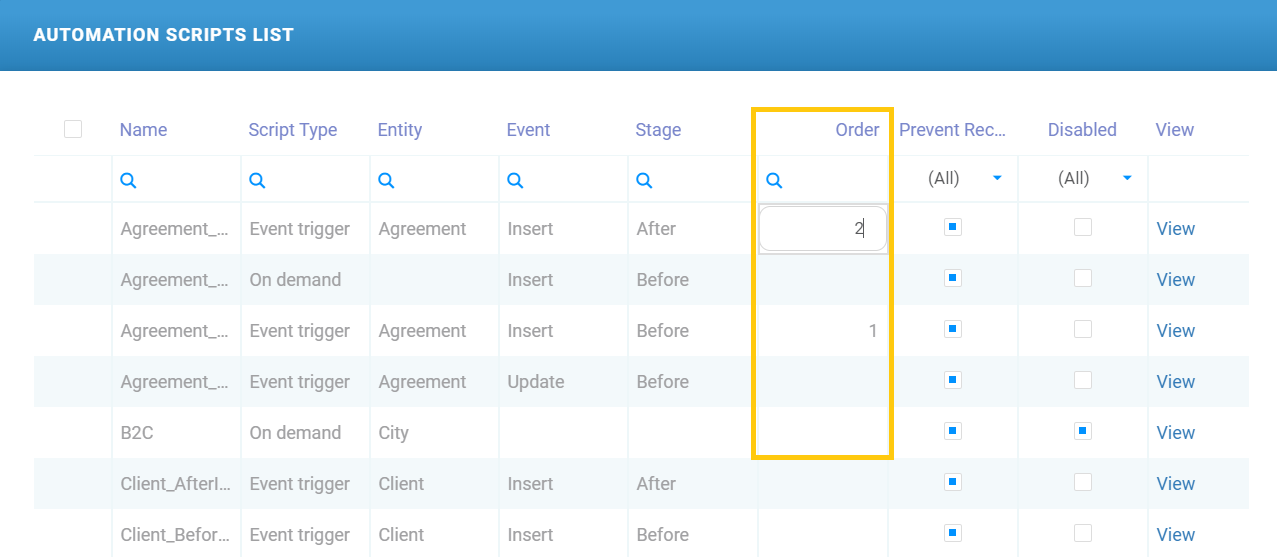
Setting the execution order of automation scripts
You can set the execution order for similar automation scripts (entity / event type / stage) from the Server Automation Scripts List page (Advanced > Server Automation Scripts) by setting the execution order in the Order column.