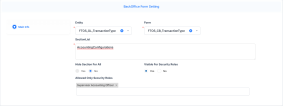
Backoffice Form Settings
Form extensibility in FintechOS allows users to manage bullet item visibility on BackOffice forms via configurable parameters, either hiding them from all users or restricting access to designated security roles. You need to have the Backoffice Portal security role to access the settings explained below.
Adjust Form Settings
-
Access FintechOS Portal and navigate to Main Menu > Contract Management > Contract Management Settings > Insurance Settings > BackOffice Form Setting.
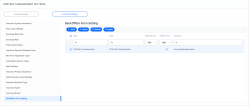
-
Click Insert to create a new form setting.
-
Specify the target entity and form for bullet visibility configuration.
-
In the Section List field, enter bullet item names (without spaces), separated by commas.
-
Setting Hide Section For All to Yes hides specified bullet items from all users; Visible For Security Roles is automatically disabled.
-
Setting Visible For Security Roles to Yesdisplays bullet items only to users with at least one role listed in Allowed Security Roles field.
-
Populate the Allowed Only Security Roles field with permitted roles for viewing the bullet item.