Quote Admin Business Workflows
You can associate one of the following roles for the applicants for a quote:
-
Policy holder: fill in both masterQuoteAdminId and quoteAdminId lookups;
-
Payer: fill in both masterQuoteAdminId and quoteAdminId lookups;
-
Insured, Beneficiary: fill in only quoteAdminId lookup.
Quotes Business Workflow
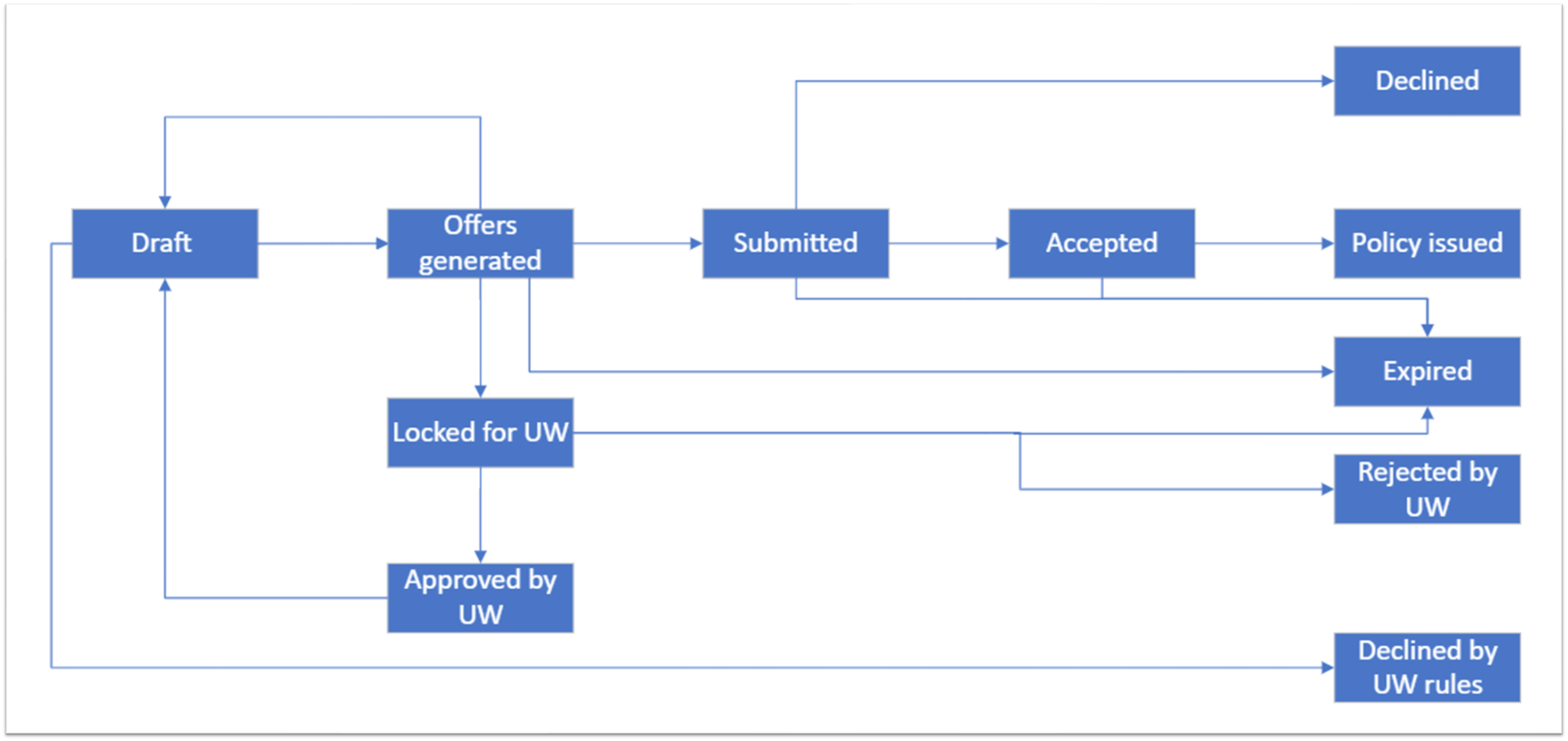
A quote can have one of the following business statuses:
| Status Name | Description |
|---|---|
| Draft | The quote is registered in the system and subjected to UW rules from product level. |
| Offers Generated | The quote has passed the UW rules. |
| Declined by UW Rules | The quote did not pass the UW rules. |
| Submitted | The offer was sent or presented to the client. |
| Accepted | The offer is accepted by the client. |
| Declined | The offer is declined by the client. |
| Locked by UW | The offer is part of the UW Admin workflow in progress. |
| Approved by UW | The offer is accepted by UW admin. |
| Declined by UW | The offer is rejected by UW admin. |
| Policy Issued | The policy is issued. |
| Expired | The quote has passed its validity date. |
The business statuses and workflow for a quote are given in the diagram below.
Master Quote Business Statuses
The master quote can have one of the following statuses:
-
Locked by UW, if one of the quotes is declined by UW, and one is locked by UW;
-
Declined by UW, if all the quotes belonging to it are declined by UW;
-
Offers Submitted, if minimum one quote that is a part of it is submitted;
-
Policy Issued, if minimum one quote that is a part of it has an issued policy.