Configure Payment Schedule Types
When you define a product, you need to choose a payment schedule type that applies to all linked policies. In FintechOS Portal you can add and configure payment schedule types, to define and set details pertaining to the way the payment schedule works for the product.
Follow the steps below to add and configure a payment schedule type:
-
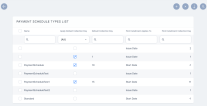
In FintechOS Portal, go to Main Menu > Settings > Payment Schedule Type. The list of payment schedule types records is displayed.
-
Click Insert. The Payment Schedule Type form is displayed.
-
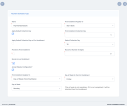
Input the following details in the form:
-
Name: The name of the schedule type. This automatically becomes an option for the Payment Schedule Type field, when configuring the business details of an insurance product;
-
First Installment Applies To: From the drop-down, select one of the following values: Issue date, or Start Date.
-
Apply Default Collection Day: If you leave this field unchecked, the installment inherits the day of the first installment. If you check this field, then the then Default Collection Day applies to all installments except for the first installment:
-
Apply Default Collection Day on First Installment: Check to apply the default collection day on the first installment;
-
Default Collection Day: Input a vale from 1 to 31, representing the date of the month. If the month has fewer days then the selected one, then the last day of that month will apply.
-
-
First Installment Collection Day: Input the number of days to apply to either the Start Date or the Issue Date of the policy.
-
Prorate to First Installment: If you leave this field unchecked, then the premium is divided by the number of installments and then the rounding mechanism is applied. If you check this field, the following calculations are applied for the installments:
-
First installment = (Second installment due Date - Begin Date)*Total Premium / (End Date - Start Date);
-
Last installment = (End Date - Last Installment Due Date)*Total Premium / (End Date - Start Date);
-
Rest of installments = (Premium - First installment - Last installment) / Number of remaining installments.
-
-
Round to (Number of Digits):
-
Round on Last Installment: If you check this field, the rounding adjustments applies to the last installment. If you leave it unchecked, the first installment is automatically adjusted;
-
Accept Weekly Configuration?: When checked, the following fields become available:
-
First Installment Applies To: Choose the date to which the first installment applies. The possible values are: Issue Date, Start Date, Day of Week (from StartDate, and Day of Week, (from Issue Date);
-
First Installment Collection Day: Choose a day for the first installment to be collected;
-
Day of Week for the First Installment: Choose the day of the week for the first installment;
-
Day of Week: Choose the day of the week for the rest of installments.
-
-

