FintechOS Cloud (for v24.x)
This document provides detailed information regarding FintechOS deployments in a FintechOS Cloud model.
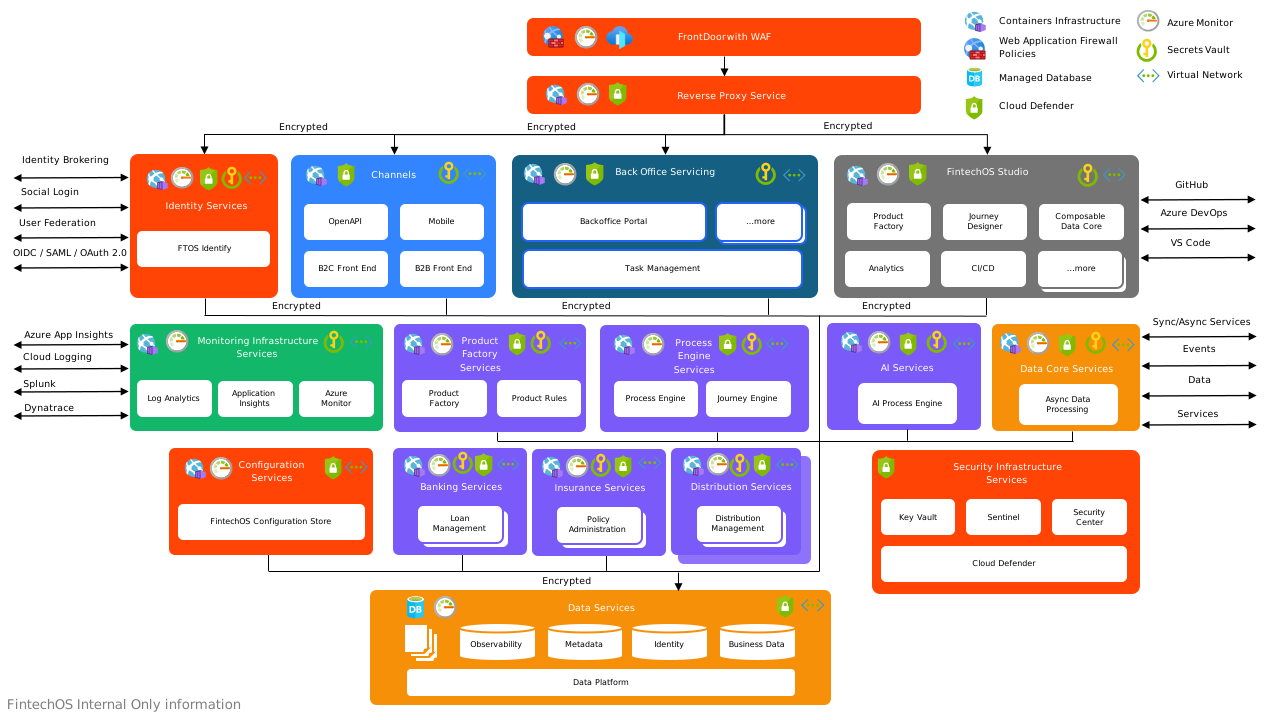
Environments
All deployment models include three sandbox environments (for development, quality testing, and user acceptance testing) and one production environment to promote the solution to end-users (clients).

- Sandbox environments are internal environments used by project teams to create, customize, and add features, to achieve the desired functionalities, and to provide a test platform for customers. Sandbox environments are similar to production environment from a functional perspective, but have a lower performance as only dummy data is used and they are not critical in terms of availability. Monitoring capabilities are also limited and they don't have associated SLAs since they are also used to fix bugs, test, and add new features which might compromise platform availability. By default, any project contains three sandboxes used for development, quality assurance, and user acceptance testing.
- Production environments have all the monitoring measures in place and come with a predefined performance level according to the offer as the latest versions of software, products, or updates are pushed live to the intended users. The production environment is where the end-users can see, experience, and interact with the products. In a production environment, regardless of the performance required for running the load, a minimum size for infrastructure components is required to meet the required security and availability standards.
An optional Disaster Recovery (DR Region) environment can be deployed in another region to assure continuity in case of a disaster. This disaster recovery environment is quoted separately as an add-on on customer request.
All models come with infrastructure monitoring and security operations including active monitoring tasks, continuous improvement, component updates, security, and auditing for infrastructure resources.
Platform upgrade tasks, application support, and application incident management are not included.
Based on customer requirements, additional environments can be added on request.
Cloud Tiers
There are two deployment tiers: Standard and Enterprise.
Compared to the Standard solution, the Enterprise model has better performance for production purposes and extra features which require the deployment of additional infrastructure components.
Regional Deployment Model
Based on the chosen or required model, there are two main deployment scenarios for production environments: single region deployment and dual region deployment.
Single Region
An Azure PaaS model is used to deliver services, high availability, load balancing, and backup capabilities offered by the cloud provider using state-of-the-art technologies.
Dual Region (Production Environment with Disaster Recovery Add-on)
Azure paired regions are used to deliver high availability, best performance, and data resilience. Databases are continuously replicated between regions and, if one region is affected by a disaster, the solution will be available in the secondary region.
Default Regions
FintechOS is running by default in the following regions:
| Zone | Primary Region | Secondary Region |
|---|---|---|
| EU | West Europe | North Europe |
| UK | UK South | UK West |
| US | East US | West US |
FintechOS can also deploy in other regions based on customer requirements.
Add-Ons
In the EU, UK, and US regions, the following add-ons are available.
| Type | Add-ons |
|---|---|
| Additional Environments | Sandbox |
| Standard Production | |
| Enterprise Production | |
| Disaster Recovery (DR Region) | |
| Additional Resources | Storage
|
| Portal | |
| Async Engine | |
| B2C Portal (Anonymous Front-end) | |
| Optional Components
|
VPN* |
| Dedicated API | |
| Reporting Database | |
| Additional VSCode Developers** | |
| Performance Upgrade | Depending on customer specific performance/load scenarios, FintechOS will analyze and provide an optimized solution to suit customer requirements. This analysis, apart from the compute performance requirements, will also include extra storage, logging, and traffic requirements (inter-region communication). |
*One VPN connection covers only one environment. If a customer has two sandbox environments and one production environment and VPN is required for each of them, then the VPN should be added to each environment.
**Each environment comes by default with 4 developers which is enough to cover any standard project. However, if more developers are required/desired, these developers can be added to existing projects. The number of developers does not depend on number of Sandboxes (environments) on a project.
Sandbox
Sandbox environments are low performance environments used in non-production scenarios by a limited number of users. From a functional perspective, all available features for Sandbox environments are equivalent to production environments.
FintechOS does not offer SLA for Sandbox environments due the fact that those environments are considered development and test environments used mostly for bug fixing, solution updates, and to test new scenarios.
Standard Production
Standard models represent production environments running in a single region. FintechOS deploys services required by customers in the region based on the regulatory compliance for that region. The standard model guarantees a minimum level of performance.
The following performance indicators are guaranteed for standard production environments:
| Performance Indicator | Value |
|---|---|
| Concurrent users | 10 |
| Response time | less than 3 seconds |
| Request rate | 80 req/s |
Enterprise Production
Enterprise production environments are standard production environments with upgraded guaranteed performance indicators:
| Performance Indicator | Value |
|---|---|
| Concurrent users | 20 |
| Response time | less than 5 seconds |
| Request rate | 80 req/s |
Concurrent Users means the number of end-users who initiate a request to the same FintechOS Platform resource at the same time.
Example: One user initiates one or multiple requests when clicking the Submit button on a form in the FintechOS Portal. A user who is only logged into FintechOS Portal, but does not input data or only reads the displayed information is not considered a concurrent user. The number of concurrent users should be evaluated by the customer based on each use case.
Example: 100 users are connected to the platform requesting a loan and all of them are filling their data at the same time. If we consider it takes 2 minutes to add personal data and FintechOS requires 5 seconds to evaluate and approve the input data, the number of concurrent users is considered to be between 4 and 6.
The Response time is calculated for a business transaction initiated in browser.
Example: The response time for login includes the page load time for the login screen, credential input/validation (get token), landing page load time – all actions in under 5 seconds.
Disaster Recovery (DR Region)
To ensure rapid recovery in the event of a disaster and to comply with regulatory standards, FintechOS can implement a hot-standby environment in a secondary region located hundreds of miles away from the primary one. This setup adheres to various regulatory standards, including GDPR, through the utilization of paired regions. In a hot standby, data is continuously synchronized assuring lowest RPO at a competitive price.
Storage
By default, all models include 3TB of storage which is enough for common scenarios. Some business scenarios require extended storage and FintechOS offers the possibility to extend the default model based on customer requirement/business analysis.
Database storage is managed separately, and the default database storage included is 250 GB which is typically enough for common business scenarios.
Portal
Apart from the default Portal included in FintechOS Cloud, additional portals might be required to expose services to different users categories (dedicated partner portal, portal for internal users, portal for public users, etc.).
Async Engine
In scenarios that involve time consuming logic or a high volume of requests, synchronous responses might not be sufficient. In these situations, an asynchronous flow is required, where a request is received, and a confirmation response is sent to the caller before the request begins processing. The caller is later notified about the processing outcome, typically through a callback.
B2C Portal (Anonymous Front-end)
You can provide consumers with unauthenticated access through anonymous front-ends to specific user journeys from a link on your website. FintechOS Studio makes this possible by exposing form driven flows and custom flows to unauthenticated users.
FintechOS can offer unauthenticated user journeys as an additional feature, in order to allow users to perform different journeys without requiring a personal account.
An unauthenticated portal is required when you want to expose a front-end which can be accessed without user credentials. Typical cases include onboarding portals or loan/insurance portals in which a user can create an account or buy a product.
An anonymous front-end environment with a secure architecture has been designed to allow exposing journeys to unauthenticated users (consumers).
The B2C Portal represents an anonymous frontend which is used to expose data from form driven flows and custom flows to unauthenticated users. This allows us to provide access to specific user journeys (for instance with a button or widget from a public website) to users who don't have a FintechOS user account.
Example User Case
In a journey for a car insurance quote, the end-user should be able to:
- follow the journey without creating an account and authenticating to it
- resume the journey within a reasonable time-frame if, for any reason, he interrupts the session
- in some cases, at the end of the journey, create an account that will help in future interactions, without having to re-enter data that has just been submitted
The insurer should be able to:
- configure specific roles that will be used by the temporary users
- configure the timeframe in which end-users can resume their journeys after an interruption, with a default of 30 days
- at the end of the journey, have the possibility to “upgrade” temporary users to permanent users
VPN
For security reasons, communication between customer on-premises systems or access to the platform require private connections. This can be achieved by setting up a VPN between FintechOS and customer systems.
Site-to-site VPN is available in our FintechOS Cloud deployment models and it is required for private and secure communication between FintechOS environments and customer on-premise services. It is usually required by internal users to access the platform via private networks without Internet access or to secure access to on-premises APIs/services from the FintechOS environment.
Dedicated API
Additional APIs with specific functions and high performance can be added based on customer requirements.
This is recommended when you need a highly scalable model to offer specific functionalities at a large scale.
Reporting Database
When running complex reports or if the reports should be available and updated during business hours, a dedicated report database is required. Data is replicated near real time in the secondary/read-only database allowing users to run reports without impacting the performance of the main environment. This setup allows users to carry out their usual tasks while reports are being generated.
The reporting database is available by default when the Disaster Recovery add-on is included.
Additional VSCode Developers
By default, 4 VSCode developers accounts are included in any offer. This allows using the FintechOS Editor to develop and promote digital journeys.
If the project requires more than 4 developers to work on the environment, FintechOS can increase the level of performance and also allocate additional licenses required for development activities.
Performance Upgrade
If your FintechOS tier does not offer the desired performance, we can provide additional performance improvements based on specific business scenarios.
Components (Features) Provisioned
FintechOS Studio
FintechOS Studio is an IDE which gives both citizen developers and software engineers the tools to build, customize, and extend digital solutions on top of the FintechOS Platform.
Using FintechOS Studio, you can configure all the components that make up a comprehensive digital experience, to create personalized products, digital journeys, or back-office applications.
Digital Experience Portal
FintechOS provides various ways for you to streamline your business users' experience by customizing the Digital Experience Portals according to their needs including digital journeys, visual branding support, enriched dashboards, and native analytics.
Job Server
This component is required to trigger asynchronous tasks based on the input provided by platform components. E.g.: generate a contract in the background and trigger external APIs, check for specific information by running queries on external services, run overnight jobs, etc.
Open API
Exposes platform APIs to external services using a standard language. It is used when you want to expose platform functionality to external services such as customer internal services.
Service Pipes
The services pipes add-on is required to integrate with external data sources and it brings additional features as parallel processing, fast integration, and standard configuration available for well-known services (e.g.: PayU).
Common Features Offered in Production Environments
*RPO is backed up for database, which contains critical data. Storage account files are stored on an Azure Storage account and have an RPO of 15 minutes as stated by Microsoft.
**not applicable to Sandboxes
Availability
Backup Services
FintechOS simplifies workload protection with built-in backup capabilities for customer data by default, with scalable backup solutions based on your storage needs. Backup policies are in place to protect customer data against loss and are continuously monitored through internal centralized management interface.
The default backup policies include:
| Backup Item | Backup Solution | Backup Policy |
|---|---|---|
| SQL Database | Azure SQL Database Backup | Incremental backups every 20 minutes Daily backup for 30 days Monthly Backups fo12 months |
| App Services | App Services | Weekly backups - 30 days (no data stored- only App version) |
| Storage Account | Versioning, Soft Delete, Geo-replication | 7 days retention period for soft delete, previous versions available Geo-replication to have a copy of your data in the paired Azure region. |
Redundancy
By default, your services are running in a single region. For recovery purpose, the data files and database backups are using a geo-redundant storage which means your data is synchronously copied three times in a single physical location in the primary region and also copied in a secondary region where it can be recovered in case of primary region unavailability.
Disaster Recovery
In the event of a disaster, there is always a risk of data loss because services may become unavailable, and some data might be compromised, as outlined in our Recovery Point Objective (RPO).
RTO measures how long it takes to fail over services in various scenarios. The failover time depends on several factors, including database RTO, storage account RTO, and DNS switching time. FintechOS relies on the underlying infrastructure provided by Microsoft, which supports the RTO. It is important to note that a fully functional environment may depend on integrated customer services, which FintechOS's RTO guarantees do not cover.
RTO time calculation begins once a disaster is acknowledged, meaning services are deemed irrecoverable in the current region and under the desired conditions. For the default recovery model, RTO depends on resource provisioning time in the secondary region, DNS switching time, database RTO, and storage account data.
Disaster Recovery Add-On Models
These models offer a more robust approach by having services in the secondary region already available and data asynchronously replicated. In the event of a disaster, failover is manually triggered based on the Crisis Management Team's decision. This manual control allows for better data management and the decision regarding the acceptable level of data loss. However, involving human decision-making can affect the recovery time.
In these disaster recovery models, both regions are active, and failover is fully managed by Microsoft based on the following mechanisms:
- Traffic Routing: Traffic is directed to the secondary region based on predefined health probes.
- Failover Automation: Database and service failovers are automated, and any outage in the primary region is immediately managed in the secondary region based on predefined decision factors. Since data is asynchronously replicated to the secondary region, automatic failover without human intervention is generally not recommended, as the business impact of switching to the secondary region could be more significant than restoring the primary region.
- Storage Account Failover: This is based on geo-replicated storage. In case of disaster, Microsoft services and policies fully dictate and manage failover.
Recovery Point Objective (RPO)
RPO measures the time between the disaster or failure and the point at which data can be recovered. It refers to the last point in time when data was preserved in a usable format, usually from the most recent backup or successful replication. The RPO determines how much data may be lost during a disaster.
In FintechOS, RPOs depend on database and storage-level data:
- Default Tier: RPOs are based on backup frequency for databases and geo-replicated storage.
- Professional Tier DR Add-on: This tier utilizes full replication mechanisms for both data and storage, offering improved RPO times while maintaining a cost-effective environment by reducing performance since the services will be used only in case of emergency.
- Enterprise Tier DR Add-on: This tier utilizes full replication mechanisms for both data and storage, offering improved RPO times and similar performance compared to the primary region.
For the disaster recovery add-on, the secondary region is pre-provisioned and ready to accept workloads. Failover and a switch to the secondary region can be executed in case of a disaster. This action is taken on demand, based on a business decision related to the disaster's impact on the primary region.
Forced failover is a direct consequence of a disaster and may result in data loss due to asynchronous replication mechanisms. The estimated data loss is determined by the RPO outlined above.
The failover proceeds differently, depending on the Disaster Recovery (DR) model:
- Default DR Model: This model is included free of charge with any cloud offering and is based on regular backups. In the event of a disaster, the entire environment is restored to a secondary region located hundreds of miles from the primary region. Services are provisioned in the secondary region using predefined automated scripts, and data is restored based on the latest available backup according to the backup policy.
- DR Add-On for Business Critical Services: FintechOS provides a DR add-on for business-critical services that sets up a hot standby environment in the secondary region. This environment ensures that all services remain operational and that data is accessible in case of a disaster, utilizing asynchronously replicated storage and databases. The add-on model is divided into two options based on the desired performance in the secondary region:
- Enterprise Tier DR Add-on - Same Performance Level as the Primary Region: This option ensures the secondary environment's performance matches that of the primary region, providing seamless continuity in the event of a disaster.
- Professional Tier DR Add-on - Cost-Effective Model: This lower-performance option is designed for use only during emergencies. This model runs only the critical services necessary to maintain business operations until a full recovery can be completed.
Disaster Recovery Testing
All FintechOS disaster recovery (DR) models undergo rigorous testing to ensure customer solutions remain secure and that all services are seamlessly routed to the secondary region in the event of a failover.
- Annual Validation: FintechOS conducts annual validations of all DR models in a generic environment. These internal tests are thoroughly supervised and formally documented. The resulting reports include Recovery Time Objective (RTO) and Recovery Point Objective (RPO) validations. Any issues encountered and recommended improvements are provided to all customers.
- Personalized DR Testing Add-On: A personalized DR testing add-on is available for customers with more specific requirements. This service involves testing the customer's particular environment with custom test scenarios for the DR environment. Customers also have the option to actively participate in the process and perform their own testing if desired.
Performance
Performance Enhancement
All FintechOS environments are based on Azure PaaS services that offer state-of-the-art technology to host your services while providing you the best cost/performance balance. Standard and Enterprise tiers provide enhanced performance using Premium level services to host FintechOS workloads.
Performance Model
The general purpose model is designed for applications with typical availability and common I/O latency requirements, and it has improvements such as auto-scale and premium tier resources for front-end workloads.
A business critical tier is the optimal choice for mission-critical workloads offering the highest performance tiers, lowest latency, auto-scale features, and additional high availability measures based on state-of-the-art underlying technology.
Adaptive Performance
With adaptive performance, you are never worried that the system will block during peak loads. The production environment is configured to increase performance based on predefined rules related to performance metrics such as CPU or memory usage. FintechOS front-end components are configured to automatically create additional nodes (scale out) when performance drops below predefined criteria.
Security
Encryption in Transit
Protects all your data if communications are intercepted while data moves between clients and FintechOS or between services. This protection is achieved by encrypting the data before transmission. All endpoints are securely exposed using HTTPS with TLS 1.2 or above.
Data Encryption at Rest
Encryption at rest provides data protection for stored data (at rest). Attacks against data at rest include attempts to obtain physical access to the hardware on which the data is stored, and then compromise the contained data. FintechOS and Microsoft Azure include tools to safeguard data according to security and compliance needs. Data is encrypted at rest without the risk or cost of a custom key management solution. All encryption keys are automatically managed by Microsoft. Data in Azure Storage is encrypted and decrypted transparently using 256-bit AES encryption, one of the strongest block ciphers available, and is FIPS 140-2 compliant. Azure Storage encryption is similar to BitLocker encryption on Windows. At database level, FintechOS uses Azure SQL Database which is encrypted by default using Transparent data encryption (TDE).
Vulnerability Assessment
All FintechOS production environments are regularly scanned using a vulnerability management solution powered by Tenable. Additionally, our CI/CD pipeline includes quality gateways that detect third-party vulnerabilities using solutions such as Mend and Sonar.
Access Restrictions Based on Custom Policies
ACLs are a collection of permit and deny conditions, that provide security by blocking unauthorized users and allowing authorized users to access FintechOS resources. ACLs are custom-configured based on a need-to-know basis on all FintechOS environments. Depending on project needs and customer requirements ACLs will block any unwarranted attempts to reach network resources.
Antimalware Prevention
Antimalware prevention is based on Microsoft Antimalware for Azure, a single-agent solution for applications and tenant environments, designed to run in the background without human intervention. Protection is deployed based on application workloads, with secure-by-default and advanced custom configuration, including antimalware monitoring.
Web Application Firewall
FintechOS environments are protected using a WAF which provides centralized protection of web applications from common exploits and vulnerabilities. Web applications are increasingly targeted by malicious attacks that exploit commonly known vulnerabilities and WAF can detect and prevent all requests based on a set of rules. The rules are configured and applied according to the application requirements and false positive rules are eliminated in order to offer the best customer experience while having higher protection against attacks.
Secret and Certificate Management
All FintechOS environments include a secret and certificate management solution. Storing and handling secrets, encryption keys, and certificates directly is risky, and every usage introduces the possibility of unintentional data exposure. FintechOS uses a Key Vault to provide a secure storage area for managing all app secrets so you can properly encrypt your data in transit or while it is stored.
Cloud Workload Protection Platform
Using AI and automation, we quickly identify threats, streamline threat investigation, and automate remediation. The Security Center's integrated cloud workload protection platform (CWPP), brings advanced, intelligent, protection of workloads. The Azure Security Benchmark provides a truly customized view of your compliance.
Secure API Exposure
We employ a dedicated API management tool to optimize API traffic flow and meet security and compliance requirements while having a unified management experience and full observability across all APIs.
Automatic Threat Prevention
Built-in threat protection functionality is provided through services such as Azure Monitor logs and Azure Security Center. This collection of security services and capabilities provides a simple and fast way to understand what is happening with your FintechOS deployments.
Incident Management
Central management and automation of incident handling using automation rules define and assign playbooks to incidents (not just to alerts). Automation rules also allow you to automate responses for multiple analytics rules at once, automatically tag, assign, or close incidents, and control the order of actions that are executed. Automation rules streamline automations used in Azure Sentinel to simplify complex workflows for your incident orchestration processes.
Active Traffic Monitoring & Always-On Detection
Services running on Azure are inherently protected by the default infrastructure-level DDoS protection, which provides defense against common network-layer attacks through always-on traffic monitoring and real-time mitigation.
SIEM with Built in AI
Azure Sentinel delivers intelligent security analytics and threat intelligence, providing a single solution for alert detection, threat visibility, proactive hunting, and threat response.
Proactive Threat Detection
Investigate threats with artificial intelligence, hunt for suspicious activities at scale, tapping into years of cyber security work at Microsoft and respond to incidents with built-in orchestration and automation of common tasks.
SLA
Understanding customer availability expectations is vital to reviewing overall operations for the application. For instance, if a customer strives to achieve an application SLA of 99.99%, the level of activity required by the application is going to be far greater than if an SLA of 99.9% is the goal.
An uptime of 99.99% translates to about five minutes of total downtime per month. Is it worth the extra complexity and cost to reach five nines? The answer depends on the business requirements/criticality.
Other considerations when defining an SLA:
- To achieve four nines (99.99%), you can't rely on manual intervention to recover from failures. The application must be self-diagnosing and self-healing.
- Beyond four nines, it is challenging to detect outages quickly enough to meet the SLA.
- Think about the time window that your SLA is measured against. The smaller the window, the tighter the tolerances. It doesn't make sense to define the SLA in terms of hourly or daily uptime.
- Get agreement from customers for the availability targets of each piece of application, and document it.
The Service Level Agreement describes FintechOS commitment for uptime and connectivity. If the SLA for the platform is 99.9%, you should expect the service to be available 99.9% of the time. Additional services might have different SLAs. As an example, if you add an OCR connector to the platform and you use it in a customer journey, the composite SLA should be calculated as a combination between platform SLA and OCR connector SLA.
The SLA also includes provisions for obtaining a service credit if the SLA is not met, along with specific definitions of availability for each service. That aspect of the SLA acts as an enforcement policy.
How We Calculate FintechOS Cloud SLA
The SLA is calculated as a composite taking into consideration all components of the platform based on the models below.
Single Region Deployment
For a single region deployment model, the SLA is calculated as a composite SLA, taking into consideration all components of the platform running in the deployment region.
Single region system design is not prepared to recover from a failure of the entire region and therefore such events are considered Force Majeure.
For example, if a service component that writes to the database has a 99.95% SLA while the database has a 99.99% SLA, the maximum downtime you would expect will be lower than individual components, because if either service fails, the whole application fails.
The probability of each service failing is independent, so the composite SLA for this setup is 99.95% × 99.99% = 99.94%. That's lower than the individual SLAs, which isn't surprising because an application that relies on multiple services has more potential failure points.
SLAs for Multiregion Deployments (with DR add-on)
SLAs for multiregion deployments involve a high-availability technique to deploy the application in more than one region and use a traffic management tool to fail over if the application fails in one region.
Multiregion system design is not prepared to recover from a failure of paired regions or global failures and therefore such events are considered Force Majeure.
The composite SLA for a multiregion deployment is calculated as follows:
- N is the composite SLA for the application deployed in one region.
- R is the number of regions where the application is deployed.
The expected chance that the application fails in all regions at the same time is
For example, if the single-region SLA is 99.95%, the combined SLA for the two regions is
Scheduled Maintenance
Scheduled maintenance takes place during our maintenance window. The customer is notified in advance by an e-mail sent to the registered e-mail address. It is possible that during this maintenance period the service or services are temporarily, completely, or partially out of use and, therefore, not available to the customer.
A scheduled maintenance message will contain the following information:
- Timeframe in which scheduled maintenance will take place
- Expected duration of scheduled maintenance
- The services on which scheduled maintenance will be of influence
Scheduled maintenance is excluded from the availability calculations unless the period for the scheduled maintenance is exceeded and the service is therefore not available.