Accounting Systems
An accounting system The system used to manage the income, expenses, and other financial activities of a business.represents the system used for collecting and organizing the financial data. For each legal entity there is a corresponding system. An entity can have more accounting systems.
Creating Accounting Systems
-
In FintechOS Portal, click the main menu > Ledger > Operational Ledger Settings > Accounting System.
-
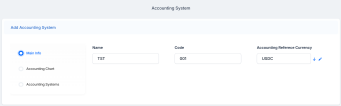
Click the Insert button to create an accounting system. The Add Accounting System page opens.
-
Fill in the following fields:
-
Name: Enter the official name of the accounting system.
-
Code: Enter the code of the accounting system.
-
Accounting Reference Currency: It contains every currency possible with its code and symbol. Select the currency for this specific system.
-
-
Click the Save and reload button. The Accounting Chart section is displayed.

Adding Information into the Accounting Chart
Store data about the account in the Accounting Chart section.
To add a new transaction item accounting configuration, click the Insert button under the Accounting Chart section. The Accounting Chart page opens.
Fill in the following fields:
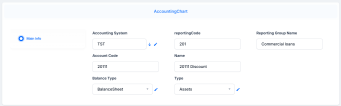
Accounting System: Select the accounting system of the chart
An index of all the financial accounts in the general ledger of a company. . Account Code: Enter the code of the account.
reportingCode: Enter the code of the reporting.
Type: Select the account type. The following options are available: Assets, Expenses, Revenues, Liabilities or Others.
Balance Type: Select the account balance type. The following options are available: BalanceSheet, P&L or OffBalanceSheet.
Reporting Group Name: Enter the name of the reporting group.
Name: Enter the name of the account.
Click the Save and close button.

You can add, delete, or export accounting charts.